





Question: Help needed for steps 1-15 Thu 3:43 PM N Go Window Help .OO Desktop - ubuntu@ip-172-31-54-208:-- ssh-i Lsmit053_CY... Memory usage: 20% IPv4 address for etho:

Help needed for steps 1-15
Help needed for steps 1-15 Thu 3:43 PM N Go Window Help

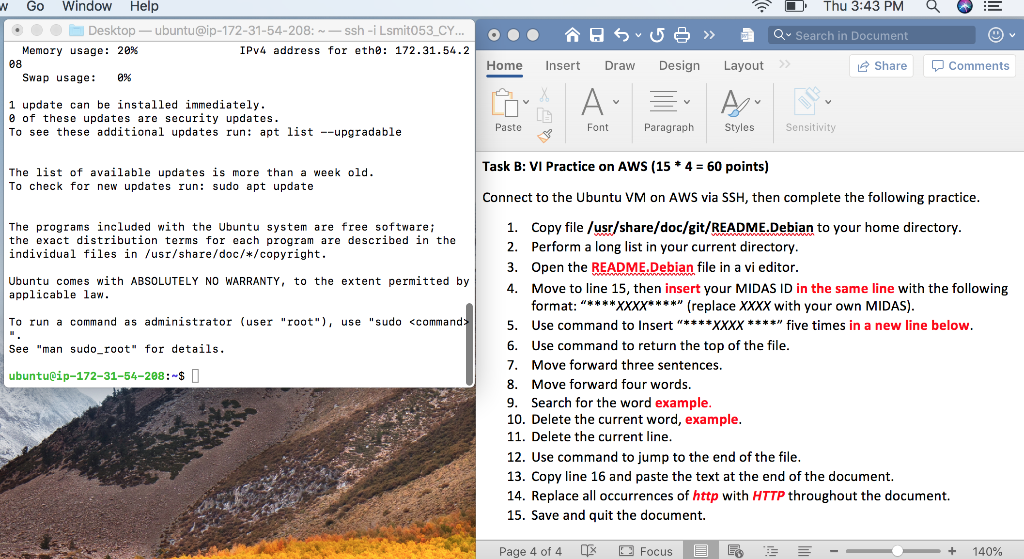
Thu 3:43 PM N Go Window Help .OO Desktop - ubuntu@ip-172-31-54-208:-- ssh-i Lsmit053_CY... Memory usage: 20% IPv4 address for etho: 172.31.54.2 08 Swap usage: 0% os 50 >> Q Search in Document Home Insert Draw Design Layout Share D Comments 1 update can be installed immediately. of these updates are security updates. To see these additional updates run: apt list --upgradable Paste Font Paragraph Styles Sensitivity Task B: VI Practice on AWS (15 * 4 = 60 points) The list of available updates is more than a week old. To check for new updates run: sudo apt update Connect to the Ubuntu VM on AWS via SSH, then complete the following practice. The programs included with the Ubuntu system are free software; the exact distribution terms for each program are described in the individual files in /usr/share/doc/*/copyright. Ubuntu comes with ABSOLUTELY NO WARRANTY, to the extent permitted by applicable law. To run a command as administrator (user "root"), use "sudo See "man sudo_root" for details. ubuntulip-172-31-54-208:-$ I 1. Copy file /usr/share/doc/git/README.Debian to your home directory. 2. Perform a long list in your current directory. 3. Open the README.Debian file in a vi editor. 4. Move to line 15, then insert your MIDAS ID in the same line with the following format: "****XXXX**** (replace XXXX with your own MIDAS). 5. Use command to Insert "****XXXX ****" five times in a new line below. 6. Use command to return the top of the file. 7. Move forward three sentences. 8. Move forward four words. 9. Search for the word example, 10. Delete the current word, example. 11. Delete the current line. 12. Use command to jump to the end of the file. 13. Copy line 16 and paste the text at the end of the document. 14. Replace all occurrences of http with HTTP throughout the document. 15. Save and quit the document. Page 4 of 4 O Focus + 140% Thu 3:43 PM N Go Window Help .OO Desktop - ubuntu@ip-172-31-54-208:-- ssh-i Lsmit053_CY... Memory usage: 20% IPv4 address for etho: 172.31.54.2 08 Swap usage: 0% os 50 >> Q Search in Document Home Insert Draw Design Layout Share D Comments 1 update can be installed immediately. of these updates are security updates. To see these additional updates run: apt list --upgradable Paste Font Paragraph Styles Sensitivity Task B: VI Practice on AWS (15 * 4 = 60 points) The list of available updates is more than a week old. To check for new updates run: sudo apt update Connect to the Ubuntu VM on AWS via SSH, then complete the following practice. The programs included with the Ubuntu system are free software; the exact distribution terms for each program are described in the individual files in /usr/share/doc/*/copyright. Ubuntu comes with ABSOLUTELY NO WARRANTY, to the extent permitted by applicable law. To run a command as administrator (user "root"), use "sudo See "man sudo_root" for details. ubuntulip-172-31-54-208:-$ I 1. Copy file /usr/share/doc/git/README.Debian to your home directory. 2. Perform a long list in your current directory. 3. Open the README.Debian file in a vi editor. 4. Move to line 15, then insert your MIDAS ID in the same line with the following format: "****XXXX**** (replace XXXX with your own MIDAS). 5. Use command to Insert "****XXXX ****" five times in a new line below. 6. Use command to return the top of the file. 7. Move forward three sentences. 8. Move forward four words. 9. Search for the word example, 10. Delete the current word, example. 11. Delete the current line. 12. Use command to jump to the end of the file. 13. Copy line 16 and paste the text at the end of the document. 14. Replace all occurrences of http with HTTP throughout the document. 15. Save and quit the document. Page 4 of 4 O Focus + 140%

Step by Step Solution

There are 3 Steps involved in it

1 Expert Approved Answer
Step: 1 Unlock blur-text-image
Question Has Been Solved by an Expert!

Get step-by-step solutions from verified subject matter experts

Step: 2 Unlock
Step: 3 Unlock

Students Have Also Explored These Related Databases Questions!