







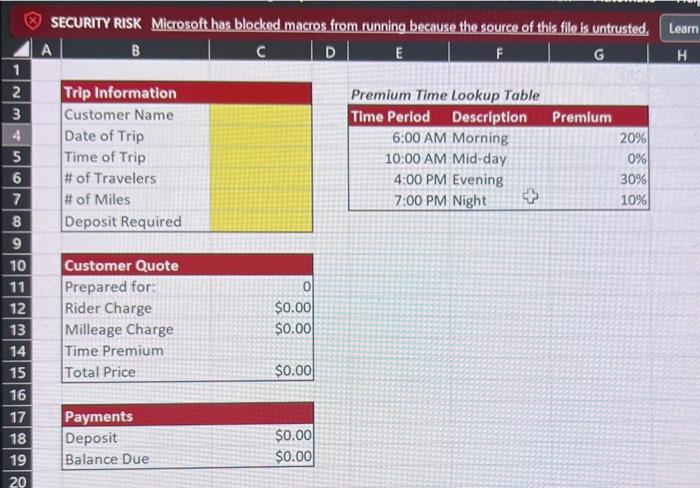
Question: HELP SOLVE PLEASE ON EXCEL( DUE IN 2 HOURS) 3 Data Validation Assessment RideShare USA is private taxi service that provides scheduled rides for customers
- Allow text with a length of at most (less than or equal to) 30 characters.
- Configure the input message with a title of "Customer Name" and "Enter the customer name." as the message.
- Set the error alert with the title of "Invalid Customer Name", and "The customer name contains more than 30 characters." as the message.
- Allow a date occurring on or after (greater than or equal to) 1/1/2021.
- Configure the input message with a title of "Trip Date" and "Enter the trip date." as the message.
- Set the error alert with the title of "Invalid Trip Date", and "The trip date must occur on or after 1/1/2021." as the message.
- Allow a time occurring during normal business hours (6:00 AM to 11:00 PM).
- Configure the input message with a title of "Time of the Trip" and "Enter the time of the trip." as the message.
- Set the error alert with the title of "Invalid Trip Time", and "The trip must occur during normal business hours (6:00 AM to 11:00 PM)." as the message.
- Allow a whole number between 1 and 12.
- Configure the input message with a title of "Number of Travelers" and "Enter the number of travelers." as the message.
- Set the error alert with the title of "Invalid Number of Travelers", and "The number of travelers must be a whole number between 1 and 12." as the message.
- Have the user select the number of miles from the list of 25, 50, 75, and 100.
- Configure the input message with a title of "Number of Miles" and "Select the number of miles." as the message.
- Set the error alert with the title of "Invalid Number of Miles", and "The number of miles was not selected from the list." as the message.
- Use a custom data validation rule.
- The value for deposit required must be "Yes" if the number of travelers is more than 4, otherwise it is should be "No".
- Hint - a valid formula for the custom rule is '=C8=IF(C6>4,"Yes","No")'
- Configure the input message with a title of "Deposit Required" and "Enter whether the deposit is required." as the message.
- Set the error alert with the title of "Invalid Deposit Required Entry", and "The value for deposit required is not correct given the number of travelers." as the message.
SECURIT RISK Microsoft has blocked macros from running because the source of this file is untrusted Learn \begin{tabular}{|c|} \hline \\ \hline 1 \\ \hline 2 \\ \hline 3 \\ \hline 4 \\ \hline 5 \\ \hline 6 \\ \hline 7 \\ \hline 8 \\ \hline 9 \\ \hline 10 \\ \hline 11 \\ \hline 12 \\ \hline 13 \\ \hline 14 \\ \hline 15 \\ \hline 16 \\ \hline 17 \\ \hline 18 \\ \hline 19 \\ \hline 20 \end{tabular} A B C D E F G H \begin{tabular}{|l|} \hline Trip Information \\ \hline Customer Name \\ Date of Trip \\ Time of Trip \\ \# of Travelers \\ \# of Miles \\ Deposit Required \\ \hline \end{tabular} Premium Time Lookup Table \begin{tabular}{|c|r|} \hline Time Period Description & \multicolumn{1}{c|}{ Premium } \\ \hline 6:00 AM Morning & 20% \\ 10:00 AM Mid-day & 0% \\ 4:00 PM Evening & 30% \\ \hline 7:00 PM Night & 10% \\ \hline \end{tabular} \begin{tabular}{|lr|} \hline Customer Quote & \\ \hline Prepared for: & 0 \\ Rider Charge & $0.00 \\ Milleage Charge & $0.00 \\ Time Premium & \\ Total Price & $0.00 \\ \hline \end{tabular} \begin{tabular}{|lr|} \hline Payments & \\ \hline Deposit & $0.00 \\ \hline Balance Due & $0.00 \\ \hline \end{tabular}
Step by Step Solution
There are 3 Steps involved in it

Get step-by-step solutions from verified subject matter experts
 Study Help