







Question: HELP: We created a Sokoban game in Java and it runs fine in eclipse, but we get errors when we submit it to Zybooks. Here
HELP: We created a Sokoban game in Java and it runs fine in eclipse, but we get errors when we submit it to Zybooks.
Here are our files: http://www.mediafire.com/folder/y7v1lbxr3vb4p/Sokoban
The following is what we get when we submit it into Zybooks: 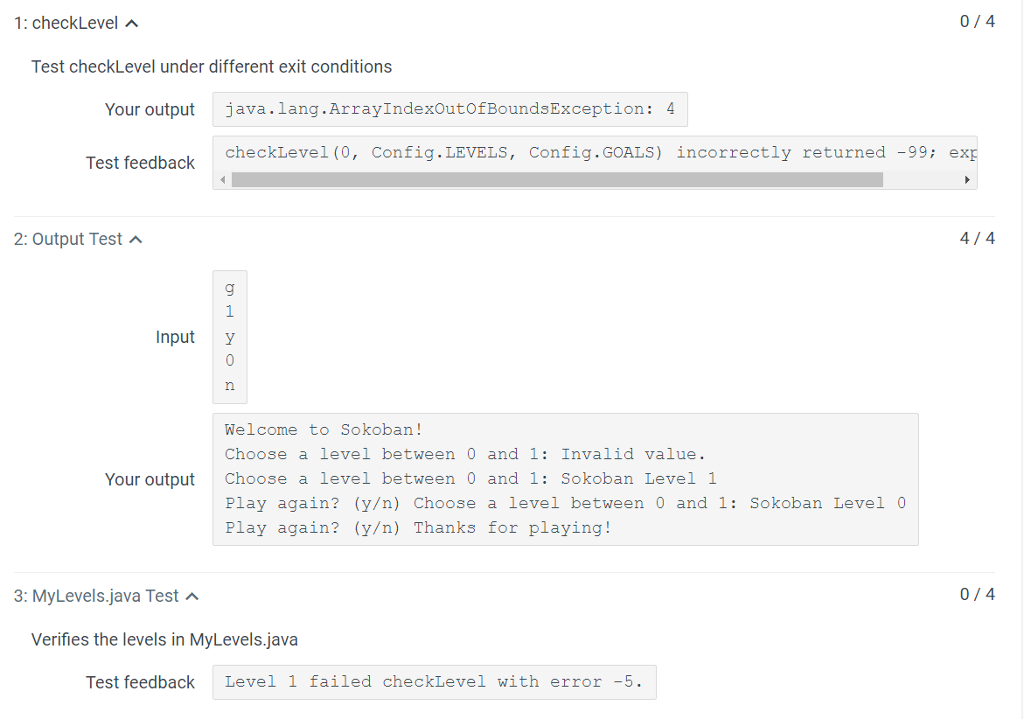
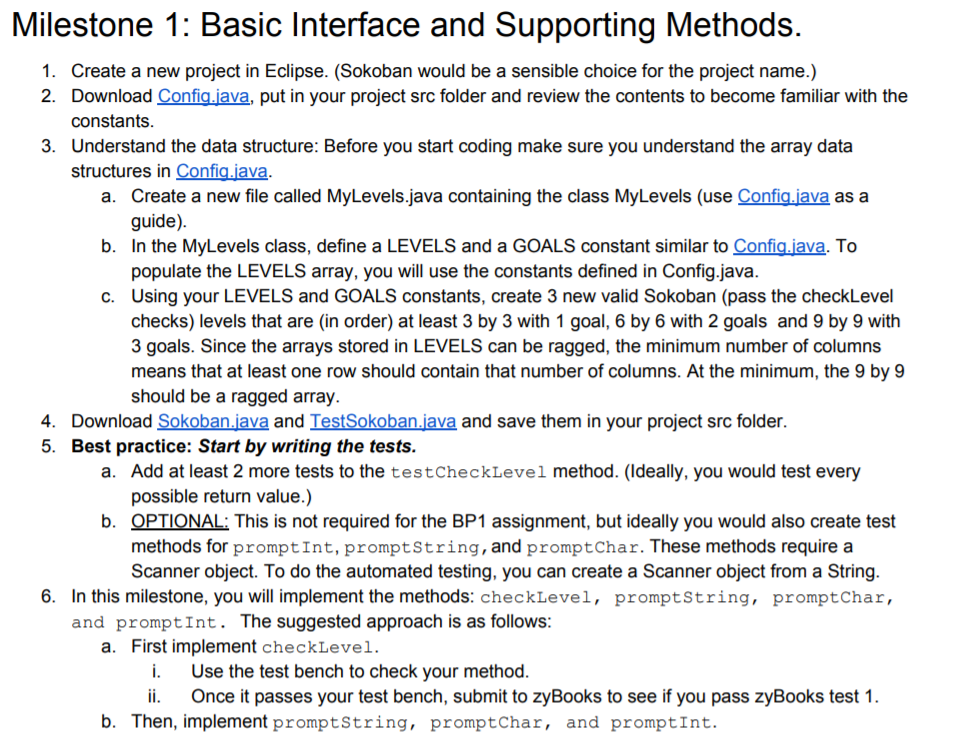
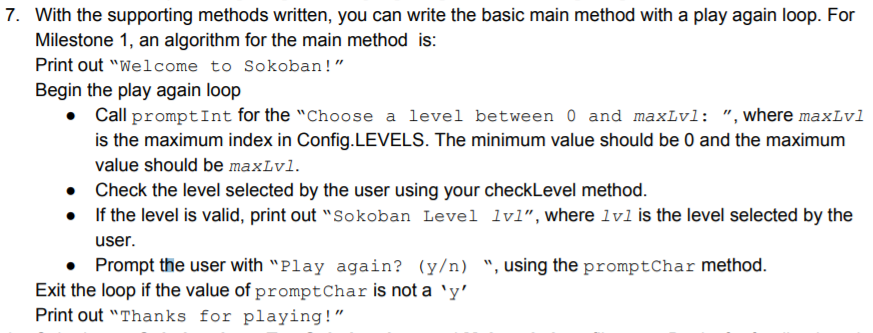
Milestone 1: Basic Interface and Supporting Methods 1. Create a new project in Eclipse. (Sokoban would be a sensible choice for the project name.) 2. Download Confia.iava, put in your project src folder and review the contents to become familiar with the constants Understand the data structure: Before you start coding make sure you understand the array data structures in Confia.iava. 3. a. Create a new file called MyLevels.java containing the class MyLevels (use Confia.iava as a guide) b. In th e MyLevels class, define a LEVELS and a GOALS constant similar to Confia.iava.T populate the LEVELS array, you will use the constants defined in Config.java. Using your LEVELS and GOALS constants, create 3 new valid Sokoban (pass the checkLevel checks) levels that are (in order) at least 3 by 3 with 1 goal, 6 by 6 with 2 goals and 9 by 9 with 3 goals. Since the arrays stored in LEVELS can be ragged, the minimum number of columns means that at least one row should contain that number of columns. At the minimum, the 9 by 9 should be a ragged array. o c. 4. Download Sokoban.iava and TestSokoban.java and save them in your project src folder. 5. Best practice: Start by writing the tests. Add at least 2 more tests to the testCheckLevel method. (Ideally, you would test every possible return value.) OPTIONAL: This is not required for the BP1 assignment, but ideally you would also create test methods for promptInt, promptString, and promptChar. These methods require a Scanner object. To do the automated testing, you can create a Scanner object from a String a. b. 6. In this milestone, you will implement the methods: checkLevel, promptstring, promptChar, and promptInt. The suggested approach is as follows: a. First implement checkLevel i. Use the test bench to check your method. i. Once it passes your test bench, submit to zyBooks to see if you pass zyBooks test 1 b. Then, implement promptstring, promptChar, and promptInt. Milestone 1: Basic Interface and Supporting Methods 1. Create a new project in Eclipse. (Sokoban would be a sensible choice for the project name.) 2. Download Confia.iava, put in your project src folder and review the contents to become familiar with the constants Understand the data structure: Before you start coding make sure you understand the array data structures in Confia.iava. 3. a. Create a new file called MyLevels.java containing the class MyLevels (use Confia.iava as a guide) b. In th e MyLevels class, define a LEVELS and a GOALS constant similar to Confia.iava.T populate the LEVELS array, you will use the constants defined in Config.java. Using your LEVELS and GOALS constants, create 3 new valid Sokoban (pass the checkLevel checks) levels that are (in order) at least 3 by 3 with 1 goal, 6 by 6 with 2 goals and 9 by 9 with 3 goals. Since the arrays stored in LEVELS can be ragged, the minimum number of columns means that at least one row should contain that number of columns. At the minimum, the 9 by 9 should be a ragged array. o c. 4. Download Sokoban.iava and TestSokoban.java and save them in your project src folder. 5. Best practice: Start by writing the tests. Add at least 2 more tests to the testCheckLevel method. (Ideally, you would test every possible return value.) OPTIONAL: This is not required for the BP1 assignment, but ideally you would also create test methods for promptInt, promptString, and promptChar. These methods require a Scanner object. To do the automated testing, you can create a Scanner object from a String a. b. 6. In this milestone, you will implement the methods: checkLevel, promptstring, promptChar, and promptInt. The suggested approach is as follows: a. First implement checkLevel i. Use the test bench to check your method. i. Once it passes your test bench, submit to zyBooks to see if you pass zyBooks test 1 b. Then, implement promptstring, promptChar, and promptInt
Step by Step Solution
There are 3 Steps involved in it

Get step-by-step solutions from verified subject matter experts
 Study Help