







Question: Help with a Basic Computer Game in 3D using JAVASCRIPT? maybe a chess game. Create a computer game that falls under the following genres: Action,
Help with a Basic Computer Game in 3D using JAVASCRIPT? maybe a chess game.
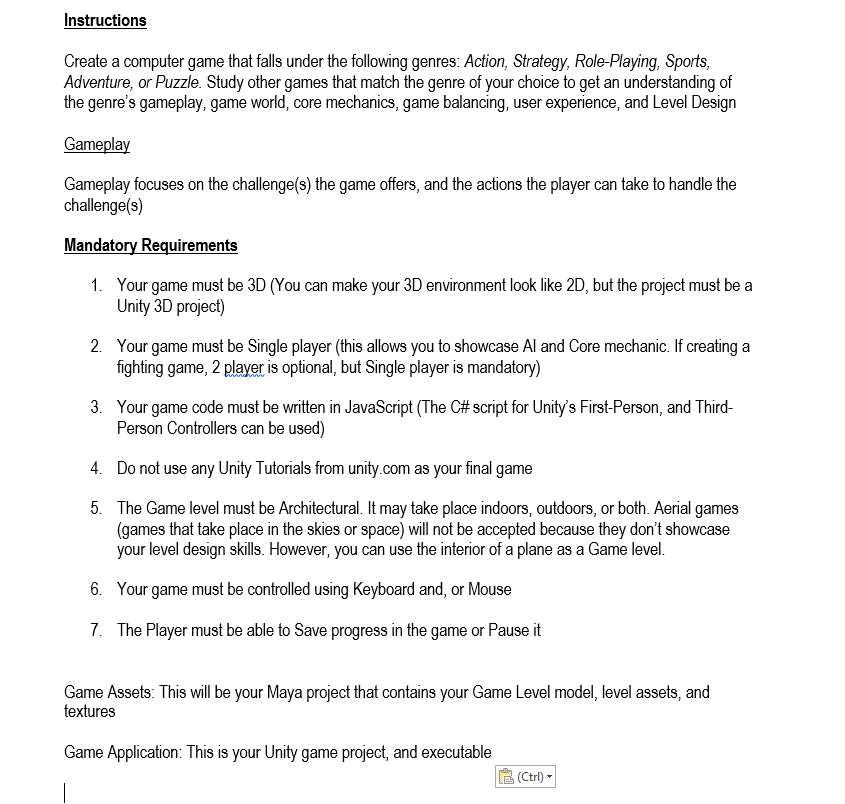
Create a computer game that falls under the following genres: Action, Strategy, Role-Playing, Sports Adventure, or Puzzle. Study other games that match the genre of your choice to get an understanding of the genre's gameplay, game world, core mechanics, game balancing, user experience, and Level Design Gameplay focuses on the challenge(s) the game offers, and the actions the player can take to handle the challenge(s) 1. Your game must be 3D (You can make your 3D environment look like 2D, but the project must be a Unity 3D project) 2. Your game must be Single player (this allows you to showcase Al and Core mechanic. If creating a fighting game, 2 player is optional, but Single player is mandatory) 3. Your game code must be written in JavaScript (The C# script for Unity's First-Person, and Third-Person Controllers can be used) 4. Do not use any Unity Tutorials from an com as your final game 5. The Game level must be Architectural. It may take place indoors, outdoors, or both. Aerial games (games that take place in the skies or space) will not be accepted because they don't showcase your level design skills. However, you can use the interior of a plane as a Game level. 6. Your game must be controlled using Keyboard and, or Mouse 7. The Player must be able to Save progress in the game or Pause it Game Assets: This will be your Maya project that contains your Game Level model, level assets, and textures Game Application: This is your Unity game project, and executable Create a computer game that falls under the following genres: Action, Strategy, Role-Playing, Sports Adventure, or Puzzle. Study other games that match the genre of your choice to get an understanding of the genre's gameplay, game world, core mechanics, game balancing, user experience, and Level Design Gameplay focuses on the challenge(s) the game offers, and the actions the player can take to handle the challenge(s) 1. Your game must be 3D (You can make your 3D environment look like 2D, but the project must be a Unity 3D project) 2. Your game must be Single player (this allows you to showcase Al and Core mechanic. If creating a fighting game, 2 player is optional, but Single player is mandatory) 3. Your game code must be written in JavaScript (The C# script for Unity's First-Person, and Third-Person Controllers can be used) 4. Do not use any Unity Tutorials from an com as your final game 5. The Game level must be Architectural. It may take place indoors, outdoors, or both. Aerial games (games that take place in the skies or space) will not be accepted because they don't showcase your level design skills. However, you can use the interior of a plane as a Game level. 6. Your game must be controlled using Keyboard and, or Mouse 7. The Player must be able to Save progress in the game or Pause it Game Assets: This will be your Maya project that contains your Game Level model, level assets, and textures Game Application: This is your Unity game project, and executable
Step by Step Solution
There are 3 Steps involved in it

Get step-by-step solutions from verified subject matter experts
 Study Help