







Question: helpe to complet the steps from 8 , with SQL code, the solve of first 7 steps : Command from 1 to 7 1- CREATE
Command from 1 to 7
1- CREATE TABLE T_ORDER_DATE AS
SELECT TO_CHAR(ORDER_DATE , 'DD-MM-YYYY')
AS ORDER_DATE
FROM OE.ORDERS;
2- SELECT rowid , T_ORDER_DATE.*
FROM T_ORDER_DATE;
3-SELECT DISTINCT *
FROM T_ORDER_DATE;
4- SELECT ORDER_DATE, COUNT(ORDER_DATE)
FROM T_ORDER_DATE
GROUP BY ORDER_DATE;
5- ignores
7- create table t_order_date as
select distinct (TO_CHAR(order_date , 'DD-MM-YYYY'))
as order_date
from OE.ORDERS;
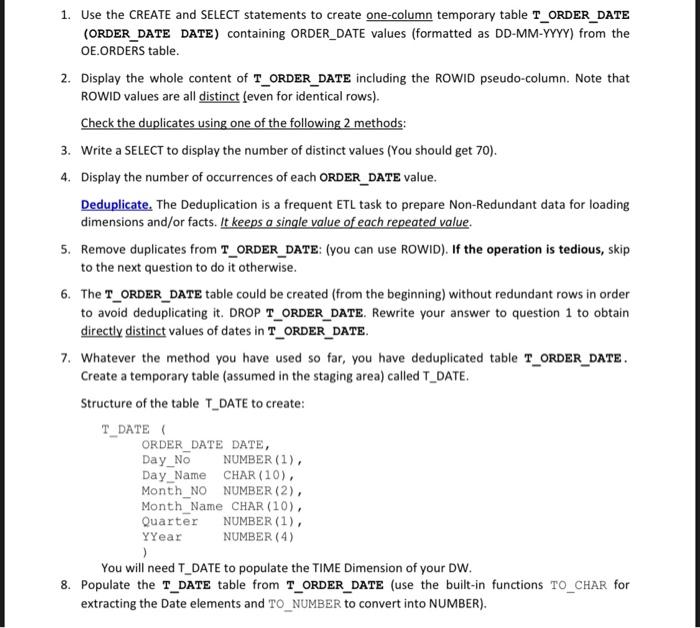
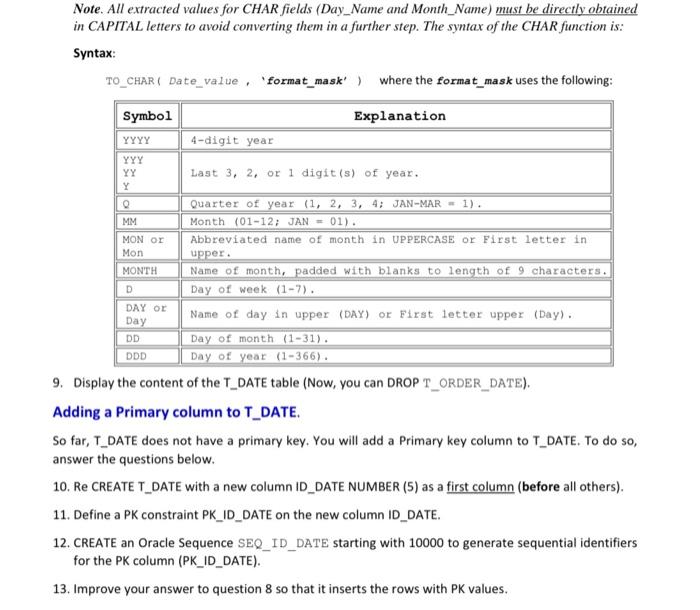
1. Use the CREATE and SELECT statements to create one-column temporary table T_ORDER_DATE (ORDER_DATE DATE) containing ORDER_DATE values (formatted as DD-MM-YYYY) from the OE.ORDERS table. 2. Display the whole content of T_ORDER_DATE including the ROWID pseudo-column. Note that ROWID values are all distinct (even for identical rows). Check the duplicates using one of the following 2 methods: 3. Write a SELECT to display the number of distinct values (You should get 70). 4. Display the number of occurrences of each ORDER_DATE value. Deduplicate. The Deduplication is a frequent ETL task to prepare Non-Redundant data for loading dimensions and/or facts. It keeps a single value of each repeated value. 5. Remove duplicates from T_ORDER_DATE: (you can use ROWID). If the operation is tedious, skip to the next question to do it otherwise. 6. The T_ORDER_DATE table could be created (from the beginning) without redundant rows in order to avoid deduplicating it. DROP T_ORDER_DATE. Rewrite your answer to question 1 to obtain directly distinct values of dates in T_ORDER_DATE. 7. Whatever the method you have used so far, you have deduplicated table T_ORDER_DATE. Create a temporary table (assumed in the staging area) called T_DATE. Structure of the table T_DATE to create: T_DATE ORDER_DATE DATE, Day_No NUMBER (1) Day_Name CHAR(10), Month_NO NUMBER (2) Month_Name CHAR(10), Quarter NUMBER (1), YYear NUMBER (4) You will need T_DATE to populate the TIME Dimension of your DW. 8. Populate the T_DATE table from T_ORDER_DATE (use the built-in functions TO_CHAR for extracting the Date elements and TO_NUMBER to convert into NUMBER). Note. All extracted values for CHAR fields (Day_Name and Month_Name) must be directly obtained in CAPITAL letters to avoid converting them in a further step. The syntax of the CHAR function is: Syntax TO_CHAR ( Date_value, 'format_mask) where the format_mask uses the following: Explanation Symbol YYYY YYY 4-digit year YY Last 3, 2, or 1 digit(s) of year. MM MON OR Mon MONTH D DAY OR Day DD DDD Quarter of year (1, 2, 3, 4; JAN-MAR - 1). Month (01-12; JAN = 01). Abbreviated name of month in UPPERCASE or First letter in upper. Name of month, padded with blanks to length of 9 characters. Day of week (1-7). Name of day in upper (DAY) or First letter upper (Day). Day of month (1-31). Day of year (1-366). 9. Display the content of the T_DATE table (Now, you can DROPT_ORDER_DATE). Adding a Primary column to T_DATE. So far,T_DATE does not have a primary key. You will add a Primary key column to T_DATE. To do so, answer the questions below. 10. Re CREATE T_DATE with a new column ID_DATE NUMBER (5) as a first column (before all others). 11. Define a PK constraint PK_ID_DATE on the new column ID_DATE. 12. CREATE an Oracle Sequence SEQ_ID_DATE starting with 10000 to generate sequential identifiers for the PK column (PK_ID_DATE). 13. Improve your answer to question 8 so that it inserts the rows with PK values
Step by Step Solution
There are 3 Steps involved in it

Get step-by-step solutions from verified subject matter experts
 Study Help