







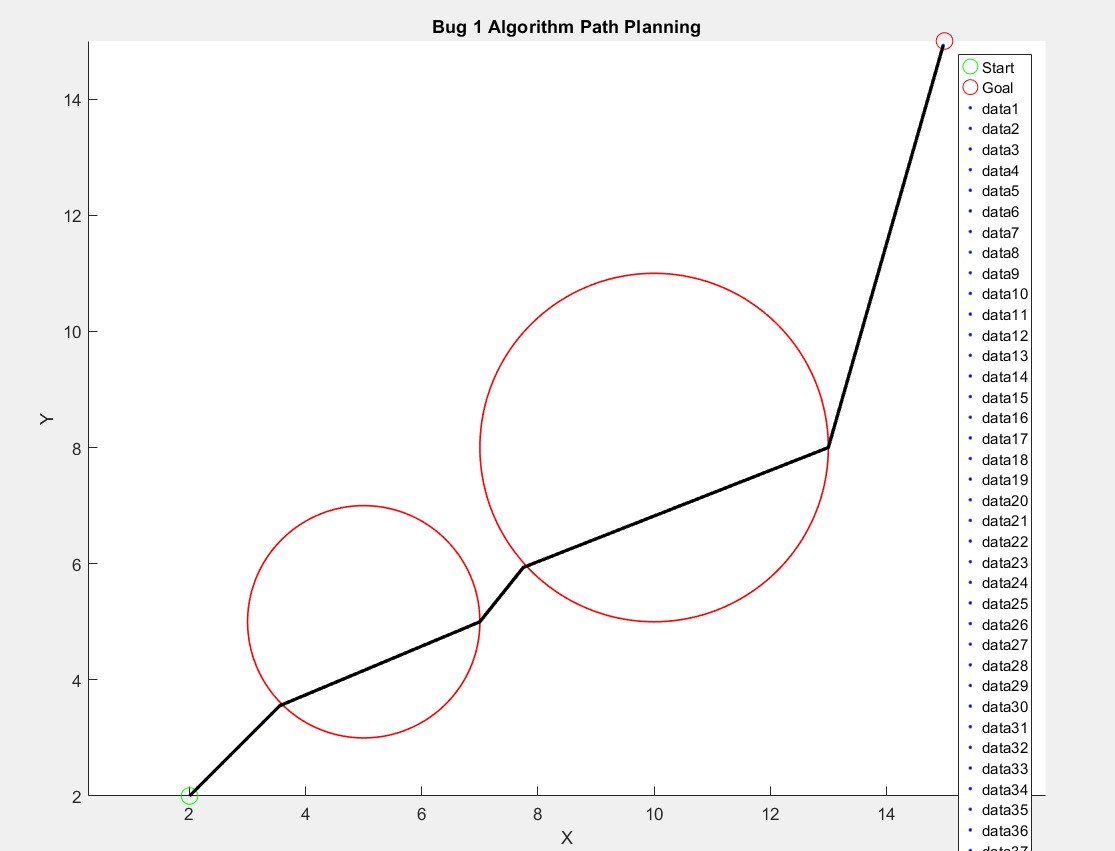
Question: here is a code for bug 1 algorithm in matlab. the output of this code is shown in the first image which is not desired.
here is a code for bug algorithm in matlab. the output of this code is shown in the first image which is not desired. the output graph should look like the second image. so rewrite the code make the changes so that the output looks like the nd image:
Bug Algorithm in MATLAB
clc; clear; close all;
Start and goal positions
start ; Start point x y
goal ; Goal point x y
Define obstacles as circles with center and radius
obstacles ; ; xcenter, ycenter, radius
Plot environment, start, and goal
figure; hold on; axis equal;
plotstart startgo 'MarkerSize', 'DisplayName', 'Start';
plotgoal goalro 'MarkerSize', 'DisplayName', 'Goal';
Plot the obstacles
for i :sizeobstacles
viscirclesobstaclesi: obstaclesi 'LineWidth', ;
end
legend;
xlabelX; ylabelY; titleBug Algorithm Path Planning';
Initialize robot position at the start point
robotpos start;
path robotpos; Store the robot's path
Parameters
stepsize ; Robot's step size
tolerance ; Distance threshold for reaching the goal
while normrobotpos goal tolerance
Compute the straightline direction to the goal
direction goal robotpos normgoal robotpos;
Predict next step
nextpos robotpos stepsize direction;
Check for collisions with any obstacle
collision false;
for i :sizeobstacles
obscenter obstaclesi:;
obsradius obstaclesi;
Check if the next step is inside an obstacle
if normnextpos obscenter obsradius
collision true;
break;
end
end
if collision
Move around the obstacle following the edge
fprintfObstacle encountered at ff
robotpos robotpos;
Follow the obstacle edge until free to move toward the goal again
while collision
theta linspace pi; Points along the obstacle's edge
edgex obscenter obsradius costheta;
edgey obscenter obsradius sintheta;
Move along the edge in small steps
for k :lengthedgex
robotpos edgexk edgeyk;
path path; robotpos; Store the path
Plot the robot's movement along the obstacle
plotrobotpos robotposb 'MarkerSize', ;
pause; Slow down for visualization
Check if free path toward the goal is possible again
directiontogoal goal robotpos normgoal robotpos;
testpos robotpos stepsize directiontogoal;
if normtestpos obscenter obsradius
collision false; Free to move toward the goal
break;
end
end
end
else
No collision, move towards the goal
robotpos nextpos;
path path; robotpos; Store the path
Plot the robot's movement
plotrobotpos robotposb 'MarkerSize', ;
pause; Slow down for visualization
end
end
fprintfGoal reached at ff
robotpos robotpos;
Plot the final path
plotpath: path:k 'LineWidth', 'DisplayName', 'Path';
legend;
hold off;
Step by Step Solution
There are 3 Steps involved in it
1 Expert Approved Answer
Step: 1 Unlock

Question Has Been Solved by an Expert!
Get step-by-step solutions from verified subject matter experts
Step: 2 Unlock
Step: 3 Unlock
 Study Help