







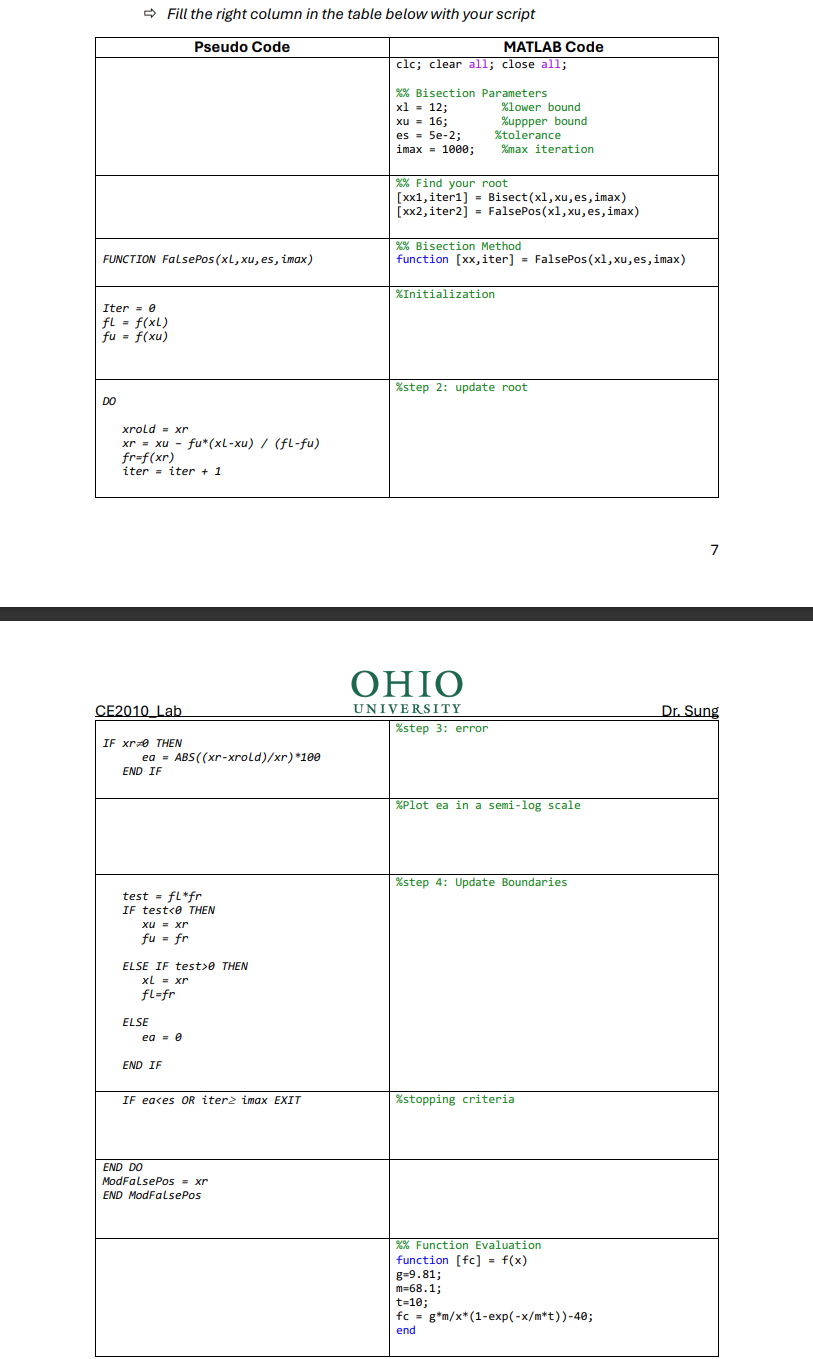
Question: Here is the code given for the bisection method: clc; clear all; close all; % Parameters xl = 1 2 ; % lower bound xu
Here is the code given for the bisection method:
clc;
clear all;
close all;
Parameters
xl ; lower bound
xu ; upper bound
es e; tolerance
imax ; max iteration
Initialization of the plot
figure;
xlabelIteration;
ylabelApproximate Relative Error ;
titleError vs Iterations';
hold on;
xlim;
setgca 'YScale', 'log';
grid on;
Find root
xx iter Bisectxl xu es imax;
Bisection Method
function xx iter Bisectxl xu es imax
Initialization
iter ;
xr xl;
ea ;
Graph shows iterations
for iter :
Step : update root
xrold xr;
xr xl xu;
Step : error
if xr ~ && iter
ea absxr xrold xr;
end
Plot relative error
semilogyiter eabo;
Step : Update Boundary
test fxl fxr;
if test
xu xr;
elseif test
xl xr;
else
ea ;
end
end
xx xr;
end
Part :
Modify the MATLAB script of the Bisection Method function for the Falseposition Methodwith minimum function evaluations. You may read about minimum function evaluation in textbook page section The only diIerence between the Bisection and Falseposition method is how you get the root at each iteration in step Fill the right column in the table below with your script
Bisection Method
False Position Method:
Step by Step Solution
There are 3 Steps involved in it
1 Expert Approved Answer
Step: 1 Unlock

Question Has Been Solved by an Expert!
Get step-by-step solutions from verified subject matter experts
Step: 2 Unlock
Step: 3 Unlock
 Study Help