







Question: here is the design. If that can help I'm working with arduino uno kit as well. below is the given code. Public Class Form1 Private
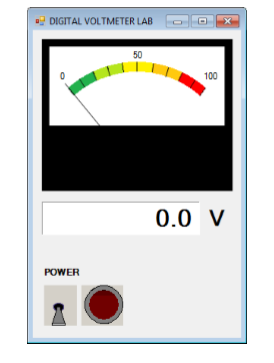
here is the design. If that can help I'm working with arduino uno kit as well.
below is the given code.
Public Class Form1
Private Sub Timer1_Tick(ByVal sender As System.Object, ByVal e As System.EventArgs) Handles Timer1.Tick
Dim com1 As IO.Ports.SerialPort = Nothing
Light1.State = ToggleSwitch1.State 'power ON/OFF
If Light1.State = True Then 'check if the Power is ON
Try
'Insert correct Com port here
com1 = My.Computer.Ports.OpenSerialPort("COM3")
'set baud rate here
com1.BaudRate = 9600
'set parity to none
com1.Parity = IO.Ports.Parity.None
'set data bits to 8
com1.DataBits = 8
'set stop bits to 1
com1.StopBits = 1
'turn of data transmit ready and request to send handshaking
com1.DtrEnable = False
com1.RtsEnable = False
'give up if no reading for 10 seconds
com1.ReadTimeout = 10000
com1.Encoding = System.Text.Encoding.Default
Catch ex As TimeoutException
MsgBox("Error: Serial Port read timed out")
Finally
If com1 IsNot Nothing Then
Dim potData As String = com1.ReadLine() 'reading the pot
'writing the pot ADC values into the label 1
Label1.Text = potData
'close serial port
com1.Close()
End If
End Try
End If
End Sub
End Class
Part IV: Modify the Visual Studio code given above to convert the ADC numbers to voltage. This can simply be done by multiplying Label1.Text by a conversion factor of 5/1024. Your program must display the actual measured voltage values in Label1 and on the Meter. Part V: Add a code to your Visual Studio code to display pot resistance in addition to voltage. (You may want to add additional labels to your form similar to Label 1 and Label 2 in order to display the resistance) To calculate the resistance, you will need to develop the formula from circuit analysis Part IV: Modify the Visual Studio code given above to convert the ADC numbers to voltage. This can simply be done by multiplying Label1.Text by a conversion factor of 5/1024. Your program must display the actual measured voltage values in Label1 and on the Meter. Part V: Add a code to your Visual Studio code to display pot resistance in addition to voltage. (You may want to add additional labels to your form similar to Label 1 and Label 2 in order to display the resistance) To calculate the resistance, you will need to develop the formula from circuit analysis
Step by Step Solution
There are 3 Steps involved in it

Get step-by-step solutions from verified subject matter experts
 Study Help