







Question: Here is the Excel file that needs work: And here is the finished product. Please do in VBA, I will thumbs up if correct. Write
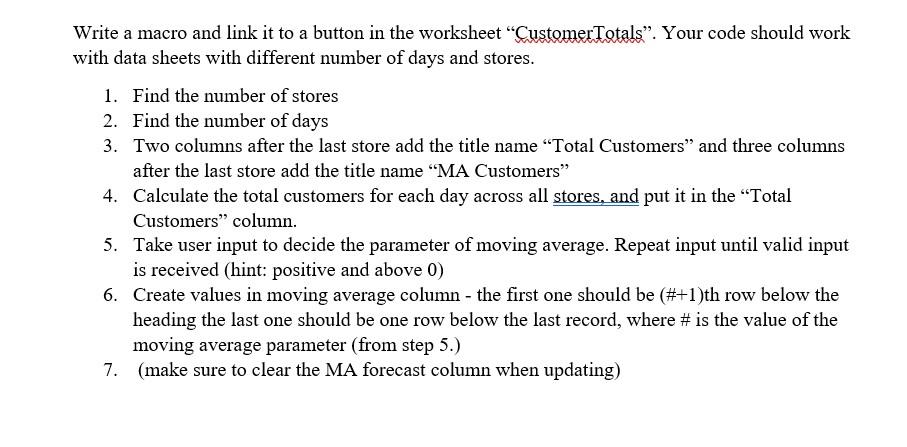
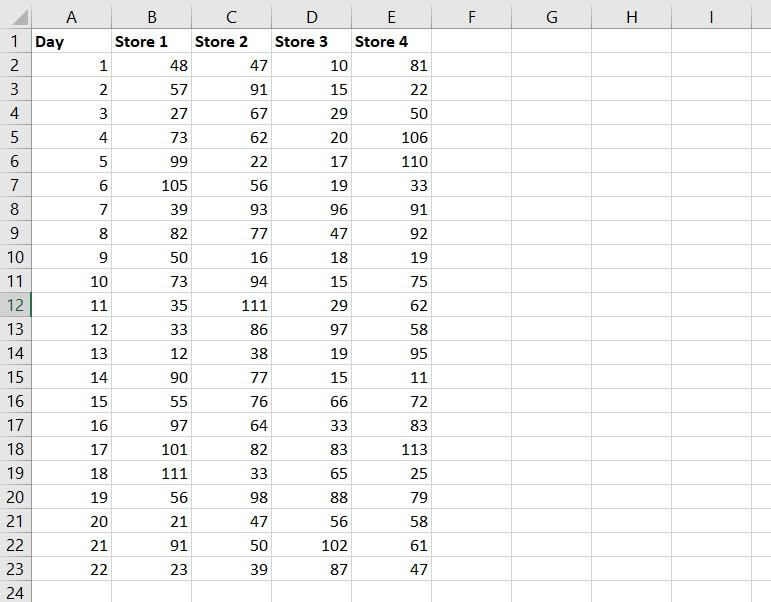
Here is the Excel file that needs work:
And here is the finished product. Please do in VBA, I will thumbs up if correct. 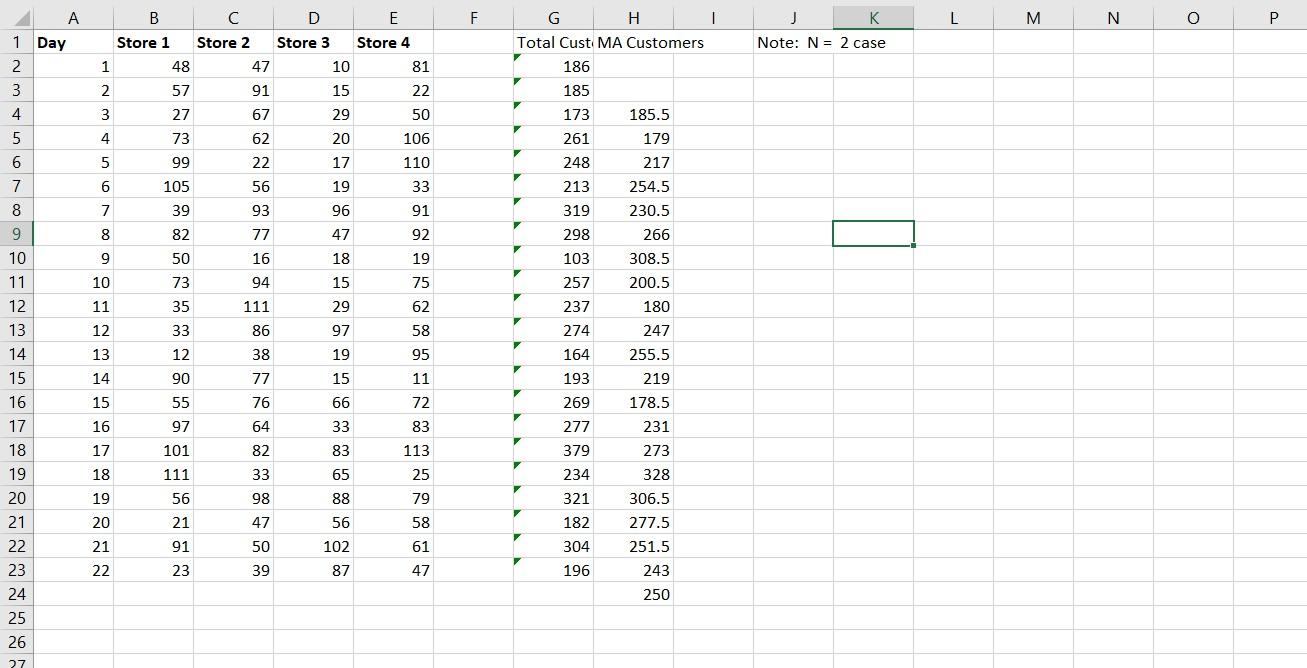
Write a macro and link it to a button in the worksheet CustomerTotals. Your code should work with data sheets with different number of days and stores. 1. Find the number of stores 2. Find the number of days 3. Two columns after the last store add the title name "Total Customers and three columns after the last store add the title name MA Customers" 4. Calculate the total customers for each day across all stores, and put it in the Total Customers column. 5. Take user input to decide the parameter of moving average. Repeat input until valid input is received (hint: positive and above 0) 6. Create values in moving average column - the first one should be (#+1)th row below the heading the last one should be one row below the last record, where # is the value of the moving average parameter (from step 5.) 7. (make sure to clear the MA forecast column when updating) F G . 2 3 4 5 A 1 Day 2 3 4 5 6 7 8 9 10 11 12 13 14 15 16 17 18 19 20 B C D E Store 1 Store 2 Store 3 Store 4 1 48 47 10 81 2 57 91 15 22 3 27 67 29 50 4 73 62 20 106 99 22 17 110 6 105 56 19 33 7 39 93 96 91 8 82 77 47 92 9 50 16 18 19 10 73 94 15 75 11 35 111 29 62 12 33 86 97 58 13 12 38 19 95 14 90 77 15 11 15 55 76 66 72 16 97 64 33 83 17 101 82 83 113 18 111 33 65 25 19 56 98 88 79 20 21 47 56 58 21 91 50 102 61 22 23 39 87 47 NNN B D F M N O P Store 2 Store 3 Note: N = 2 case Store 4 81 1 N 22 50 3 29 G H Total Cust. MA Customers 186 185 173 261 248 213 319 298 106 110 33 93 91 00 77 92 47 18 I 9 16 A B 1 Day Store 1 2 1 3 4 3 27 5 4 73 6 5 99 7 6 105 8 7 39 9 82 10 9 11 10 12 11 13 12 33 12 15 14 90 16 15 55 17 16 97 101 19 18 111 20 19 56 21 21 22 103 257 94 75 15 29 111 237 180 86 97 19 247 255.5 219 178.5 77 15 66 76 64 231 113 274 164 193 269 277 379 234 321 182 304 196 33 83 65 88 56 102 87 273 Write a macro and link it to a button in the worksheet CustomerTotals. Your code should work with data sheets with different number of days and stores. 1. Find the number of stores 2. Find the number of days 3. Two columns after the last store add the title name "Total Customers and three columns after the last store add the title name MA Customers" 4. Calculate the total customers for each day across all stores, and put it in the Total Customers column. 5. Take user input to decide the parameter of moving average. Repeat input until valid input is received (hint: positive and above 0) 6. Create values in moving average column - the first one should be (#+1)th row below the heading the last one should be one row below the last record, where # is the value of the moving average parameter (from step 5.) 7. (make sure to clear the MA forecast column when updating) F G . 2 3 4 5 A 1 Day 2 3 4 5 6 7 8 9 10 11 12 13 14 15 16 17 18 19 20 B C D E Store 1 Store 2 Store 3 Store 4 1 48 47 10 81 2 57 91 15 22 3 27 67 29 50 4 73 62 20 106 99 22 17 110 6 105 56 19 33 7 39 93 96 91 8 82 77 47 92 9 50 16 18 19 10 73 94 15 75 11 35 111 29 62 12 33 86 97 58 13 12 38 19 95 14 90 77 15 11 15 55 76 66 72 16 97 64 33 83 17 101 82 83 113 18 111 33 65 25 19 56 98 88 79 20 21 47 56 58 21 91 50 102 61 22 23 39 87 47 NNN B D F M N O P Store 2 Store 3 Note: N = 2 case Store 4 81 1 N 22 50 3 29 G H Total Cust. MA Customers 186 185 173 261 248 213 319 298 106 110 33 93 91 00 77 92 47 18 I 9 16 A B 1 Day Store 1 2 1 3 4 3 27 5 4 73 6 5 99 7 6 105 8 7 39 9 82 10 9 11 10 12 11 13 12 33 12 15 14 90 16 15 55 17 16 97 101 19 18 111 20 19 56 21 21 22 103 257 94 75 15 29 111 237 180 86 97 19 247 255.5 219 178.5 77 15 66 76 64 231 113 274 164 193 269 277 379 234 321 182 304 196 33 83 65 88 56 102 87 273
Step by Step Solution
There are 3 Steps involved in it

Get step-by-step solutions from verified subject matter experts
 Study Help