







Question: Here is the original code: (From Concepts of Programming Languages 12th Edition) /* front.c - a lexical analyzer system for simple arithmetic expressions */ #include
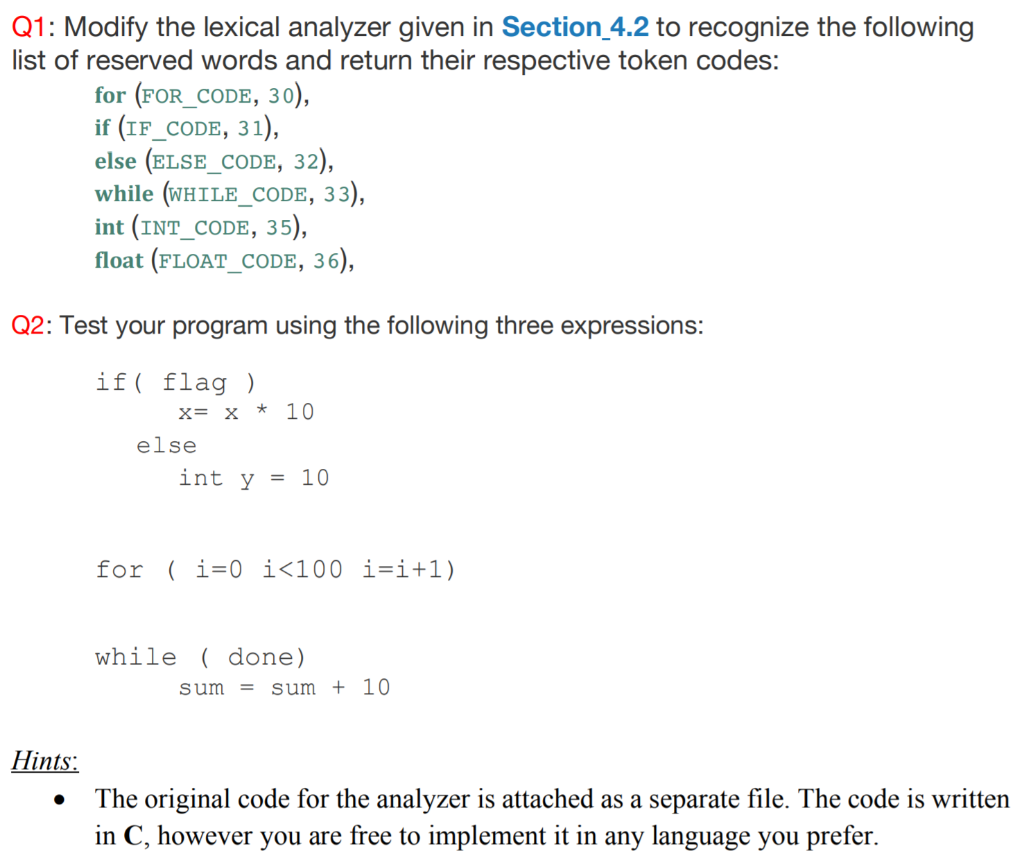
Here is the original code: (From Concepts of Programming Languages 12th Edition)
/* front.c - a lexical analyzer system for simple
arithmetic expressions */
#include
#include
/* Global declarations */
/* Variables */
int charClass;
char lexeme [100];
char nextChar;
int lexLen;
int token;
int nextToken;
FILE *in_fp, *fopen();
/* Function declarations */
void addChar();
void getChar();
void getNonBlank();
int lex();
/* Character classes */
#define LETTER 0
#define DIGIT 1
#define UNKNOWN 99
/* Token codes */
#define INT_LIT 10
#define IDENT 11
#define ASSIGN_OP 20
#define ADD_OP 21
#define SUB_OP 22
#define MULT_OP 23
#define DIV_OP 24
#define LEFT_PAREN 25
#define RIGHT_PAREN 26
/******************************************************/
/* main driver */
main() {
/* Open the input data file and process its contents */
if ((in_fp = fopen("front.in", "r")) == NULL)
printf("ERROR - cannot open front.in ");
else {
getChar();
do {
lex();
} while (nextToken! = EOF);
}
}
/*****************************************************/
/* lookup - a function to lookup operators and parentheses
and return the token */
int lookup(char ch) {
switch (ch) {
case '(':
addChar();
nextToken = LEFT_PAREN;
break;
case ')':
addChar();
nextToken = RIGHT_PAREN;
break;
case '+':
addChar();
nextToken = ADD_OP;
break;
case '-':
addChar();
nextToken = SUB_OP;
break;
case '*':
addChar();
nextToken = MULT_OP;
break;
case '/':
addChar();
nextToken = DIV_OP;
break;
default:
addChar();
nextToken = EOF;
break;
}
return nextToken;
}
/*****************************************************/
/* addChar - a function to add nextChar to lexeme */
void addChar() {if (lexLenlexeme[lexLen++] = nextChar;lexeme[lexLen] = 0;}elseprintf("Error - lexeme is too long ");}/*****************************************************//* getChar - a function to get the next character ofinput and determine its character class */void getChar() {if ((nextChar = getc(in_fp)) != EOF) {if (isalpha(nextChar))charClass = LETTER;else if (isdigit(nextChar))charClass = DIGIT;else charClass = UNKNOWN;}elsecharClass = EOF;}/*****************************************************//* getNonBlank - a function to call getChar until itreturns a non-whitespace character */void getNonBlank() {while (isspace(nextChar))getChar();}/*****************************************************//* lex - a simple lexical analyzer for arithmeticexpressions */int lex() {lexLen = 0;getNonBlank();switch (charClass) {/* Parse identifiers */case LETTER:addChar();getChar();while (charClass == LETTER || charClass == DIGIT) {addChar();getChar();}nextToken = IDENT;break;/* Parse integer literals */case DIGIT:addChar();getChar();while (charClass == DIGIT) {addChar();getChar();}nextToken = INT_LIT;break;/* Parentheses and operators */case UNKNOWN:lookup(nextChar);getChar();break;/* EOF */case EOF:nextToken = EOF;lexeme[0] = 'E';lexeme[1] = 'O';lexeme[2] = 'F';lexeme[3] = 0;break;} /* End of switch */printf("Next token is: %d, Next lexeme is %s ",nextToken, lexeme);return nextToken;} /* End of function lex */Q1: Modify the lexical analyzer given in Section 4.2 to recognize the following list of reserved words and return their respective token codes: for (FOR_cODE, 30) if (IF_CODE, 31) else (ELSE_coDE, 32) while (WHILE_CODE, 33) int (INT CODE, 35) float (FLOAT_CODE, 36), Q2: Test your program using the following three expressions: if flag) x= x * 10 else int y = 10 for ( i=0 i100 1=1+1) while ( done) sum = sum + 10 Hints The original code for the analyzer is attached as a separate file. The code is written in C, however you are free to implement it in any language you prefer
Step by Step Solution
There are 3 Steps involved in it

Get step-by-step solutions from verified subject matter experts
 Study Help