







Question: Here's the code in Python (solution in Python please): class RetailItem: def __init__(self, description, units, price): self.description = description self.units = units self.price = price
Here's the code in Python (solution in Python please):
class RetailItem:
def __init__(self, description, units, price):
self.description = description
self.units = units
self.price = price
def set_description(self, description):
self.description = description
def set_units(self, units):
self.units = units
def set_price(self, price):
self.price = price
def get_description(self):
return self.description
def get_units(self):
return self.units
def get_price(self):
return self.price
def __str__(self):
return "Description: {}, number of units: {} and price: ${}".format(self.description, self.units, self.price)
def main():
item1 = RetailItem('Jacket', 12, 59.95)
item2 = RetailItem('Designer Jeans', 40, 34.95)
item3 = RetailItem('Shirt', 20, 24.95)
print(item1)
print(item2)
print(item3)
if __name__ == '__main__':
main()
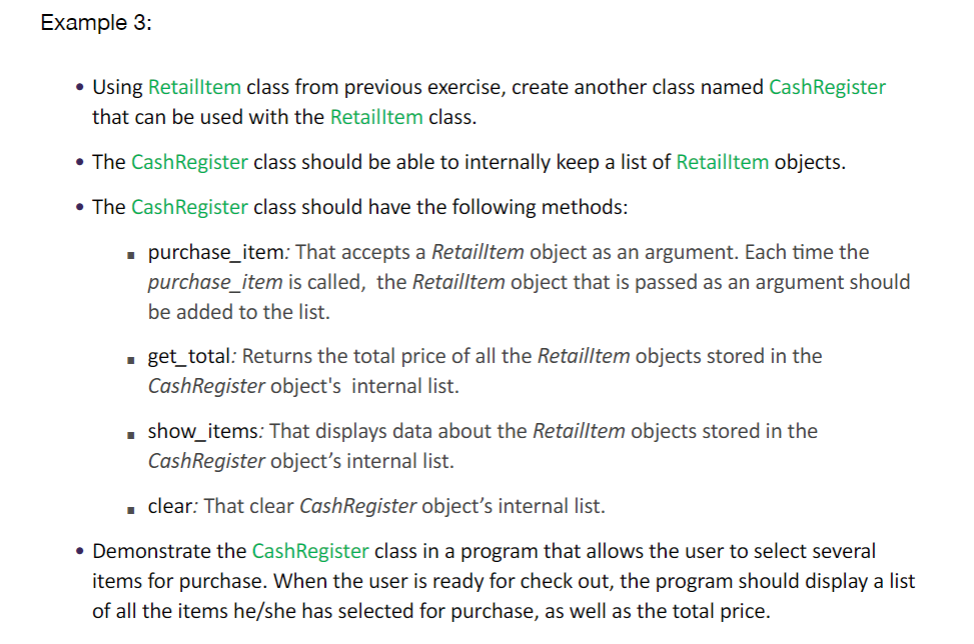
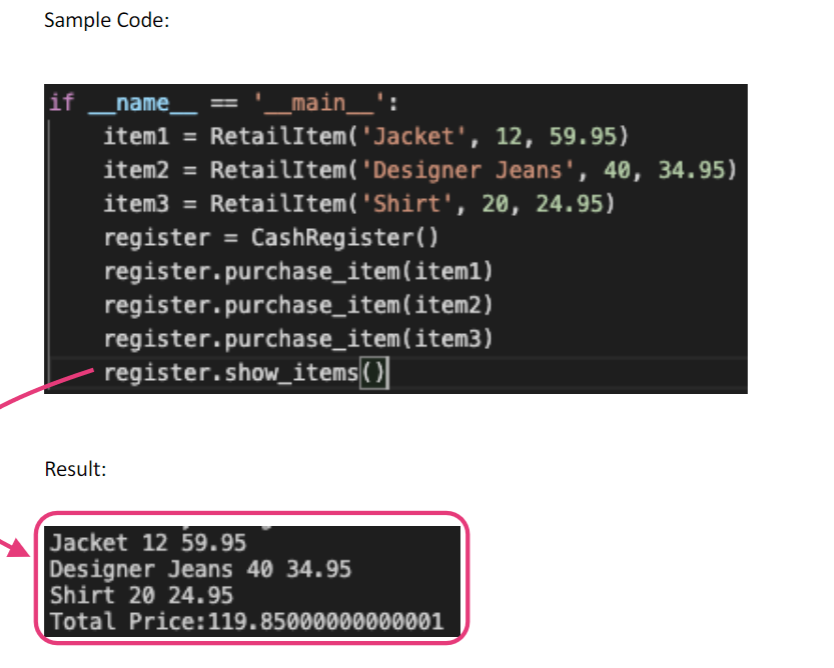
Example 3: Using Retailltem class from previous exercise, create another class named Cash Register that can be used with the Retailltem class. The CashRegister class should be able to internally keep a list of Retailltem objects. The Cash Register class should have the following methods: purchase_item: That accepts a Retailltem object as an argument. Each time the purchase_item is called, the Retailltem object that is passed as an argument should be added to the list. = get_total: Returns the total price of all the Retailltem objects stored in the Cash Register object's internal list. show_items: That displays data about the Retailltem objects stored in the Cash Register object's internal list. clear: That clear Cash Register object's internal list. Demonstrate the Cash Register class in a program that allows the user to select several items for purchase. When the user is ready for check out, the program should display a list of all the items he/she has selected for purchase, as well as the total price. Sample Code: if name_ :'_main__' item1 = RetailItem( 'Jacket', 12, 59.95) item2 = RetailItem( 'Designer Jeans', 40, 34.95) item3 = RetailItem("Shirt', 20, 24.95) register = CashRegister() register.purchase_item( item1) register.purchase_item(item2) register.purchase_item(item3) register.show_items Result: Jacket 12 59.95 Designer Jeans 40 34.95 Shirt 20 24.95 Total Price: 119.85000000000001
Step by Step Solution
There are 3 Steps involved in it

Get step-by-step solutions from verified subject matter experts
 Study Help