



Question: Hi, I am having trouble trying to input the correct information and formula. The formula I put is =FREQUENCY(B2:B380,E2:E11), but the frequency came out to
Hi, I am having trouble trying to input the correct information and formula. The formula I put is =FREQUENCY(B2:B380,E2:E11), but the frequency came out to all zeros. I was wondering what am I doing wrong? Is it because of the BIN numbers?
PROBLEM: The file for problem 6 lists the average time (in minutes) it takes citizens of 379 metropolitan areas to travel to work and back home each day.
a) Create a histogram of the daily commute times.
b) Find the most representative average daily commute time across this distribution.
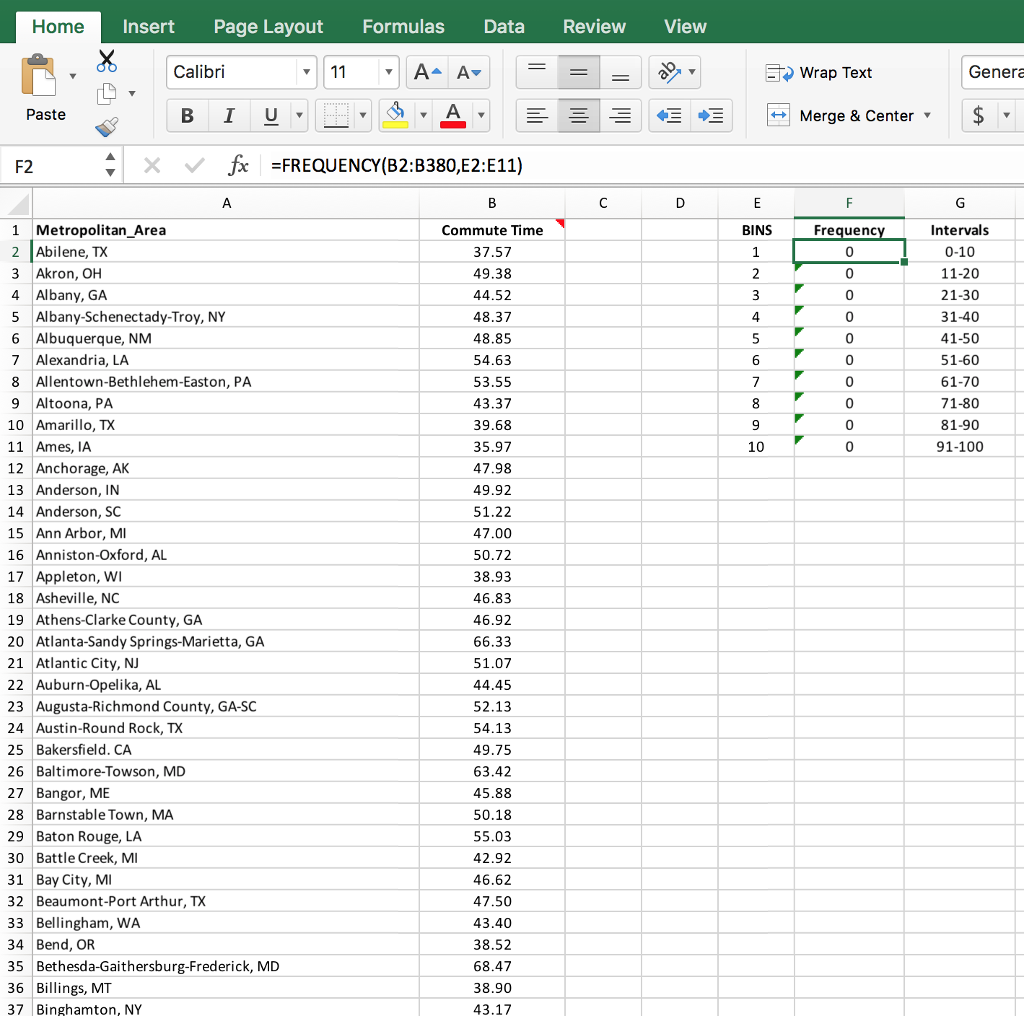
Home Insert Page Layout Formulas Data Review View Calibri Wrap Text Genera Paste +E -Merge & Center / fx =FREQUENCY(B2:B380,E2:E11) BINS Intervals 0-10 11-20 21-30 31-40 41-50 51-60 61-70 71-80 81-90 91-100 1 Metropolitan_Area 2 Abilene, TX 3 Akron, OH 4 Albany, GA 5 Albany-Schenectady-Troy, NY 6 Albuquerque, NM 7 Alexandria, LA 8 Allentown-Bethlehem-Easton, PA 9 Altoona, PA 10 Amarillo, TX 11 Ames, IA 12 Anchorage, AK 13 Anderson, IN 14 Anderson, SC 15 Ann Arbor, MI 16 Anniston-Oxford, AL 17 Appleton, WI 18 Asheville, NC 19 Athens-Clarke County, GA 20 Atlanta-Sandy Springs-Marietta, GA 21 Atlantic City, N 22 Auburn-Opelika, AL 23 Augusta-Richmond County, GA-SC 24 Austin-Round Rock, TX 25 Bakersfield. CA 26 Baltimore-Towson, MD 27 Bangor, ME 28 Barnstable Town, MA 29 Baton Rouge, LA 30 Battle Creek, MI 31 Bay City, MI 32 Beaumont-Port Arthur, TX 33 Bellingham, WiA 34 Bend, OR 35 Bethesda-Gaithersburg-Frederick, MD 36 Billings, MT 37 Binghamton, NY Commute Time 37.57 49.38 44.52 48.37 48.85 54.63 53.55 43.37 39.68 35.97 47.98 49.92 51.22 47.00 50.72 38.93 46.83 46.92 66.33 51.07 44.45 52.13 54.13 49.75 63.42 45.88 50.18 55.03 42.92 46.62 47.50 43.40 38.52 68.47 38.90 43.17 Frequenc 0 0 0 6 0 0
Step by Step Solution
There are 3 Steps involved in it

Get step-by-step solutions from verified subject matter experts