



Question: hi i need help with a matlab scrip. i have done all the work but i cant get it to work the way i need
hi i need help with a matlab scrip. i have done all the work but i cant get it to work the way i need to. when i input a matrix it outputs " invalid matrix size multiplication" but is only suppose to say that if the matrices cannot be multiplied together. i have also attached the instructions to the assigment at the bottom so u have a more clear understandment.
A=input('enter x coordinates between square brackets,like this [1 2 3] : ');
B=input('enter y coordinates between square brackets,like this [1 2 3] : ');
[r1,c1]=size(A); % row and column size of the matrix A;
[r2,c2]=size(B);%Set zero matrix for C
C=zeros(r1,c2);
% checking if multiplication is exists
if c1==r2
for i = 1:r1
for k = 1:c2
for j =1:r2
C(i,k) = C(i,k) + A(i,j) * B(j,k);
end
end
end
else
fprintf('Invalid matrix size multiplication');
end
example output: when i input any matrix it outputs " invalid matrix size multiplication"
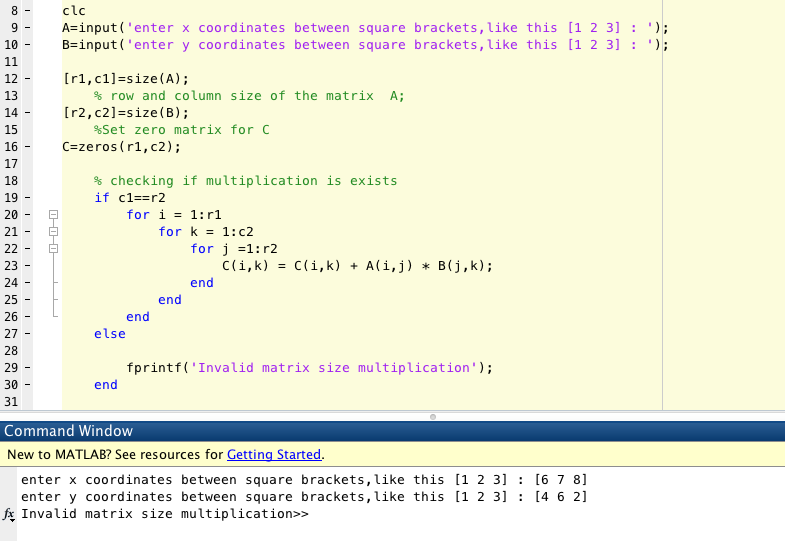
these are the instructins to the assigment: is the addition section in bold letters that is basically giving me trouble.
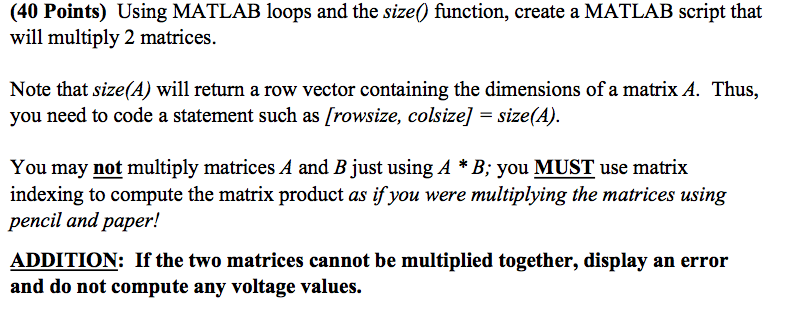
clc 9 A input enter x coordinates between square brackets, like this [1 2 3] 10 B input ('enter y coordinates between square brackets,like this [1 2 31 11 [r1,c1] size (A) 12 row and column size of the matrix A 13, [r2,c2 size (B); 14 %Set zero matrix for C 15 16 c zeros (r1, c2); checking if multiplication is exists 18 19 if cl r2 for i 1: r1 20 for k 1: C2 21 for j 1: r2 22 C (i, k) C (i, k) A (i,j) B (j,k) 23, 24 end 25 end 26 end 27 else 28 f printf Invalid matrix size multiplication 29 30 end 31 Command Window New to MATLAB? See resources for Getting Started. enter x between square brackets, like this 2 31 16 7 81 enter y coordinates between square brackets, like this [1 2 3] [4 6 21 f Invalid matrix size multiplication
Step by Step Solution
There are 3 Steps involved in it

Get step-by-step solutions from verified subject matter experts