







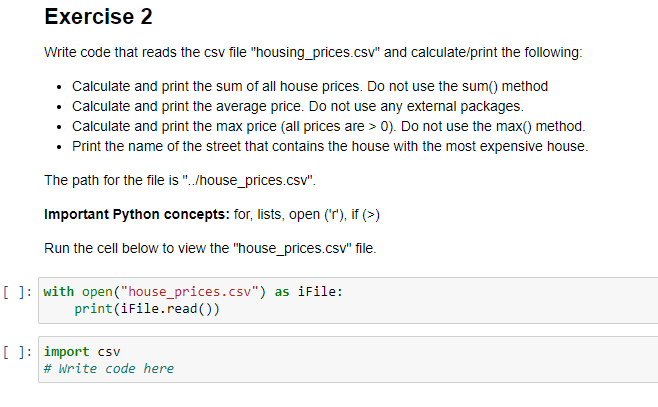
Question: house_prices.csv contents( only 3 rows). Using Python, Jupyter, on PC. Thank you. Exercise 2 Write code that reads the csv file housing_prices.csv and calculate/print the
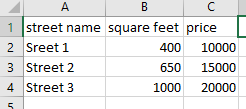
house_prices.csv contents( only 3 rows). Using Python, Jupyter, on PC. Thank you.
Exercise 2 Write code that reads the csv file "housing_prices.csv" and calculate/print the following: Calculate and print the sum of all house prices. Do not use the sum() method Calculate and print the average price. Do not use any external packages. Calculate and print the max price (all prices are > 0). Do not use the max() method. Print the name of the street that contains the house with the most expensive house. The path for the file is "./house_prices.csv". Important Python concepts: for, lists, open (r), if (>) Run the cell below to view the "house_prices.csv" file. [ ]: with open("house_prices.csv") as iFile: print(iFile.read() [ ]: import csv # Write code here A B B 1 street name square feet price 2 Sreet 1 400 10000 3 Street 2 650 15000 4 Street 3 1000 20000 5
Step by Step Solution
There are 3 Steps involved in it

Get step-by-step solutions from verified subject matter experts
 Study Help