







Question: How did you get the minimum cost using excel solver? I am not getting the accurate minimum cost. Why is my excel solver not working?
How did you get the minimum cost using excel solver? I am not getting the accurate minimum cost. Why is my excel solver not working?
ANSWER:
*Please please please LIKE THIS ANSWER, so that I can get a small benefit, Please*
YOUR ONE LIKE CAN REALLY HELP ME,PLEASE.THANKS!
Solution using Excel Solver is following:
Step 1: Create spreadsheet model
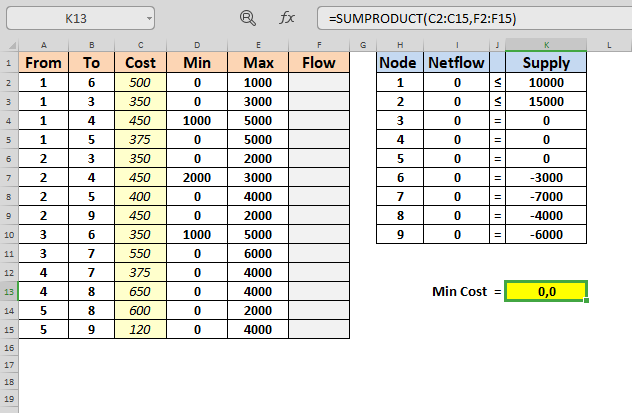
FORMULAS:
| From | To | Cost | Min | Max | Flow | Node | Netflow | Supply | ||
| 1 | 6 | 500 | 0 | 1000 | 1 | =SUMIF($A$2:$A$15,H2,$F$2:$F$15)-SUMIF($B$2:$B$15,H2,$F$2:$F$15) | 10000 | |||
| 1 | 3 | 350 | 0 | 3000 | 2 | =SUMIF($A$2:$A$15,H3,$F$2:$F$15)-SUMIF($B$2:$B$15,H3,$F$2:$F$15) | 15000 | |||
| 1 | 4 | 450 | 1000 | 5000 | 3 | =SUMIF($A$2:$A$15,H4,$F$2:$F$15)-SUMIF($B$2:$B$15,H4,$F$2:$F$15) | = | 0 | ||
| 1 | 5 | 375 | 0 | 5000 | 4 | =SUMIF($A$2:$A$15,H5,$F$2:$F$15)-SUMIF($B$2:$B$15,H5,$F$2:$F$15) | = | 0 | ||
| 2 | 3 | 350 | 0 | 2000 | 5 | =SUMIF($A$2:$A$15,H6,$F$2:$F$15)-SUMIF($B$2:$B$15,H6,$F$2:$F$15) | = | 0 | ||
| 2 | 4 | 450 | 2000 | 3000 | 6 | =SUMIF($A$2:$A$15,H7,$F$2:$F$15)-SUMIF($B$2:$B$15,H7,$F$2:$F$15) | = | -3000 | ||
| 2 | 5 | 400 | 0 | 4000 | 7 | =SUMIF($A$2:$A$15,H8,$F$2:$F$15)-SUMIF($B$2:$B$15,H8,$F$2:$F$15) | = | -7000 | ||
| 2 | 9 | 450 | 0 | 2000 | 8 | =SUMIF($A$2:$A$15,H9,$F$2:$F$15)-SUMIF($B$2:$B$15,H9,$F$2:$F$15) | = | -4000 | ||
| 3 | 6 | 350 | 1000 | 5000 | 9 | =SUMIF($A$2:$A$15,H10,$F$2:$F$15)-SUMIF($B$2:$B$15,H10,$F$2:$F$15) | = | -6000 | ||
| 3 | 7 | 550 | 0 | 6000 | ||||||
| 4 | 7 | 375 | 0 | 4000 | ||||||
| 4 | 8 | 650 | 0 | 4000 | Min Cost | = | =SUMPRODUCT(C2:C15,F2:F15) | |||
| 5 | 8 | 600 | 0 | 2000 | ||||||
| 5 | 9 | 120 | 0 | 4000 |
Step 2: Enter Solver Parameters:
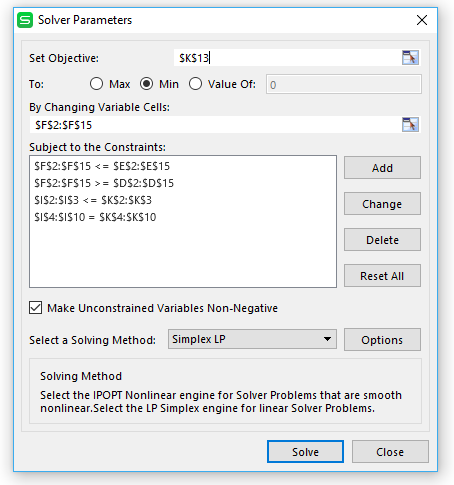
Step 3: Click Solve button on the Solver Parameters to generate the optimal solution
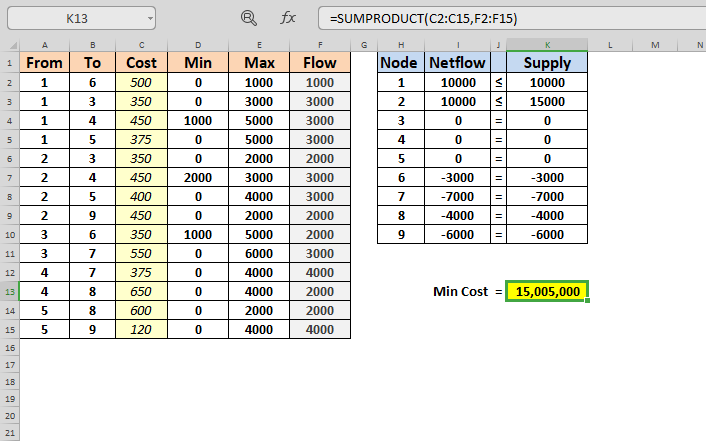
Optimal transportation flow is shown in column F (F2:F15)
Total cost = $ 15,005,000
K13 fix =SUMPRODUCT(C2:C15,F2:F15) B D E F G H 1 From To Cost Min Max Flow Node Netflow Supply 2 1 6 500 0 1000 1 0 s 10000 3 1 3 350 0 3000 2 0 = $D$2:$D$15 $1$2:$1$3Step by Step Solution
There are 3 Steps involved in it
1 Expert Approved Answer
Step: 1 Unlock

Question Has Been Solved by an Expert!
Get step-by-step solutions from verified subject matter experts
Step: 2 Unlock
Step: 3 Unlock
 Study Help