







Question: How do i change these floating values to integers or rather round to the nearest value? Using GiS/ arcpy / python Label Values 3.81233173956221 4.50002415251779
How do i change these floating values to integers or rather round to the nearest value? Using GiS/ arcpy / python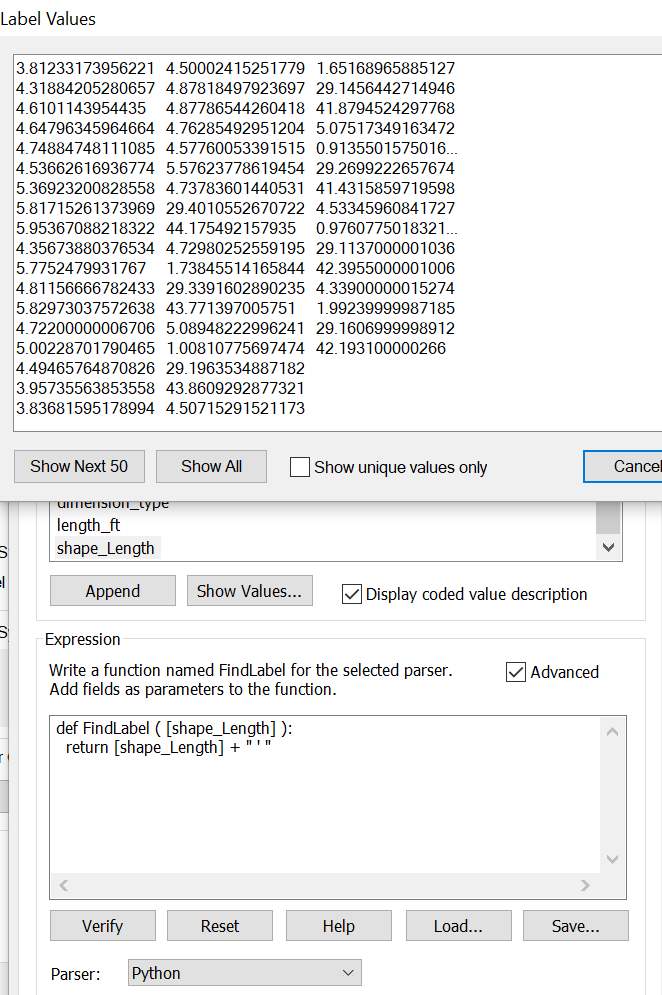
Label Values 3.81233173956221 4.50002415251779 1.65168965885127 4.31884205280657 4.87818497923697 29.1456442714946 4.6101143954435 4.87786544260418 41.8794524297768 4.64796345964664 4.76285492951204 5.07517349163472 4.74884748111085 4.57760053391515 0.9135501575016 4.53662616936774 5.57623778619454 29.2699222657674 5.36923200828558 4.73783601440531 41.4315859719598 5.81715261373969 29.4010552670722 4.53345960841727 5.95367088218322 44.175492157935 0.9760775018321 4.35673880376534 4.72980252559195 29.1137000001036 5.77524799317671.73845514165844 42.3955000001006 4.81156666782433 29.3391602890235 4.33900000015274 5.82973037572638 43.771397005751 1.99239999987185 4.72200000006706 5.08948222996241 29.1606999998912 5.00228701790465 1.00810775697474 42.193100000266 4.49465764870826 29.1963534887182 3.95735563853558 43.8609292877321 3.83681595178994 4.50715291521173 Show Next 50 Show All Show unigue values only Cancel length _ft shape_Length Append Show Values Display coded value description Expression Write a function named FindLabel for the selected parser. Add fields as parameters to the function. Advanced def FindLabel ( [shape_Length] ): return [shape_Length] +"'" Veri Reset Help Load... Save ParserPython
Step by Step Solution
There are 3 Steps involved in it

Get step-by-step solutions from verified subject matter experts
 Study Help