







Question: How do I run the following assembly program using raspberry pi? please post screenshots of the solutions. 5. Enter and run the following assembly program
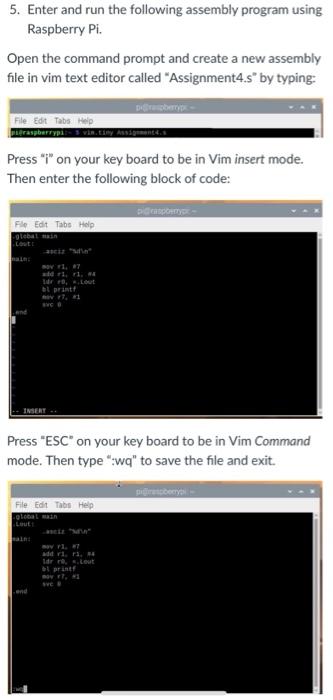
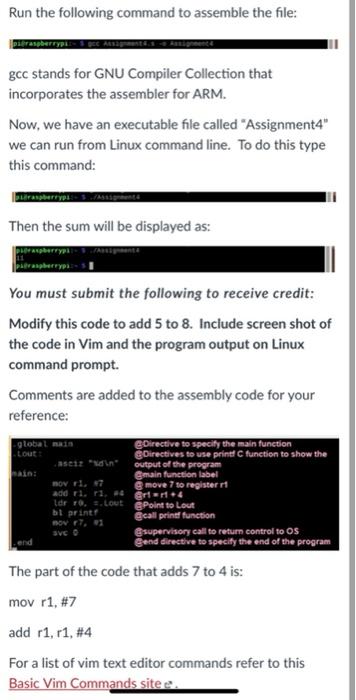
5. Enter and run the following assembly program using Raspberry Pi. Open the command prompt and create a new assembly file in vim text editor called "Assignment4.s by typing: Darby File Edit Tabs Help perSperry Press "i" on your key board to be in Vim insert mode. Then enter the following block of code: DOMY File Edit Tabs Help 1. Lout al print 7. Press "ESC on your key board to be in Vim Command mode. Then type":wq" to save the file and exit. DY File Edit Tabs Help Q10 v 17 addir Idre Leut 1 print end Run the following command to assemble the file: gcc stands for GNU Compiler Collection that incorporates the assembler for ARM. Now, we have an executable file called "Assignment4" we can run from Linux command line. To do this type this command: Then the sum will be displayed as: You must submit the following to receive credit: Modify this code to add 5 to 8. Include screen shot of the code in Vim and the program output on Linux command prompt. Comments are added to the assembly code for your reference: global main Directive to specify the main function Lout Directives to use print function to show the seit in output of the program pain main function label BOV T. 17 move 7 to register addri. . Grer. Ldr . s.lout Point to Lout bt printf @call print function v r7.01 SVC supervisory call to return control to os Send directive to specify the end of the program The part of the code that adds 7 to 4 is: mov r1, #7 add r1, r1, #4 For a list of vim text editor commands refer to this Basic Vim Commands sitee
Step by Step Solution
There are 3 Steps involved in it

Get step-by-step solutions from verified subject matter experts
 Study Help