







Question: How do make the layout change like the example in the picture down below when i make the the width 1050 using media query. Use
How do make the layout change like the example in the picture down below when i make the the width 1050 using media query. Use Flexbox, grid or float.
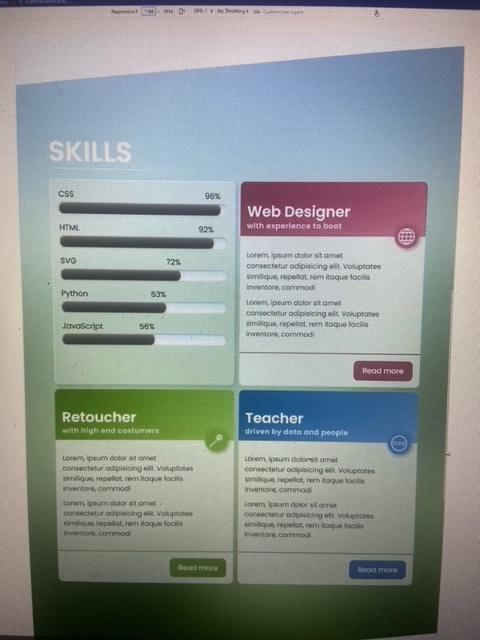
My html code:
Web Designer
With experience to boot
Lorem, ipsum dolor sit amet consectetur adipisicing elit. Voluptates similique,
repellat, rem itaque facilis inventore, commodi
Lorem, ipsum dolor sit amet consectetur adipisicing elit. Voluptates similique,
repellat, rem itaque facilis inventore, commodi
Read more
My css code:
*{box-sizing: border-box;}
.cardbody {
padding: 0;
z-index: 2;
}
.card {
position: relative;
border-radius: 1.2rem;
box-shadow: 0 1px 5px black;
background-color: hsl(0, 7%, 86%, 0.75);
z-index: 1;
}
.cardtitle, .cardsubtitle, .button, h2, h3 {
font-family: 'poppins';
color: aliceblue;
}
.cardheader {
border-radius: 1.2rem 1.2rem 0 0 ;
padding-top: 4rem;
padding-bottom: 1rem;
background-color: hsl(var(--hue-3), 30%, 60%);
background-image: linear-gradient(
150deg,
hsl(318, 40%, 39%),
hsl(327, 32%, 57%)
);
z-index: 2;
}
h2 {
margin-left: 1rem;
}
h5 {
margin-left: 1rem;
letter-spacing: .1rem;
}
.cardimage {
position: absolute;
top: 8.2rem;
right: 1.5rem;
z-index: 3;
background-color: rgb(145, 68, 121);
border: 1rem rgb(145, 68, 121);
border-style: solid;
border-radius: 50%;
width: 6.25rem;
height: 6.25rem;
box-shadow: 0 1px 5px black;
}
.cardcopy {
font-size: 1.4rem;
margin-right: .7rem;
z-index: 2;
padding-top: 1.4rem;
margin-left: 1.2rem;
padding-bottom: 1.5rem;
}
.cardfooter {
display: grid;
padding-top: 1.5rem;
padding-right: 1.5rem;
padding-bottom: 1.5rem;
border-top: 0.2rem solid rgb(145, 68, 121);
justify-content: end;
}
.button {
display: block ;
border: 2px solid rgb(145, 68, 121);
background-color: rgb(145, 68, 121);
border-radius: .5rem;
padding: 0.7rem 2rem;
font-size: 16px;
padding-right: 2rem;
}
.button:hover {
border: 2px solid rgb(145, 68, 121);
background-color:white;
color: rgb(145, 68, 121);
}
I could not include the rest of the css code because it was too long but all the cards are the same just copy the first css codes css.
Step by Step Solution
There are 3 Steps involved in it

Get step-by-step solutions from verified subject matter experts
 Study Help