





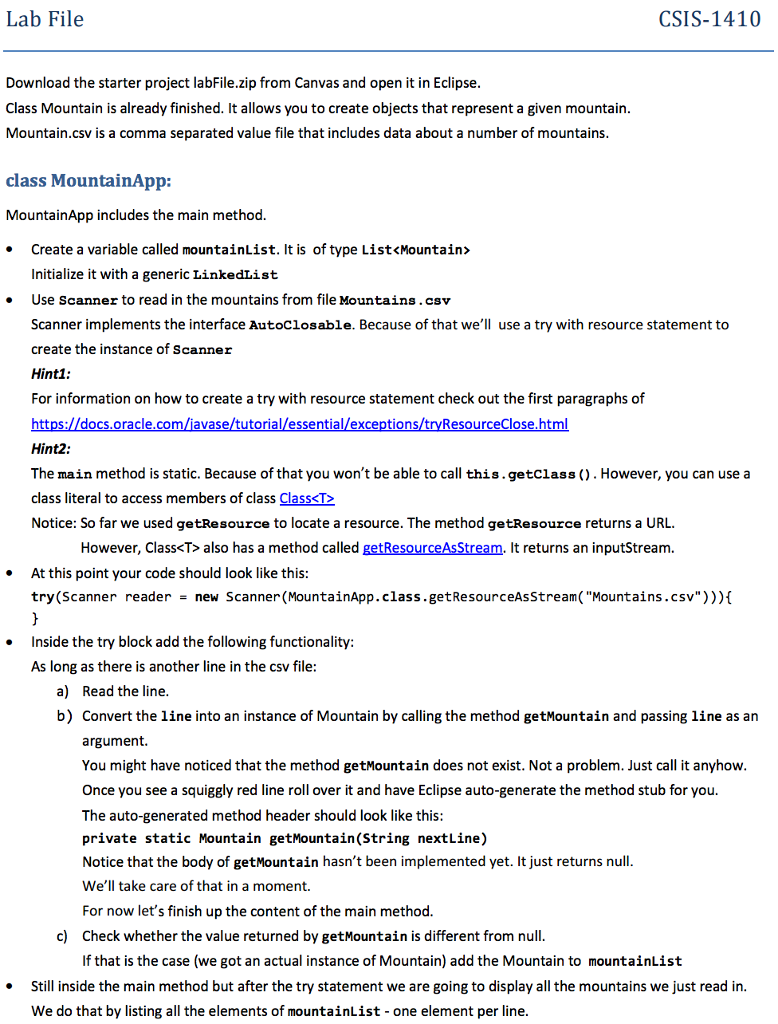
Question: How do you acomplish this task? CSIS-1410 Lab File Download the starter project labFile.zip from Canvas and open it in Eclipse Class Mountain is already
 How do you acomplish this task? CSIS-1410 Lab File Download the

starter project labFile.zip from Canvas and open it in Eclipse Class Mountain

How do you acomplish this task?

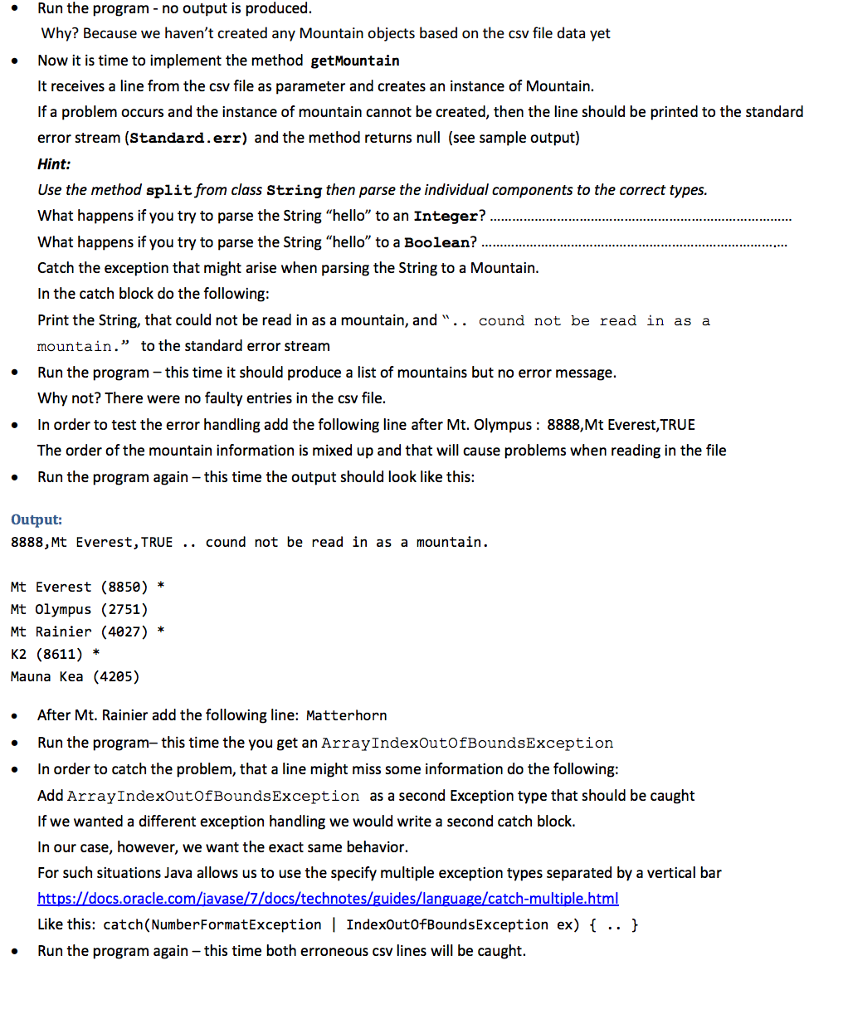
CSIS-1410 Lab File Download the starter project labFile.zip from Canvas and open it in Eclipse Class Mountain is already finished. It allows you to create objects that represent a given mountain Mountain.csv is a comma separated value file that includes data about a number of mountains. ass MountainApp: Mountain App includes the main method Create a variable called mountainList. It is of type List also has a method called getResourceAsStream. t returns an inputStream. At this point your code should look like this try (Scanner reader new Scanner (MountainApp.class.getResourceAsstream ("Mountains .csv"))){ Inside the try block add the following functionality: As long as there is another line in the csv file: a) Read the line b) Convert the line into an instance of Mountain by calling the method getMountain and passing line as an argument. You might have noticed that the method getMountain does not exist. Not a problem. Just call it anyhow Once you see a squiggly red line roll over it and have Eclipse auto-generate the method stub for you The auto-generated method header should look like this: private static Mountain getMountain (String nextLine) Notice that the body of getMountain hasn't been implemented yet. It just returns null We'll take care of that in a moment For now let's finish up the content of the main method c) Check whether the value returned by getMountain is different from null If that is the case (we got an actual instance of Mountain) a the Mountain to mountainList Still inside the main method but after thetry statement we are going to display all the mountains we just read in We do that by listing all the elements of mountainList one element per line CSIS-1410 Lab File Download the starter project labFile.zip from Canvas and open it in Eclipse Class Mountain is already finished. It allows you to create objects that represent a given mountain Mountain.csv is a comma separated value file that includes data about a number of mountains. ass MountainApp: Mountain App includes the main method Create a variable called mountainList. It is of type List also has a method called getResourceAsStream. t returns an inputStream. At this point your code should look like this try (Scanner reader new Scanner (MountainApp.class.getResourceAsstream ("Mountains .csv"))){ Inside the try block add the following functionality: As long as there is another line in the csv file: a) Read the line b) Convert the line into an instance of Mountain by calling the method getMountain and passing line as an argument. You might have noticed that the method getMountain does not exist. Not a problem. Just call it anyhow Once you see a squiggly red line roll over it and have Eclipse auto-generate the method stub for you The auto-generated method header should look like this: private static Mountain getMountain (String nextLine) Notice that the body of getMountain hasn't been implemented yet. It just returns null We'll take care of that in a moment For now let's finish up the content of the main method c) Check whether the value returned by getMountain is different from null If that is the case (we got an actual instance of Mountain) a the Mountain to mountainList Still inside the main method but after thetry statement we are going to display all the mountains we just read in We do that by listing all the elements of mountainList one element per line

Step by Step Solution

There are 3 Steps involved in it

1 Expert Approved Answer
Step: 1 Unlock blur-text-image
Question Has Been Solved by an Expert!

Get step-by-step solutions from verified subject matter experts

Step: 2 Unlock
Step: 3 Unlock

Students Have Also Explored These Related Databases Questions!