





Question: how to fix the error code shown in screenshot and restart my apache service Jun 13 15:12:00 Inx21server systemd [1]: Starting The Apache HTTP Server.

how to fix the error code shown in screenshot and restart my apache service
how to fix the error code shown in screenshot and
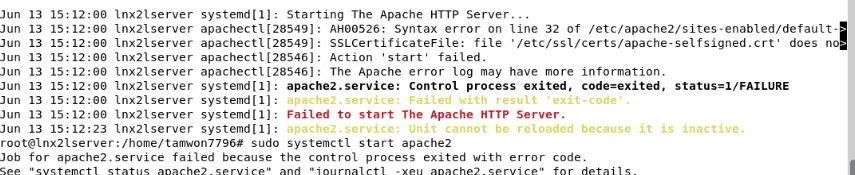
Jun 13 15:12:00 Inx21server systemd [1]: Starting The Apache HTTP Server. . . Jun 13 15:12:00 Inx21server apachectl[28549]: AH00526: Syntax error on line 32 of /etc/apache2/sites-enabled/default- Jun 13 15:12:00 Inx21server apachectl [28549]: SSLCertificateFile: file '/etc/ssl/certs/apache- selfsigned. crt' does no> Jun 13 15:12:00 Inx21server apachectl [28546]: Action 'start' failed. Jun 13 15:12:00 Inx21server apachectl [28546]: The Apache error log may have more information. Jun 13 15:12:00 Inx21server systemd [1]: apache2. service: Control process exited, code=exited, status=1/FAILURE Jun 13 15:12:00 Inx21server systemd [1]: apache2 . service: Failed with result 'exit-code' . Jun 13 15:12:00 Inx21server systemd [1]: Failed to start The Apache HTTP Server. Jun 13 15:12:23 Inx2\\server systemd [1]: apache2. service: Unit cannot be reloaded because it is inactive. root@lnx2lserver :/home/tamwon7796# sudo systemctl start apache2 Job for apache2. service failed because the control process exited with error code. See "systemctl status apache?.service" and "journal pache2.service" for deta

Step by Step Solution

There are 3 Steps involved in it

1 Expert Approved Answer
Step: 1 Unlock blur-text-image

Question Has Been Solved by an Expert!

Get step-by-step solutions from verified subject matter experts

Step: 2 Unlock
Step: 3 Unlock

Students Have Also Explored These Related Accounting Questions!