







Question: How would you summarize this procedure? It is a tool offset for CNC programming EMCO Mill. 2870-348 CNC Programming I EMCO Mill (Fanuc Control) Procedures
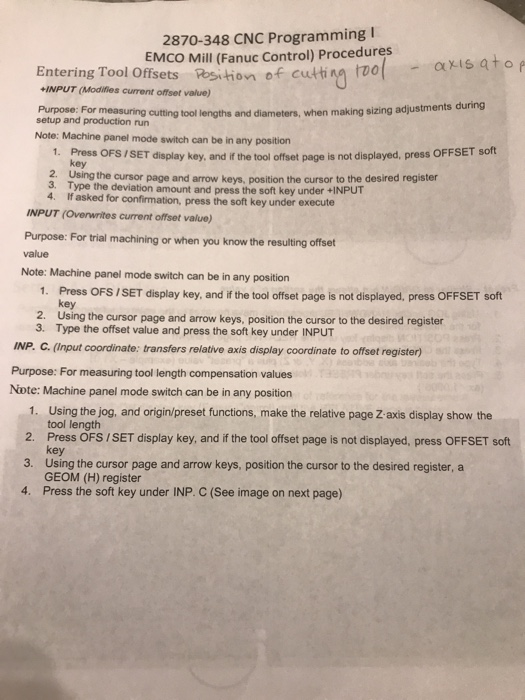
2870-348 CNC Programming I EMCO Mill (Fanuc Control) Procedures sets Resithion of cuti vo f cutti na Too axis ato Entering Tool Offse INPUT (Modifies current offset value) Purpose: setup and production nun cutting tool lengths and diameters, when making sizing adjustments during Note: Machine panel mode switch can be in any position 1 Press OFS/SET display key, and if the tol fset page is not displayed, press OFFSET soft 2. 3. 4. key Using the cursor page and arrow keys, position the cursor to the desired register Type the deviation amount and press the soft key under +INPUT If asked for confirmation, press the soft key under execute INPUT (Overwrites current offset value) Purpose: For trial machining or when you know the resulting offset Note: Machine panel mode switch can be in any position 1. Press OFS /SET display key, and if the tool offset page is not displayed, press OFFSET soft key 2. Using the cursor page and arrow keys, position the cursor to the desired register 3. Type the offset value and press the soft key under INPUT INP. C. (Input coordinate: transfers relative axis display coordinate to offset register) Purpose: For measuring tool length compensation values Note: Machine panel mode switch can be in any position 1. Using the jog, and origin/preset functions, make the relative page Z-axis display show the 2. 3. 4. Press the soft key under INP. C (See image on next page tool length Press OFS /SET display key, and if the tool offset page is not displayed, press OFFSET soft Using the cursor page and arrow keys, position the cursor to the desired register, a GEOM (H) register 2870-348 CNC Programming I EMCO Mill (Fanuc Control) Procedures sets Resithion of cuti vo f cutti na Too axis ato Entering Tool Offse INPUT (Modifies current offset value) Purpose: setup and production nun cutting tool lengths and diameters, when making sizing adjustments during Note: Machine panel mode switch can be in any position 1 Press OFS/SET display key, and if the tol fset page is not displayed, press OFFSET soft 2. 3. 4. key Using the cursor page and arrow keys, position the cursor to the desired register Type the deviation amount and press the soft key under +INPUT If asked for confirmation, press the soft key under execute INPUT (Overwrites current offset value) Purpose: For trial machining or when you know the resulting offset Note: Machine panel mode switch can be in any position 1. Press OFS /SET display key, and if the tool offset page is not displayed, press OFFSET soft key 2. Using the cursor page and arrow keys, position the cursor to the desired register 3. Type the offset value and press the soft key under INPUT INP. C. (Input coordinate: transfers relative axis display coordinate to offset register) Purpose: For measuring tool length compensation values Note: Machine panel mode switch can be in any position 1. Using the jog, and origin/preset functions, make the relative page Z-axis display show the 2. 3. 4. Press the soft key under INP. C (See image on next page tool length Press OFS /SET display key, and if the tool offset page is not displayed, press OFFSET soft Using the cursor page and arrow keys, position the cursor to the desired register, a GEOM (H) register
Step by Step Solution
There are 3 Steps involved in it

Get step-by-step solutions from verified subject matter experts
 Study Help