







Question: html coding can you please tell how to add my picture as well Task 1: HTML form elements with JavaScript conditional statements Enter your guess
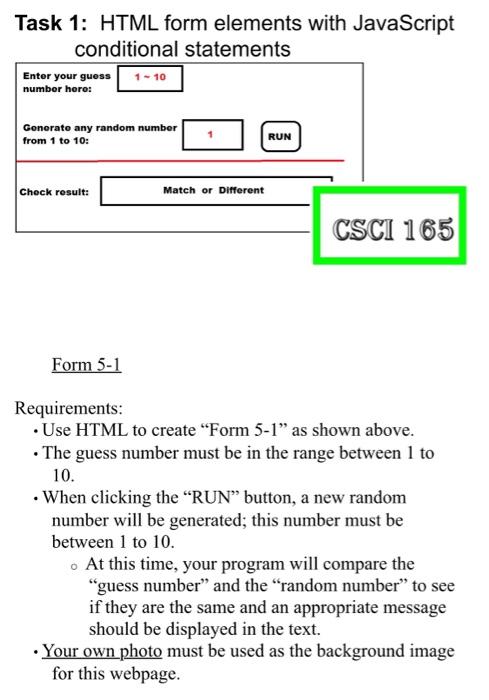
Task 1: HTML form elements with JavaScript conditional statements Enter your guess number here: 1 - 10 Generate any random number from 1 to 10: RUN Check result: Match or Different CSCI 165 Form 5-1 Requirements: Use HTML to create "Form 5-1 as shown above. The guess number must be in the range between 1 to 10. When clicking the RUN button, a new random number will be generated; this number must be between 1 to 10. - At this time, your program will compare the "guess number" and the "random number" to see if they are the same and an appropriate message should be displayed in the text. Your own photo must be used as the background image for this webpage
Step by Step Solution
There are 3 Steps involved in it

Get step-by-step solutions from verified subject matter experts
 Study Help