







Question: https://phet.colorado.edu/en/help-center/running-sims/windows#q20-header Experiment 1 - Elastic Collision Values 1. Deselect everything in green box in upper right corner except for Kinetic Energy and Show 2. Set
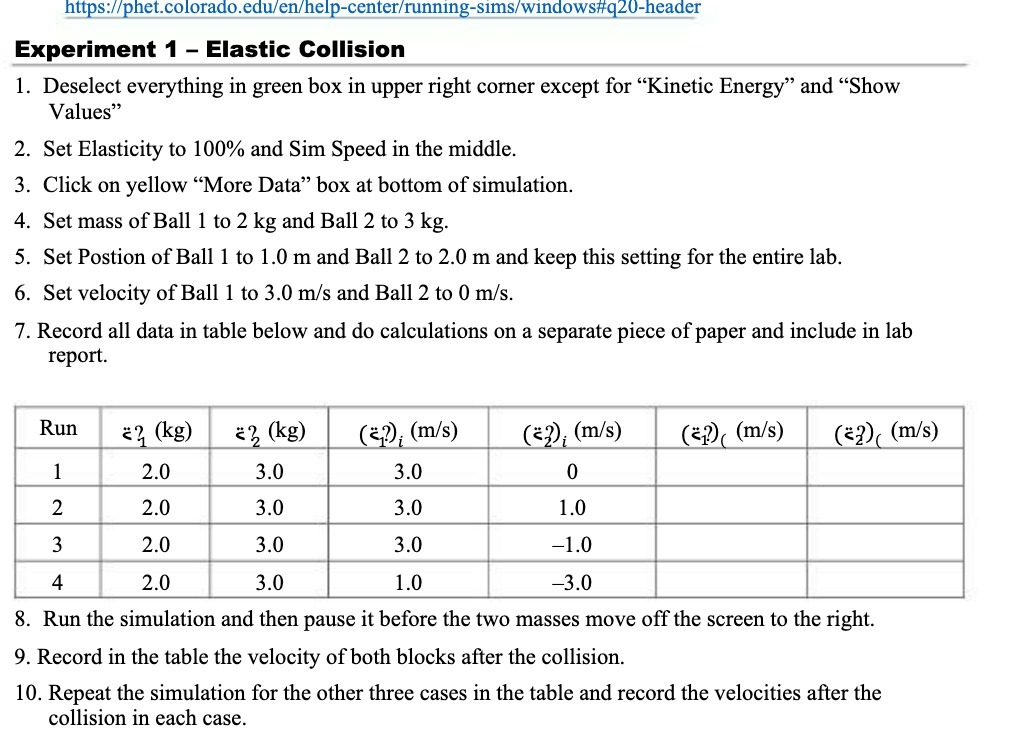
https://phet.colorado.edu/en/help-center/running-sims/windows#q20-header Experiment 1 - Elastic Collision Values" 1. Deselect everything in green box in upper right corner except for "Kinetic Energy" and "Show 2. Set Elasticity to 100% and Sim Speed in the middle. 3. Click on yellow "More Data" box at bottom of simulation. 4. Set mass of Ball 1 to 2 kg and Ball 2 to 3 kg. 5. Set Postion of Ball 1 to 1.0 m and Ball 2 to 2.0 m and keep this setting for the entire lab. 6. Set velocity of Ball 1 to 3.0 m/s and Ball 2 to 0 m/s. 7. Record all data in table below and do calculations on a separate piece of paper and include in lab report. Run 2? (kg) 23 (kg) (z?); (m/s) (=?); (m/s) (z) (m/s) (=2) (m/s) 2.0 3.0 3.0 0 2 2.0 3.0 3.0 1.0 3 2.0 3.0 3.0 -1.0 4 2.0 3.0 1.0 -3.0 8. Run the simulation and then pause it before the two masses move off the screen to the right. 9. Record in the table the velocity of both blocks after the collision. 10. Repeat the simulation for the other three cases in the table and record the velocities after the collision in each case
Step by Step Solution
There are 3 Steps involved in it

Get step-by-step solutions from verified subject matter experts
 Study Help