







Question: I am getting these errors whenever I try to change this setting in my Visual Studio Code. I have not been able to find any
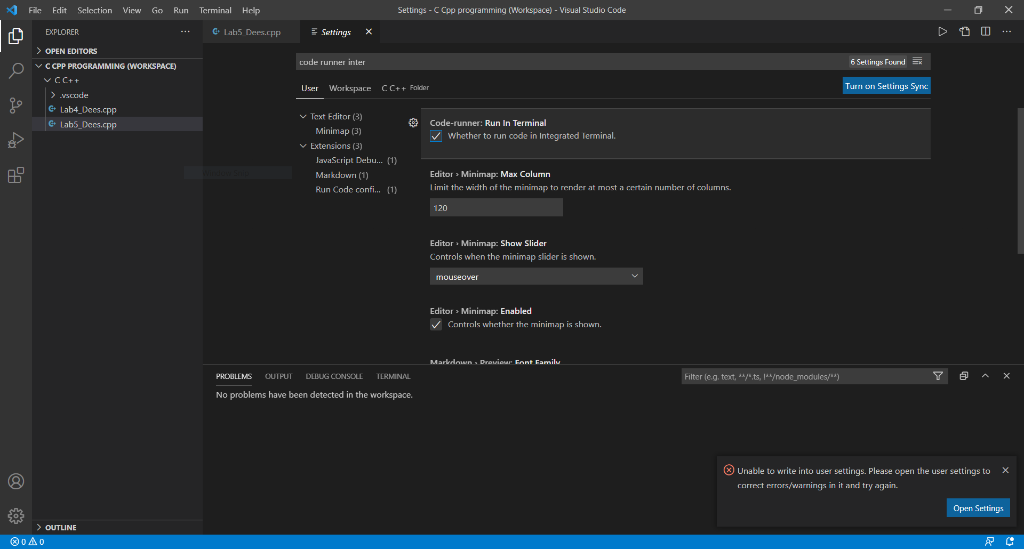
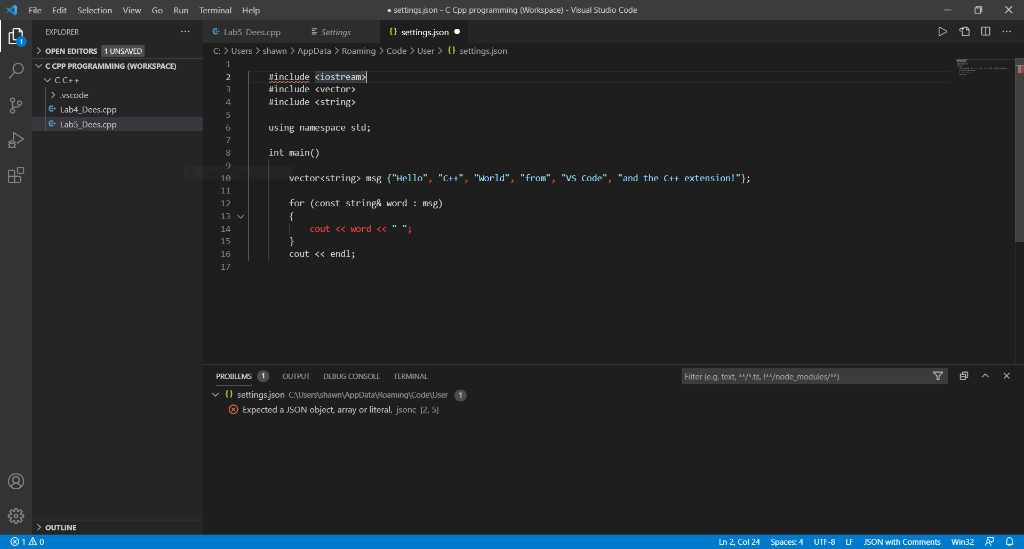
I am getting these errors whenever I try to change this setting in my Visual Studio Code. I have not been able to find any help online so I'm asking you guys if you know how to fix this. Any answers are greatly appreciated.
Thank you
x File Edit Selection View Go Run Terminal Help Settings - Cpp programming (Workspace) - Visual Studio Code EXPLORER Lab5 Dees.app Settings X > 00 code runner inter 6 Settings found : > OPEN EDITORS V CCPP PROGRAMMING (WORKSPACE) V C C++ > .scade e Lab4_Dee.cpp Lab5_Dees.cpp User Workspace CC++ Polder Turn on Settings Sync Code-runner: Run In Terminal : Whether to run code in Integrated Terminal. v Text Editor (3) Minimap (3) v Extensions (3) JavaScript Debu... (1) Markdown (1) Run Code confi... (1) Editor > Minimap: Max Column Limit the width of the minimap to render at most a certain number of columns. 120 Editor Minimap: Show Slider Controls when the minimap slider is shown mouseover Editor Minimap:Enabled > Controls whether the minimap is shown. Markdow Draviour Cant Family PROBLEMS OUTPUT DELUG CONSOLE TERMINAL Filter leg, text, sayts, 14ode_modules/s) No problems have been detected in the workspace. Unable to write into user settings. Please open the user settings to X correct errors/warnings in it and try again. Open Settings 303 > OUTLINE BAO > x File Edit Selection View Go Run Terminal Help settings.json - Cpp programming (Workspace) - Visual Studio Code EXPLORER Lab5 Dees.epp Settings {} settings.json > OPEN EDITORS 1 UNSAVED C: > Users > Shawn > AppData > Roaming > Code > User > 1) settings.json 1 V CCPP PROGRAMMING (WORKSPACE) 2 Jinclude
Step by Step Solution
There are 3 Steps involved in it

Get step-by-step solutions from verified subject matter experts
 Study Help