







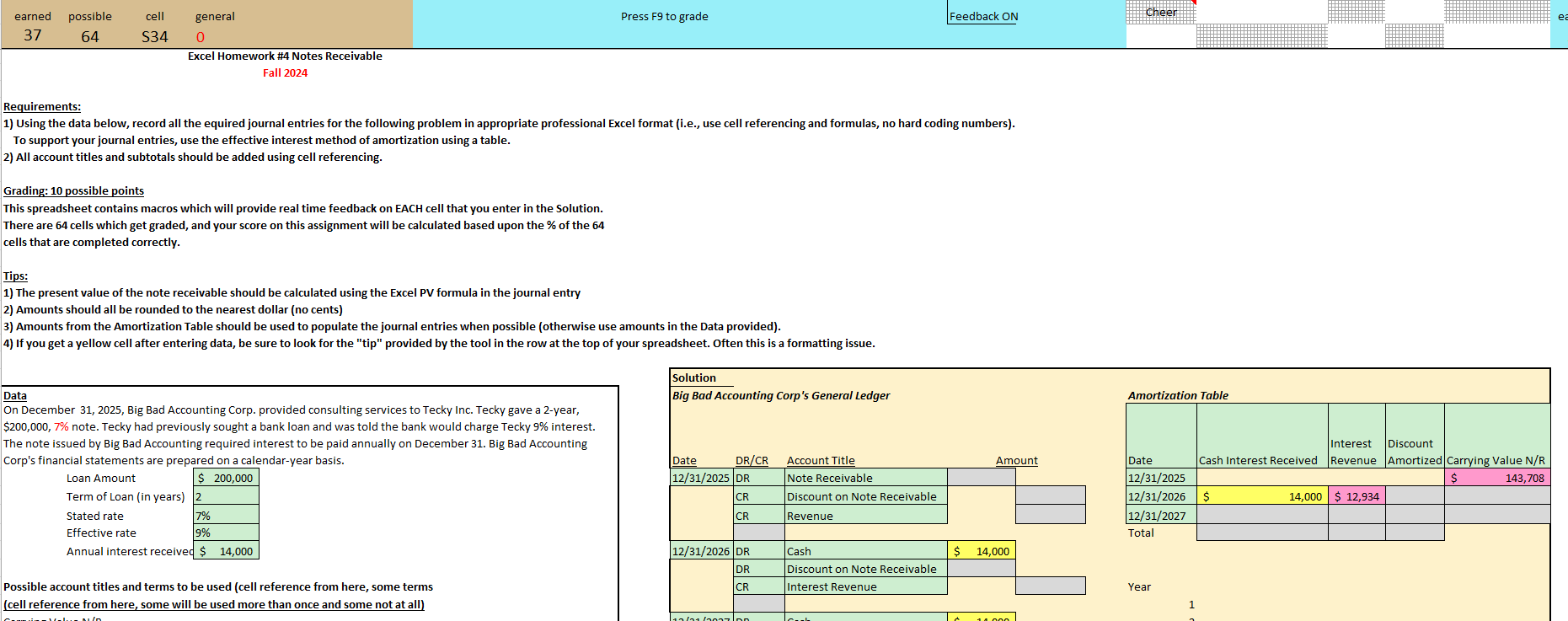
Question: I am having issues with the formatting Using the data below, record all the required journal entries for the following problem in appropriate professional Excel
I am having issues with the formatting
Using the data below, record all the required journal entries for the following problem in appropriate professional Excel format ie use cell referencing and formulas, no complex coding numbers
To support your journal entries, use the effective interest method of amortization using a table.
All account titles and subtotals should be added using cell referencing.
Grading: possible points
This spreadsheet contains macros which will provide real time feedback on EACH cell that you enter in the Solution.
There are cells which get graded, and your score on this assignment will be calculated based upon the of the
cells that are completed correctly.
Tips:
The present value of the note receivable should be calculated using the Excel PV formula in the journal entry
Amounts should all be rounded to the nearest dollar no cents
Amounts from the Amortization Table should be used to populate the journal entries when possible otherwise use amounts in the Data provided
If you get a yellow cell after entering data, be sure to look for the "tip" provided by the tool in the row at the top of your spreadsheet. Often this is a formatting issue.
Data
On December Big Bad Accounting Corp. provided consulting services to Tecky Inc. Tecky gave a year,
$ note. Tecky had previously sought a bank loan and was told the bank would charge Tecky interest.
ACTG Excel Homework # Notes Receivable Fall Requirements: Using the data below, record all the equired journal entries for the following problem in appropriate professional Excel format ie use cell referencing and formulas, no hard coding numbers To support your journal entries, use the effective interest method of amortization using a table. All account titles and subtotals should be added using cell referencing. Grading: possible points This spreadsheet contains macros which will provide real time feedback on EACH cell that you enter in the Solution. There are cells which get graded, and your score on this assignment will be calculated based upon the of the cells that are completed correctly. Tips: The present value of the note receivable should be calculated using the Excel PV formula in the journal entry Amounts should all be rounded to the nearest dollar no cents Amounts from the Amortization Table should be used to populate the journal entries when possible otherwise use amounts in the Data provided If you get a yellow cell after entering data, be sure to look for the "tip" provided by the tool in the row at the top of your spreadsheet. Often this is a formatting issue. Solution Data Big Bad Accounting Corp's General Ledger Amortization Table On December Big Bad Accounting Corp. provided consulting services to Tecky Inc. Tecky gave a year, $ note. Tecky had previously sought a bank loan and was told the bank would charge Tecky interest. The note issued by Big Bad Accounting required interest to be paid annually on December Big Bad Accounting Corp's financial statements are prepared on a calendaryear basis. Date DRCR Account Title Amount Loan Amount $ DR Note Receivable $ Term of Loan in years CR Discount on Note Receivable Stated rate CR Revenue Effective rate Total Annual interest received $ DR Cash DR Discount on Note Receivable Possible account titles and terms to be used cell reference from here, some terms CR Interest Revenue cell reference from here, some will be used more than once and some not at all Carrying Value NR DR Cash Cash DR Discount on Note Receivable Cash Interest Received CR Interest Revenue CR Date DR Cash Discount Amortized CR Note Receivable Discount on Note Receivable DR Interest Revenue Note Receivable Premium Amortized Premium on Note Receivable Revenue Cash To record revenue for consulting services and the receipt of the note To record principal repayment years $
Step by Step Solution
There are 3 Steps involved in it
1 Expert Approved Answer
Step: 1 Unlock

Question Has Been Solved by an Expert!
Get step-by-step solutions from verified subject matter experts
Step: 2 Unlock
Step: 3 Unlock
 Study Help