







Question: I am having trouble creating the completing the Players() class. You are suppose to be able to enter a name in a text box called,
I am having trouble creating the completing the Players() class. You are suppose to be able to enter a name in a text box called, 'txtName' and you press a submit button called 'btnYes'. If the name is valid (not null, or have special character), the Bingo Game will begin. If it does not meet the requirements, return a error message box saying to reenter your name. I will provide the necessary classes all within the same Solution/NameSpace. Also at the end of the game, when a winner is found, print out the person's inputted name and tell them you won.
Note: In mainForm, I have excluded alot of extra code that will not be usefull for this situation. If you feel anything is missing, please comment and I will find it and edit my question.
--mainForm.cs--
//The message that pops up when a winner is found and thier inputted name is returned saying they won is down where the comment "//Check for winner" starts.
private void Button_Click(object sender, EventArgs e) { int bingoCount2D; int bingoCountWO2D; int selectedNumber; // number randomly selected
int rowID = convertCharToInt(((Button)sender).Name[3]); int colID = convertCharToInt(((Button)sender).Name[4]); MessageBox.Show("Cell[" + rowID + "," + colID + "] has been selected!"); int cellID = rowID * 3 + colID;
// Double check that clicked on button value matches called value selectedNumber = Convert.ToInt32(newButton[rowID, colID].Text); if (selectedNumber == nextCalledNumber) { newButton[rowID, colID].BackColor = System.Drawing.Color.Red; internalCardRep2DArray.recordCalledNumber(rowID, colID); internalCardRepWO2DArray.recordCalledNumber(rowID, colID); Globals.UsedNumbersObj.setUsedNumber(selectedNumber);
// Check for winner // Go here if player found the number called in his or her card // Check for winner for either internal representation bingoCount2D = internalCardRep2DArray.isWinner(rowID, colID); bingoCountWO2D = internalCardRepWO2DArray.isWinner(rowID, colID); if ((bingoCount2D > 0) && (bingoCountWO2D > 0)) { MessageBox.Show("You are a Winner!" + " BINGOs count = " + (bingoCount2D + bingoCountWO2D) / 2 + ". Game over!", "Winner Found! "); Close(); } // end inner if
playTheGame(); } else { MessageBox.Show("Called number does not match the one in the box you selected." + "Try again!", "Numbers Do Not Match"); } // end outer if } // end button clickhandler
private void btnYes_Click(object sender, EventArgs e) {
//call the needed method so the when the entered name is valid, the bingo card will be created, and the game will start createCard(); playTheGame();
}
--Players.cs--
namespace BingoProject { public class Players { String name;
public String displayName() { return name; } public void addname(String name) { name = this.name; }
} }
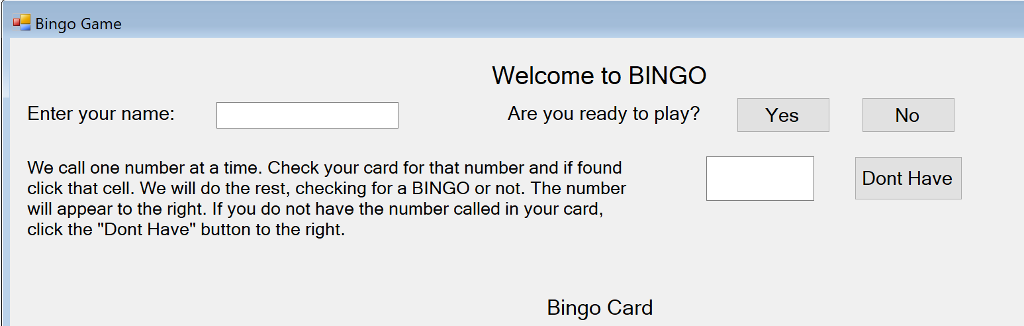
Bingo Game Welcome to BINGO Enter your name: Are you ready to play? Yes No We call one number at a time. Check your card for that number and if found click that cell. We will do the rest, checking for a BINGO or not. The number will appear to the right. If you do not have the number called in your card, click the "Dont Have" button to the right. Dont Have Bingo Card Bingo Game Welcome to BINGO Enter your name: Are you ready to play? Yes No We call one number at a time. Check your card for that number and if found click that cell. We will do the rest, checking for a BINGO or not. The number will appear to the right. If you do not have the number called in your card, click the "Dont Have" button to the right. Dont Have Bingo Card
Step by Step Solution
There are 3 Steps involved in it

Get step-by-step solutions from verified subject matter experts
 Study Help