





Question: I am new to javascript. The assignment is below. I have attached what I have completed so far. I have the page working but the

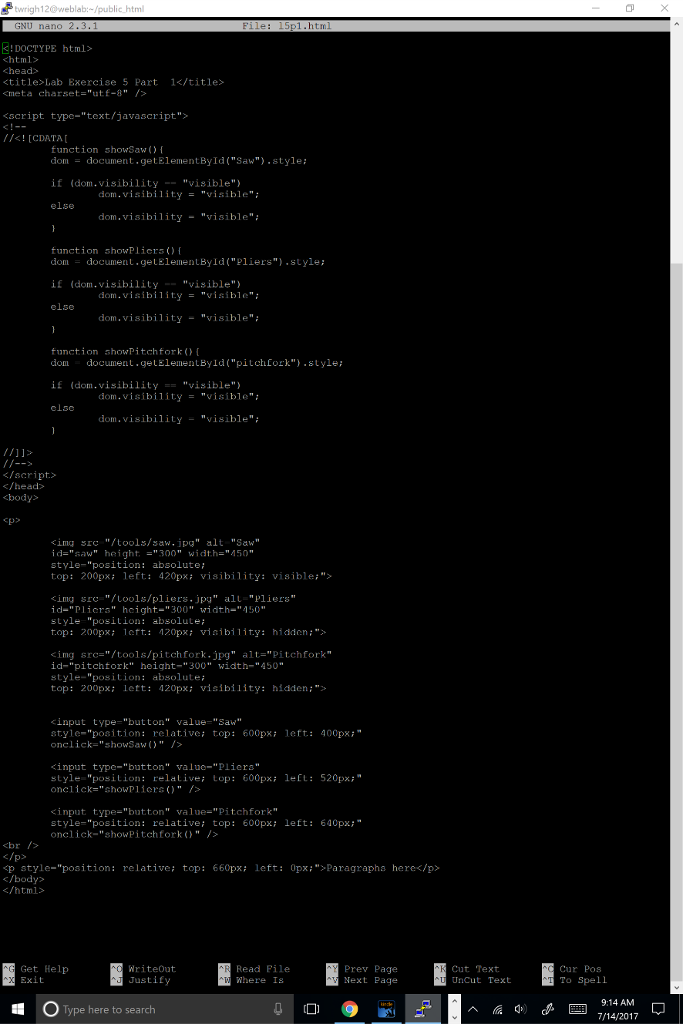
I am new to javascript. The assignment is below. I have attached what I have completed so far. I have the page working but the buttons only work the first time through and I can't seem to figure out why. My code is attached.

Part 1; a simple slide show: Create a Web document called l5p1.html that displays one of the images from lab 2 in approximately the center of the page; centering need not be exact. Below the image, place three button elements labeled with the names of items from lab 2. (One of them must be the name of the item you chose to display.) Pressing a button should change the displayed image to that of the item named on the button. (Hint: There are at least two ways to do this that are discussed in the book. Think about the zIndex: and the visibility: property.) You may use any of these approaches, but please think about all of them. Create a link to this document from your index page.

In no more than a couple of paragraphs, explain which of the possible techniques you chose and why you chose it. Place your write-up below the buttons, on the same page.
I am new to javascript. The assignment is below. I have attached

twrigh 12@weblab/public htm IDOCTYPE html> html> chead Lab Exercise 5 Part 1 I! [CDATA function showSaw () dom dom document.getElementById("Saw").style if (dom.visibility"visible") else document.getElementById ("Saw").style; = dom.visibility"isble" dom.visibility "visible" tunction showPlicrs() dom document.geLElementByld("Pliers").style if (dom.visibility "visible") else dom.visibilityble" dom.visibility "visible" function showPitchfork do document.getElementByld("pitchlork") style iE (dom.visibility"visible" if (dom.visibility "visible") == dom . visibility "visible"; = clsc dom.visibility "visible" bodys Epo img sr "tools/saw.jpg" alt "Saw" id="saw" height. ="300" width="450" style-"position: absolute; top: 200px: left: 420px visibility: visible ing src "lools/pliers. jpq" all "Pliers" id-"Plicrs" hcight-"300" width-"150" style "position absolute; top: 200px: eft: 120px: viaibility: hidden:"> img src="/tools/pitch fork.jpg" alt-" Pitchfork" id-"pitchtork" height-"300" width-"450" style-"position:absolute top: 200px: lett: 420px: visibility: hidden:"> cinput type-"button" value-"Saw style-"position: relative; top: 600px left: 400px onclick-"showsaw()" > kinput type-"button" valuo-"plier input type-"button" value-"Pliers" style "position: relaivei top: 600px leL: 520px kinput type- "button" value-"Pitchfork" style-"position: relative: top: 600px: left: 640px: onclick-"showPitchfork " pstyle-"position: relative: top: 660px left: Opx:">Paragrapha here

/html> Get Help Read Pile Where Is Prev Page Next Page Cut Text UnC Cur Pos To Spell Justify ut Text 9:14 AM O Type here to search 7/14/2017

Step by Step Solution

There are 3 Steps involved in it

1 Expert Approved Answer
Step: 1 Unlock blur-text-image
Question Has Been Solved by an Expert!

Get step-by-step solutions from verified subject matter experts

Step: 2 Unlock
Step: 3 Unlock

Students Have Also Explored These Related Databases Questions!