







Question: I am trying to create a Java GUI where if i click Red, the background will become Red. But it is not working. Please help
I am trying to create a Java GUI where if i click Red, the background will become Red. But it is not working. Please help me fix my code.
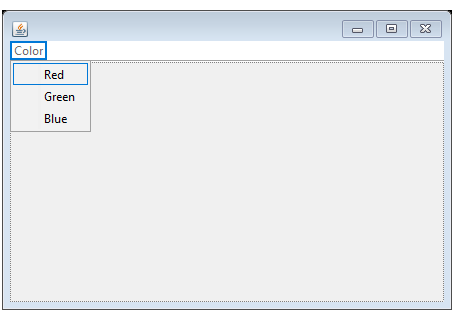
Heres my code
import java.awt.EventQueue;
import java.awt.Menu;
import java.awt.event.ActionEvent;
import java.awt.event.ActionListener;
import javax.swing.JFrame;
import javax.swing.JMenuBar;
import javax.swing.JMenuItem;
import javax.swing.JPanel;
import javax.swing.JMenu;
import java.awt.BorderLayout;
import java.awt.Color;
public class ThreeColor {
private JFrame frame;
/**
* Launch the application.
*/
public static void main(String[] args) {
EventQueue.invokeLater(new Runnable() {
public void run() {
try {
ThreeColor window = new ThreeColor();
window.frame.setVisible(true);
} catch (Exception e) {
e.printStackTrace();
}
}
});
}
/**
* Create the application.
*/
public ThreeColor() {
initialize();
}
/**
* Initialize the contents of the frame.
*/
private void initialize() {
frame = new JFrame();
frame.setBounds(100, 100, 450, 300);
frame.setDefaultCloseOperation(JFrame.EXIT_ON_CLOSE);
JMenuBar menuBar = new JMenuBar();
menuBar.setToolTipText("Color");
frame.setJMenuBar(menuBar);
JMenu mnColor = new JMenu("Color");
menuBar.add(mnColor);
JMenuItem mntmGreen = new JMenuItem("Green");
mntmGreen.setBackground(Color.GREEN);
mnColor.add(mntmGreen);
{
mntmGreen.addActionListener (new ActionListener()
{
public void actionPerformed (ActionEvent e)
{
JPanel p = new JPanel(new BorderLayout(3,3));
p.setSize(200,100);
p.setLocation(50,50);
p.setBackground(Color.green);
}
});
}
JMenuItem mntmBlue = new JMenuItem("Blue");
mntmBlue.setBackground(Color.BLUE);
mnColor.add(mntmBlue);
{
mntmBlue.addActionListener (new ActionListener()
{
public void actionPerformed (ActionEvent e)
{
JPanel p = new JPanel(new BorderLayout(3,3));
p.setSize(200,100);
p.setLocation(50,50);
p.setBackground(Color.blue);
}
});
}
JMenuItem mntmRed = new JMenuItem("Red");
mntmRed.setBackground(Color.RED);
mnColor.add(mntmRed);
{
mntmRed.addActionListener (new ActionListener()
{
public void actionPerformed (ActionEvent e)
{
JPanel p = new JPanel(new BorderLayout(3,3));
p.setSize(200,100);
p.setLocation(50,50);
p.setBackground(Color.red);
}
});
}
mnColor.add(mntmRed);
mnColor.add(mntmGreen);
mnColor.add(mntmBlue);
}
}
Step by Step Solution
There are 3 Steps involved in it

Get step-by-step solutions from verified subject matter experts
 Study Help