







Question: I am using Python but I Keep recieving NameError: name 'SERVICES' is not defined. I need help getting the total charges to display when I
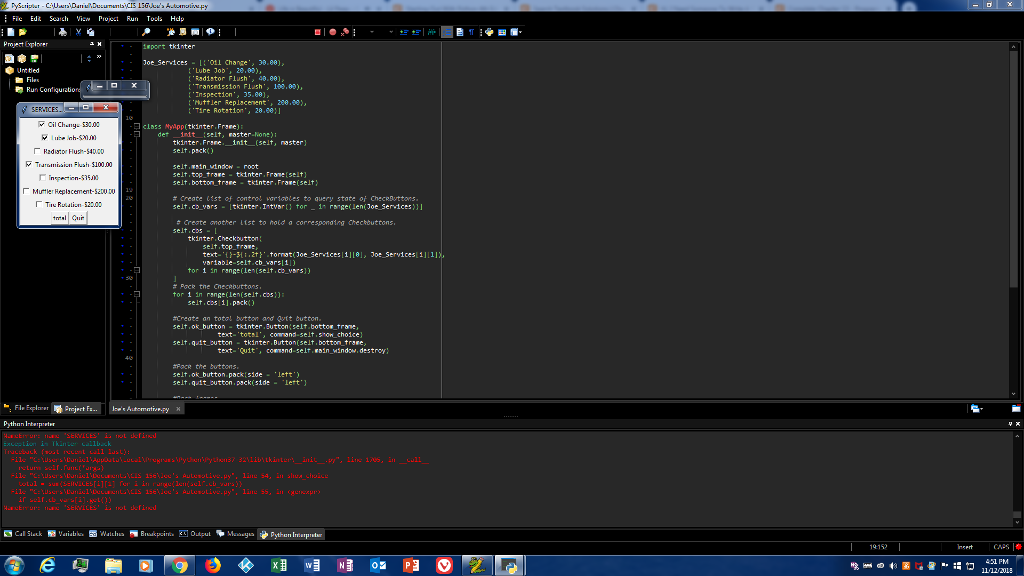
I am using Python but I Keep recieving "NameError: name 'SERVICES' is not defined". I need help getting the total charges to display when I run the program.
Exercise: Joe's Automotive: Joe's Automotive performs the following routine maintenance services: Oil change-$30.00 Lube Job-$20.00 Radiator flush-$40.00 Transmission flush-$100.00 Inspection-$35.00 Muffler replacement-$200.00 Tire Rotation-$20.00. Write a GUI program with check buttons that allow the user to select any or all of these services. When the user clicks a button, the total charges should be displayed.
Below is my code:
# 13-6 Joe's Automotive import tkinter
Joe_Services = [('Oil Change', 30.00), ('Lube Job', 20.00), ('Radiator Flush', 40.00), ('Transmission Flush', 100.00), ('Inspection', 35.00), ('Muffler Replacement', 200.00), ('Tire Rotation', 20.00)]
class MyApp(tkinter.Frame): def __init__(self, master=None): tkinter.Frame.__init__(self, master) self.pack()
self.main_window = root self.top_frame = tkinter.Frame(self) self.bottom_frame = tkinter.Frame(self)
# Create list of control variables to query state of CheckButtons. self.cb_vars = [tkinter.IntVar() for _ in range(len(Joe_Services))]
# Create another list to hold a corresponding Checkbuttons. self.cbs = [ tkinter.Checkbutton( self.top_frame, text='{}-${:.2f}'.format(Joe_Services[i][0], Joe_Services[i][1]), variable=self.cb_vars[i]) for i in range(len(self.cb_vars)) ] # Pack the Checkbuttons. for i in range(len(self.cbs)): self.cbs[i].pack()
#Create an total button and Quit button. self.ok_button = tkinter.Button(self.bottom_frame, text='total', command=self.show_choice) self.quit_button = tkinter.Button(self.bottom_frame, text='Quit', command=self.main_window.destroy)
#Pack the buttons. self.ok_button.pack(side = 'left') self.quit_button.pack(side = 'left')
#Pack frames. self.top_frame.pack() self.bottom_frame.pack()
def show_choice(self): popup_window = tkinter.Toplevel() label_frame = tkinter.LabelFrame(popup_window, text='Total Charges') label_frame.pack() # Add up the cost of all the items which are checked. total = sum(SERVICES[i][1] for i in range(len(self.cb_vars)) if self.cb_vars[i].get()) tkinter.Label(label_frame, text='${:.2f}'.format(total)).pack() # Enter a local mainloop and wait for window to be closed by user. root.wait_window(popup_window)
root = tkinter.Tk() app = MyApp(root) app.master.title('SERVICES PROVIDED BY JOE') app.mainloop()
Fie Edit Suich View Project Run Tools Hdp Poject oplorer OLl Change' 38.88) distor Flush.? 48.88) tTransedssion Fush,189.8) Inspection', 35.88) Tire Rotstion 28. Cil Chany 530.00 clb55 MyApp(tkinter, Frsee) selt packi) selt top trae tkinter Franeiselt) selt.botton traee tkinter Frase(selt # Create (. st Of control wor1ooles to query state checRButtons selt.co uors Itkinter.I tvare tor 1 rger len(Joe_Services3 Tiu Ru.alicr1 522.00 tkinter,Checkbutton seit top trae text--3ttornatiJoe services 11181, Joe Services1111l tor 1 in range(Len(selt.co vars)) tor i in renge(len(selt.Cs selt.ces11.psck selt ok button tkinter.Eutton selt.bottor trane selt.qit button tkinter.Dutton selt.botton traee co text-.Quit.. send-selt bin-window, destroy} oce the bottons selt , ok-button pack: Sde- selt qit button.ack side , lett . ) -Lert Pythan Intept UsrsCuniclDe.vels 1sele USrsCunil Det.ves 1selleu's Astive.py".lire ss .auE:, ul.: ,SENLLES. - noL fi!nsl !ian
Step by Step Solution
There are 3 Steps involved in it

Get step-by-step solutions from verified subject matter experts
 Study Help