







Question: i am working on a debugging project with a code i was given, i fixed it up but i cannot seem to get the section
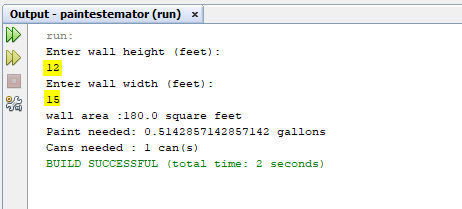
i am working on a debugging project with a code i was given, i fixed it up but i cannot seem to get the section correct in IDE i have to manually type in the 12 and 15 for my code to come out how it should look, can you please assist me how to fix the areas, i will provide a screen shot of the highlight areas that i have to manually type in, the rest of my code seemed to have read by its self in IDE except the numbers 12 and 15 i need to type in. 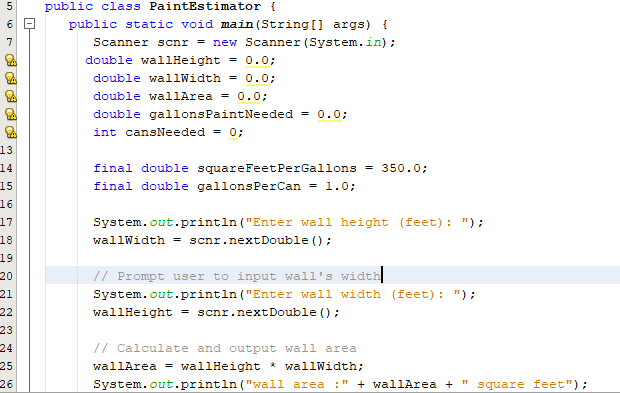
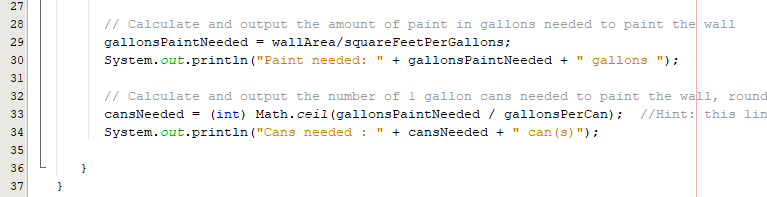
5 public class PaintEstimator public static void main (String[] args) i Scanner scnr -new Scanner (System.in); double wallHeight-0.0: double wallWidth0.0 double wallArea0.0; double gallonsPaintNeeded -0.0 int cansNeeded O; 13 14 15 16 17 18 19 final double squareFeetPerGallons 350.0. final double gallonsPerCan-1.0: System.out.println("Enter wall height (feet) "); wallWidth = scnr.nextDouble ( ) ; Prompt user to input wall's widt System.out.println("Enter wall width (feet): "); wallHeight scnr.nextDouble ) 21 // Calculate and output wall area wallArea = wal!Height wallMidth; System.out.printin ("wall area :" + wallArea 24 25 26 square feet
Step by Step Solution
There are 3 Steps involved in it

Get step-by-step solutions from verified subject matter experts
 Study Help