







Question: I can't get the following python code to run without errors. Can you please tell me what the problem is and how I would fix
I can't get the following python code to run without errors. Can you please tell me what the problem is and how I would fix it?
Thank you!
Here is the error I get:
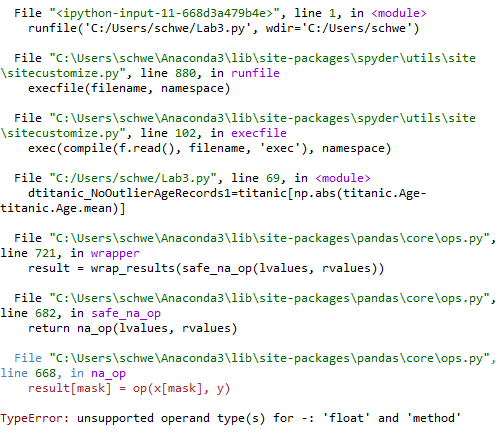
Here is the code:
import pandas as pd titanic=pd.read_csv('/Users/user/Desktop/train.csv') titanic
titanic[pd.isnull(titanic.Cabin)] titanic[pd.isnull(titanic.Cabin)].PassengerId len(titanic[pd.isnull(titanic.Cabin)]) titanic['Cabin'].fillna(0)
titanic['Age']=titanic['Age'].fillna(titanic['Age'].median())
import random as rnd
titanic=pd.read_csv('/Users/user/Desktop/train.csv') ageMean=titanic.Age.mean() ageStd=titanic.Age.std() titanic.Age.fillna(int(rnd.uniform(ageMean-ageStd, ageMean+ageStd)))
titanic.Embarked.unique() titanic['Embarked']=titanic['Embarked'].fillna('S') titanic.loc[titanic['Embarked']=='S', 'Embarked' ]=0 titanic.loc[titanic['Embarked']=='C', 'Embarked' ]=1 titanic.loc[titanic['Embarked']=='Q', 'Embarked' ]=2
titanic.Sex.unique() titanic.loc[titanic['Sex']=='male', 'Sex' ]=0 titanic.loc[titanic['Sex']=='female', 'Sex' ]=1
titanic.Cabin[:]=list(titanic.Cabin[:]) def cabin_abbreviation(df): df.Cabin=df.Cabin.fillna('N') df.CabinAbbrev=df.Cabin.apply(lambda x: x[0]) return df titanic=cabin_abbreviation(titanic) titanic.CabinAbbrev[0:3]
import re
def get_titles(name): title_search=re.search(' ([A-Za-z]+)\.', name) if title_search: return title_search.group(1) return "" titles=titanic.Name.apply(get_titles)
titles[0:3] pd.value_counts(titles)
title_mapping={"Mr":1, "Miss":2, "Mrs":3, "Master":4, "Dr":5, "Rev":6, "Col":7, "Mlle":8, "Mme":9, "Mlle":8, "Countess":10, "Lady":10, "Jonkheer":10, "Sir":9, "Capt":7, "Ms":2} for k,v in title_mapping.items(): titles[titles==k]=v titles[0:3]
pd.value_counts(titles)
titanic['Title']=titles
def extract_titles(df): df.LastName=df.Name.apply(lambda x: x.split(' ')[0]) df.Title=df.Name.apply(lambda x: x.split(' ')[1]) return df
titanic.Name[0] titanic.Title[1]
dtitanic_NoOutlierAgeRecords1=titanic[np.abs(titanic.Age-titanic.Age.mean)]
titanic_wNoOutlierAgeRecords2=titanic[~(np.abs(titanic.Age-titanic.Age.mean))]
def age_binning(df): df.Age.fillna(-0.5) thresholds=[-1, 0, 5, 12, 18, 60, 120]
Here is the train.csv file if you need it:
https://www.dropbox.com/s/6invllojk2w4lnx/train.csv?dl=0
File "
Step by Step Solution
There are 3 Steps involved in it

Get step-by-step solutions from verified subject matter experts
 Study Help