







Question: I got different values when I did these questions. Can you show me where I went wrong? In cell C11, enter a formula to re
I got different values when I did these questions. Can you show me where I went wrong?
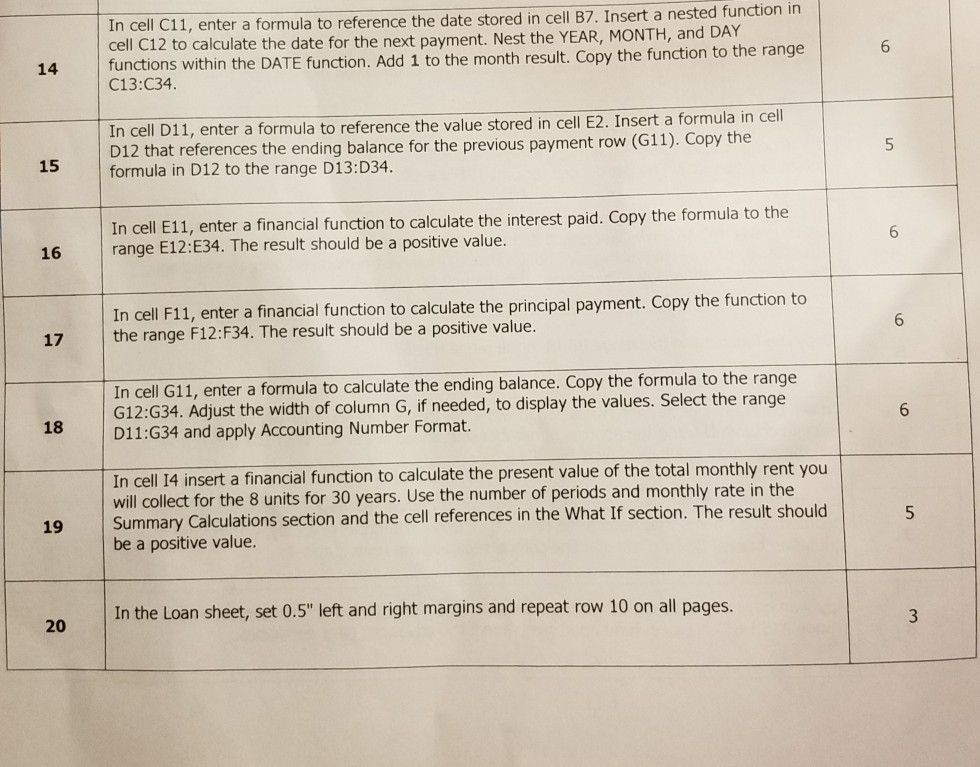
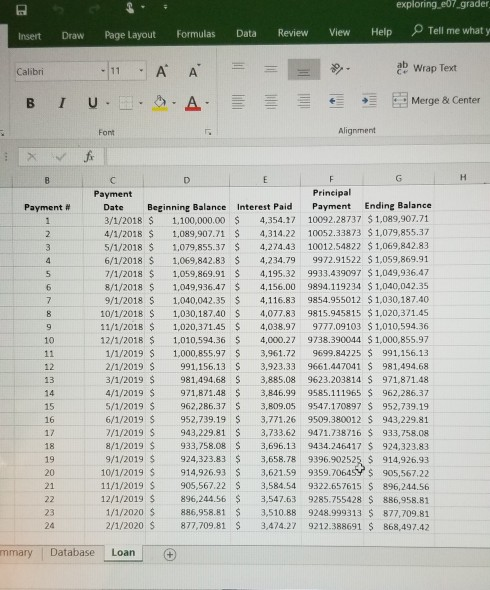
In cell C11, enter a formula to re cell C12 to calculate the date for the ne functions within the DATE function. Add 1 to the month result. Copy the function to the range C13:C34. ference the date stored in cell B7. Insert a nested function in xt payment. Nest the YEAR, MONTH, and DAY In cell D11, D12 that references the ending balance f enter a formula to reference the value stored in cell E2. Insert a formula in cell or the previous payment row (G11). Copy the 15 formula in D12 to the range D13:D34. In cell E11, enter a financial function to calculate the interest paid. Copy the formula to the 16 range E12:E34. The result should be a positive value. 6 In cell F11, enter a financial function to calculate the principal payment. Copy the function to 17 the range F12:F34. The result should be a positive value. 6 In cell G11, enter a formula G12:G34. Adjust the width of column G, if needed, to display the values. Select the range D11:G34 and apply Accounting Number Format. to calculate the ending balance. Copy the formula to the range 18 In cell 14 insert a financial function to calculate the present value of the total monthly rent you will collect for the 8 units for 30 years. Use the number of periods and monthly rate in the Summary Calculations section and the cell references in the What If section. The result should be a positive value. In the Loan sheet, set 0.5" left and right margins and repeat row 10 on all pages. 20 exploring,eb7 grader Insert Draw Page Layout Formulas Data Review View Help Tell me what y 11 A A Wrap Text Calibri B I U Merge&Center Font Alignment Payment Principal Date Beginning Balance Interest Paid Payment Ending Balance 3/1/2018 $ 1,100,000.00 4,354.1 10092.28737 $1,089,907.71 4/1/2018 1,089,907.71 4,314.22 10052.33873 $1,079,855.37 5/1/2018 1,079,855.37 4,274.43 10012.54822 $1,069,842.83 6/1/2018 1,069,842.83 4,234.79 9972.91522 $1,059,869.91 7/1/2018 1,059,869.91 $ 4,195.32 9933.439097 $1,049,936.47 8/1/2018 1,049,936.47$ 4,156.00 9894.119234 $ 1,040,042.35 9/1/2018 1,040,042.35 4,116.83 9854.955012 $1,030,187.40 10/1/2018 1,030,187.40 4,077.83 9815.945815 $1,020,371.45 11/1/2018 1,020,371.45 S 4,038.97 9777.09103 $1,010,594.36 12/1/2018 $ 1,010,594.36 $ 4,000.27 9738.390044 $1,000,855.97 1/1/2019 S 1,000,855.97 $ 3,961.72 9699.84225 991,156.13 2/1/2019 $ 991,156.13 3,923,33 9661.447041 $ 981,494.68 3/1/2019 $ 981,494.68 S 3,885.08 9623.203814 S 971,871.48 4/1/2019 971,871.48 3,846.99 9585.111965 $ 962,286.37 5/1/2019 962,286.37 $ 3,809.05 9547.170897 $ 952,739.19 6/1/2019 952,739.19 3,771.26 9509.380012 S 943,229.81 /1/2019 943,229.81 3,733.62 9471.738716 $ 933,758.08 8/1/2019 933,758.08 3,696.13 9434.246417 $ 924,323.83 9/1/2019 924,323.83 3,658.78 9396.902525 914,926.93 10/1/2019 $ 914,926.93 3,621.59 9359.70645Y $ 905,567.22 11/1/2019 $ 905,567.22 3,584.54 9322.657615 S 896,244.56 12/1/2019 896,244.56 3,547.63 9285.755428 S 886,958.81 1/1/2020 886,958.81 3,510.88 9248.999313 877,709.81 2/1/2020 877,709.81 $ 3,474.27 9212.388691 $ 868,497.42 Payment # 14 18 mmary Database Loan In cell C11, enter a formula to re cell C12 to calculate the date for the ne functions within the DATE function. Add 1 to the month result. Copy the function to the range C13:C34. ference the date stored in cell B7. Insert a nested function in xt payment. Nest the YEAR, MONTH, and DAY In cell D11, D12 that references the ending balance f enter a formula to reference the value stored in cell E2. Insert a formula in cell or the previous payment row (G11). Copy the 15 formula in D12 to the range D13:D34. In cell E11, enter a financial function to calculate the interest paid. Copy the formula to the 16 range E12:E34. The result should be a positive value. 6 In cell F11, enter a financial function to calculate the principal payment. Copy the function to 17 the range F12:F34. The result should be a positive value. 6 In cell G11, enter a formula G12:G34. Adjust the width of column G, if needed, to display the values. Select the range D11:G34 and apply Accounting Number Format. to calculate the ending balance. Copy the formula to the range 18 In cell 14 insert a financial function to calculate the present value of the total monthly rent you will collect for the 8 units for 30 years. Use the number of periods and monthly rate in the Summary Calculations section and the cell references in the What If section. The result should be a positive value. In the Loan sheet, set 0.5" left and right margins and repeat row 10 on all pages. 20 exploring,eb7 grader Insert Draw Page Layout Formulas Data Review View Help Tell me what y 11 A A Wrap Text Calibri B I U Merge&Center Font Alignment Payment Principal Date Beginning Balance Interest Paid Payment Ending Balance 3/1/2018 $ 1,100,000.00 4,354.1 10092.28737 $1,089,907.71 4/1/2018 1,089,907.71 4,314.22 10052.33873 $1,079,855.37 5/1/2018 1,079,855.37 4,274.43 10012.54822 $1,069,842.83 6/1/2018 1,069,842.83 4,234.79 9972.91522 $1,059,869.91 7/1/2018 1,059,869.91 $ 4,195.32 9933.439097 $1,049,936.47 8/1/2018 1,049,936.47$ 4,156.00 9894.119234 $ 1,040,042.35 9/1/2018 1,040,042.35 4,116.83 9854.955012 $1,030,187.40 10/1/2018 1,030,187.40 4,077.83 9815.945815 $1,020,371.45 11/1/2018 1,020,371.45 S 4,038.97 9777.09103 $1,010,594.36 12/1/2018 $ 1,010,594.36 $ 4,000.27 9738.390044 $1,000,855.97 1/1/2019 S 1,000,855.97 $ 3,961.72 9699.84225 991,156.13 2/1/2019 $ 991,156.13 3,923,33 9661.447041 $ 981,494.68 3/1/2019 $ 981,494.68 S 3,885.08 9623.203814 S 971,871.48 4/1/2019 971,871.48 3,846.99 9585.111965 $ 962,286.37 5/1/2019 962,286.37 $ 3,809.05 9547.170897 $ 952,739.19 6/1/2019 952,739.19 3,771.26 9509.380012 S 943,229.81 /1/2019 943,229.81 3,733.62 9471.738716 $ 933,758.08 8/1/2019 933,758.08 3,696.13 9434.246417 $ 924,323.83 9/1/2019 924,323.83 3,658.78 9396.902525 914,926.93 10/1/2019 $ 914,926.93 3,621.59 9359.70645Y $ 905,567.22 11/1/2019 $ 905,567.22 3,584.54 9322.657615 S 896,244.56 12/1/2019 896,244.56 3,547.63 9285.755428 S 886,958.81 1/1/2020 886,958.81 3,510.88 9248.999313 877,709.81 2/1/2020 877,709.81 $ 3,474.27 9212.388691 $ 868,497.42 Payment # 14 18 mmary Database Loan
Step by Step Solution
There are 3 Steps involved in it
1 Expert Approved Answer
Step: 1 Unlock

Question Has Been Solved by an Expert!
Get step-by-step solutions from verified subject matter experts
Step: 2 Unlock
Step: 3 Unlock
 Study Help