







Question: In the Loan sheet, insert formulas in the range E2:E4 to calculate the loan amount, the number of payment periods, and the monthly interest rate,
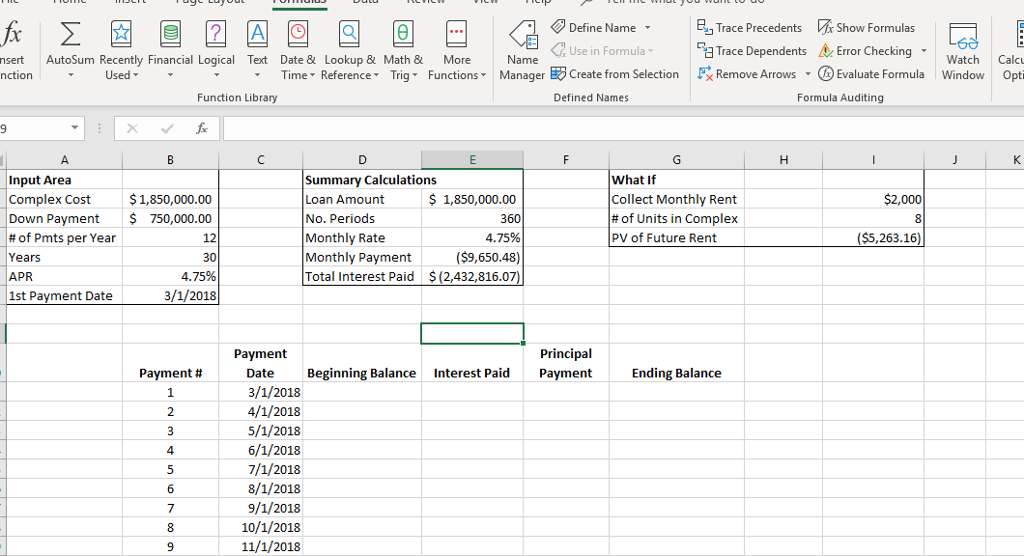
| In the Loan sheet, insert formulas in the range E2:E4 to calculate the loan amount, the number of payment periods, and the monthly interest rate, respectively. Use cell references in all formulas. |
| In cell E5, enter a financial function to calculate the monthly payment. In cell E6, insert a financial function to calculate the cumulative total interest paid throughout the loan. Make sure the results display as positive numbers. |
| In cell C11, enter a formula to reference the date stored in cell B7. Insert a nested function in cell C12 to calculate the date for the next payment. Nest the YEAR, MONTH, and DAY functions within the DATE function. Add 1 to the month result. Copy the function to the range C13:C34. |
| In cell D11, enter a formula to reference the value stored in cell E2. Insert a formula in cell D12 that references the ending balance for the previous payment row (G11). Copy the formula in D12 to the range D13:D34. |
| In cell E11, enter a financial function to calculate the interest paid. Copy the formula to the range E12:E34. The result should be a positive value. |
| In cell F11, enter a financial function to calculate the principal payment. Copy the function to the range F12:F34. The result should be a positive value. |
| In cell G11, enter a formula to calculate the ending balance. Copy the formula to the range G12:G34. Adjust the width of column G, if needed, to display the values. Select the range D11:G34 and apply Accounting Number Format. |
| In cell I4 insert a financial function to calculate the present value of the total monthly rent you will collect for the 8 units for 30 years. Use the number of periods and monthly rate in the Summary Calculations section and the cell references in the What If section. The result should be a positive value. |
| In the Loan sheet, set 0.5" left and right margins and repeat row 10 on all pages. |
| Save and close the workbook, and submit the file as directed. |
Define Name Trace Precedents x Show Formulas CUse in Formula- ca Trace Dependents A. Error Checking . nsert AutoSum Recently Financial Logical Text Date & Lookup & Math & More nction WatchCalc Used Time-Reference* Trig. Functions Manager Create from Selection Remove Arrows Evaluate Formula Window Opti . Function Library Defined Names Formula Auditing Input Area Complex Cost Down Payment # of Pmts per Year Years APR 1st Payment Date Summary Calculations Loan Amount No. Periods Monthly Rate Monthly Payment Total Interest Paid$(2,432,816.07 What If Collect Monthly Rent # of Units in Complex PV of Future Rent $1,850,000.00 750,000.00 $ 1,850,000.00 $2,000 $5,263.16 12 30 4.75% 3/1/2018 4.75% ($9,650.48) Principal Beginning Balance Interest Paid Payment Payment Payment # Ending Balance Date 3/1/2018 4/1/2018 5/1/2018 6/1/2018 7/1/2018 8/1/2018 9/1/2018 2 4 10/1/2018 11/1/2018 Define Name Trace Precedents x Show Formulas CUse in Formula- ca Trace Dependents A. Error Checking . nsert AutoSum Recently Financial Logical Text Date & Lookup & Math & More nction WatchCalc Used Time-Reference* Trig. Functions Manager Create from Selection Remove Arrows Evaluate Formula Window Opti . Function Library Defined Names Formula Auditing Input Area Complex Cost Down Payment # of Pmts per Year Years APR 1st Payment Date Summary Calculations Loan Amount No. Periods Monthly Rate Monthly Payment Total Interest Paid$(2,432,816.07 What If Collect Monthly Rent # of Units in Complex PV of Future Rent $1,850,000.00 750,000.00 $ 1,850,000.00 $2,000 $5,263.16 12 30 4.75% 3/1/2018 4.75% ($9,650.48) Principal Beginning Balance Interest Paid Payment Payment Payment # Ending Balance Date 3/1/2018 4/1/2018 5/1/2018 6/1/2018 7/1/2018 8/1/2018 9/1/2018 2 4 10/1/2018 11/1/2018
Step by Step Solution
There are 3 Steps involved in it

Get step-by-step solutions from verified subject matter experts
 Study Help