







Question: I ' m trying to write a VBA sub that checks the value of a certain cell in a column, if there's a number there
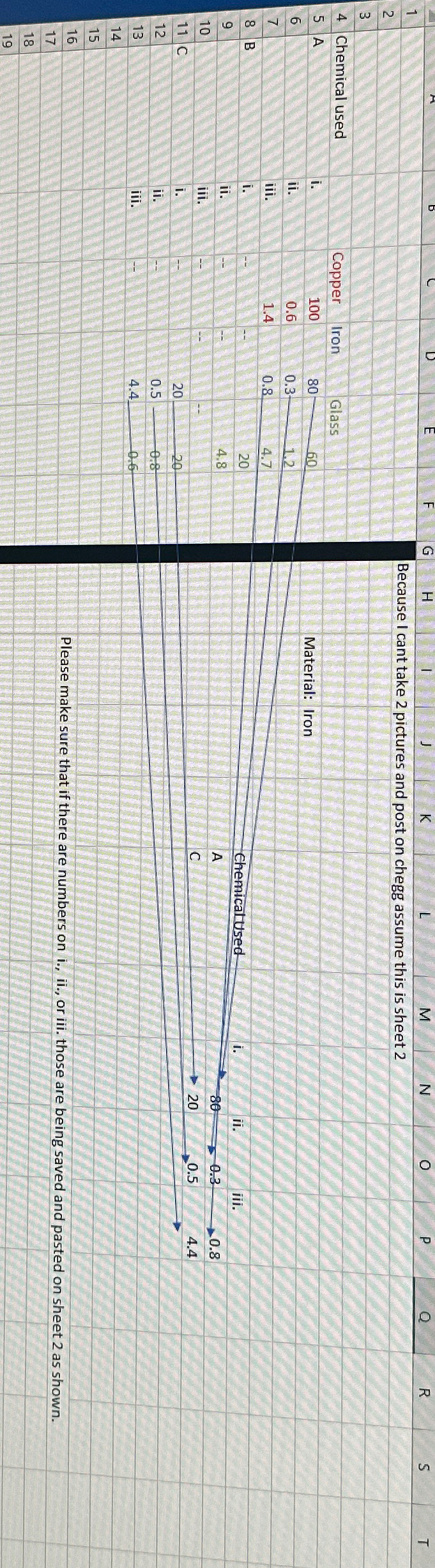
Im trying to write a VBA sub that checks the value of a certain cell in a column, if there's a number there then i need it to save that number, save the content of the cells ii iii. directly below it and the row name where it is and then paste it into specific cells cells will not be next to each other material name can be pasted on A and below, i can be pasted on D and below, ii can be pasted on E below and iii. F and below on another table in a different sheet.The picture shown is a simplified version of what i have. On sheet id have a drop down list where the user picks the material they want. In this
example they chose "iron".Then what I want the sub to do is match the material name from all the columns on sheet look down the matched column, check if there's a number not a then paste back on sheet the name chemicals there might be more than one used and values as shown on the image attached. Thanks in advance!! will upvote if its correct
Step by Step Solution
There are 3 Steps involved in it
1 Expert Approved Answer
Step: 1 Unlock

Question Has Been Solved by an Expert!
Get step-by-step solutions from verified subject matter experts
Step: 2 Unlock
Step: 3 Unlock
 Study Help