







Question: Complete the following questions in the query using SQL Developer 1. The TOYS view is no longer necessary, try to delete it. Confirm the removal
Complete the following questions in the query using SQL Developer
1. The TOYS view is no longer necessary, try to delete it. Confirm the removal of TOYS view by using select view_name from user_view
2. For each order, list the order number and order date along with the number and name of the customer that placed the order.
3. Display item number and description for items that have not been ordered.
4. Display the customer number, customer name, order number, and order date for each order. Sort the results by order date by descending sequence.
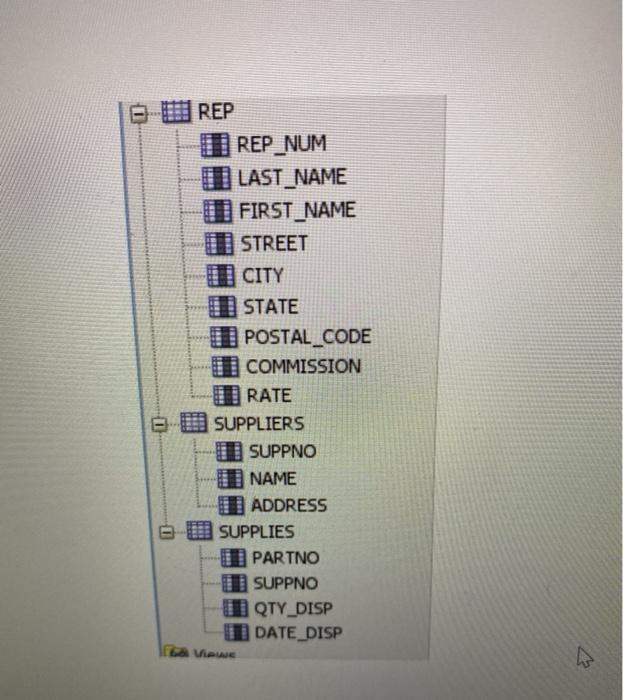
5. For each order line, what is the amount of discount, and percent discount is given. Discount is based on the difference between price and quoted_price. Report order number, order date, discount amount, and discount percent. Percentage of discount is based on difference_ in_ price/price*100
6. For each order report order number, order date, and discount percent.
n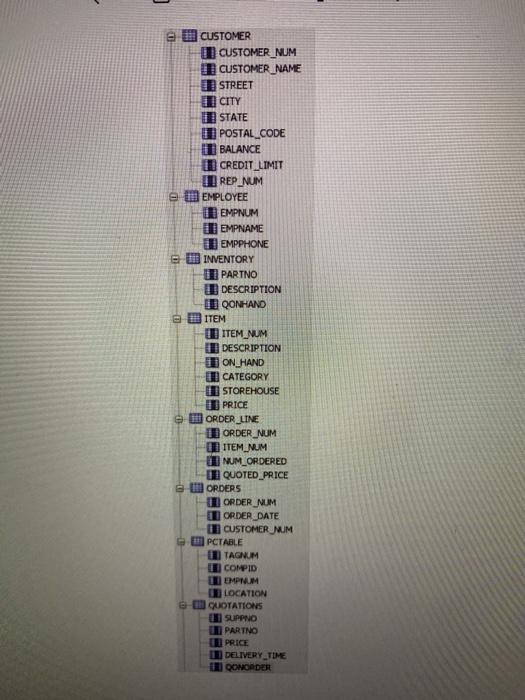
CUSTOMER m CUSTOMER_NUM CUSTOMER NAME STREET CITY I STATE O POSTAL_CODE I BALANCE I CREDIT LIMIT REP NUM EMPLOYEE I EMPNUM D EMPNAME D EMPPHONE INVENTORY O PARTNO DESCRIPTION I QONHAND ITEM O ITEM NUM I DESCRIPTION I ON HAND I CATEGORY I STOREHOUSE O PRICE e ORDER LINE ORDER_NUM O ITEM_NUM I NUM_ORDERED I QUOTED PRICE ORDERS ORDER NUM I ORDER DATE CUSTOMER MUM PCTABLE TAGNUM O COMPID EMPNUM LOCATION QUOTATIONS I SUPPNO PARTNO D DELIVERY TIME 5 QONORDER
Step by Step Solution
3.42 Rating (155 Votes )
There are 3 Steps involved in it

Get step-by-step solutions from verified subject matter experts
 Study Help