







Question: I NEED HELP! Coding a GUI in javaFX. create a class call ProfilePane. Reading the UML diagram above. Also ProfilePane should extend one of the
I NEED HELP! Coding a GUI in javaFX. create a class call ProfilePane. Reading the UML diagram above. Also ProfilePane should extend one of the subclasses of pane (StackPane, HBox, VBox, GridPane, or BorderPane.) Please someone take the time to help me .
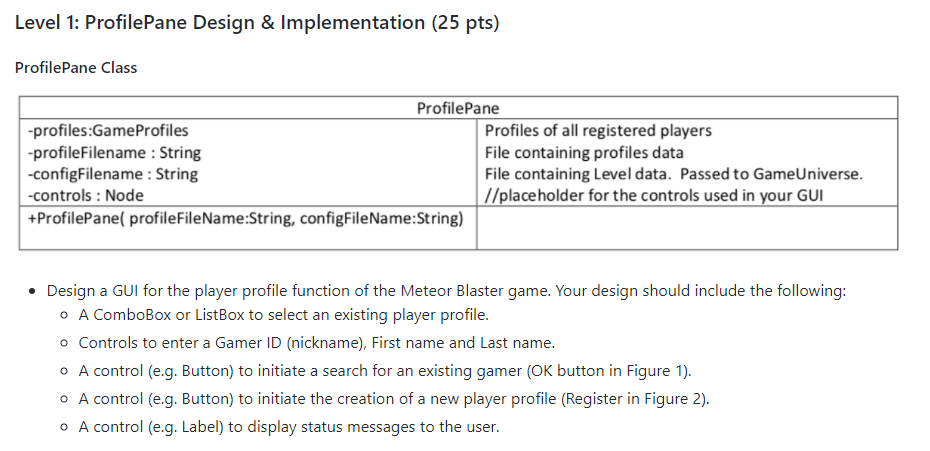
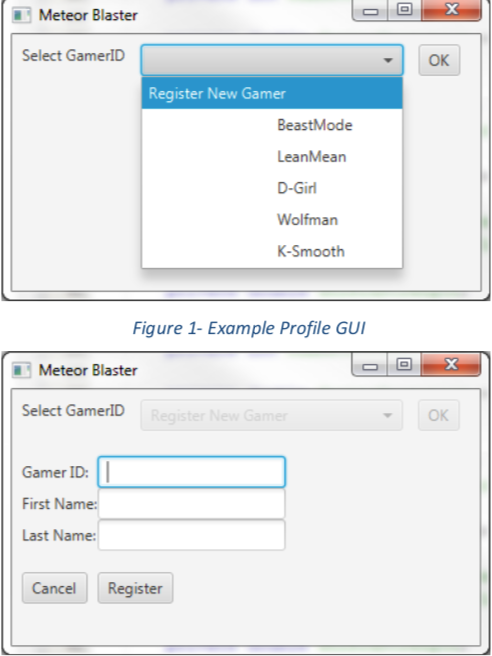
Level 1: ProfilePane Design& Implementation (25 pts) ProfilePane Class ProfilePane proftiesGameProfies -profileFilename : String configFilename: String controls :Node +ProfilePane(profileFileName:String, configFileName:String) Profiles of all registered players File containing profiles data File containing Level data. Passed to GameUniverse. //placeholder for the controls used in your GU Design a GUI for the player profile function of the Meteor Blaster game. Your design should include the following o A ComboBox or ListBox to select an existing player profile. Controls to enter a Gamer ID (nickname), First name and Last name. A control (e.g. Button) to initiate a search for an existing gamer (OK button in Figure 1) A control (e.g. Button) to initiate the creation of a new player profile (Register in Figure 2). A control (e.g. Label) to display status messages to the user Level 1: ProfilePane Design& Implementation (25 pts) ProfilePane Class ProfilePane proftiesGameProfies -profileFilename : String configFilename: String controls :Node +ProfilePane(profileFileName:String, configFileName:String) Profiles of all registered players File containing profiles data File containing Level data. Passed to GameUniverse. //placeholder for the controls used in your GU Design a GUI for the player profile function of the Meteor Blaster game. Your design should include the following o A ComboBox or ListBox to select an existing player profile. Controls to enter a Gamer ID (nickname), First name and Last name. A control (e.g. Button) to initiate a search for an existing gamer (OK button in Figure 1) A control (e.g. Button) to initiate the creation of a new player profile (Register in Figure 2). A control (e.g. Label) to display status messages to the user
Step by Step Solution
There are 3 Steps involved in it

Get step-by-step solutions from verified subject matter experts
 Study Help