Question: I need help in Python 3.0 and only in Python version 3.0, if ts not in 3.0 I cannot run the file. The code can
I need help in Python 3.0 and only in Python version 3.0, if ts not in 3.0 I cannot run the file. The code can only be in Python 3.0 and any other version thank you.
I need help with question #2. It can literally be anything.
I tried answering question #3 in the code below what am doing wrong?
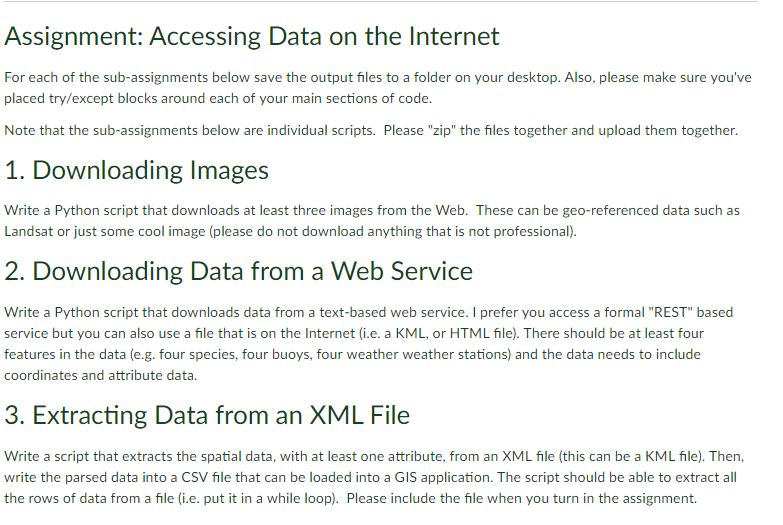
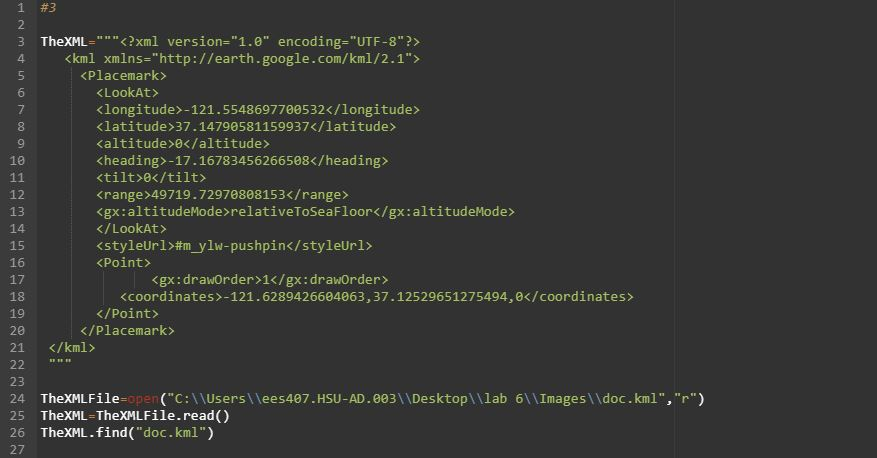
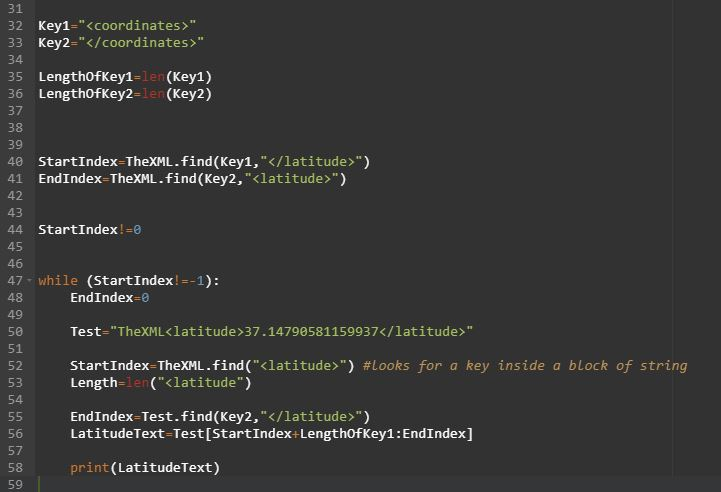
Assignment: Accessing Data on the Internet For each of the sub-assignments below save the output files to a folder on your desktop. Also, please make sure you've placed try/except blocks around each of your main sections of code. Note that the sub-assignments below are individual scripts. Please "zip" the files together and upload them together. 1. Downloading Images Write a Python script that downloads at least three images from the Web. These can be geo-referenced data such as Landsat or just some cool image (please do not download anything that is not professional). 2. Downloading Data from a Web Service Write a Python script that downloads data from a text-based web service. I prefer you access a formal "REST" based service but you can also use a file that is on the Internet (i.e. a KML, or HTML file). There should be at least four features in the data (e.g. four species, four buoys, four weather weather stations) and the data needs to include coordinates and attribute data 3. Extracting Data from an XML File Write a script that extracts the spatial data, with at least one attribute, from an XML fle (this can be a KML file). Then, write the parsed data into a CSV file that can be loaded into a GIS application. The script should be able to extract all the rows of data from a file (i.e. put it in a while loop). Please include the file when you turn in the assignment. #3 3 TheXML?xml version-"1.e" encoding-"UTF-8?> 4. kml xmins-"http://earth.google.com/km1/2.1"> Placemark> Klatitude 37.14790581159937 Kaltitude 0 Kheading>-17.16783456266508 tilt>0 Krange 49719.72970808153 relativeToSeaFloor #mylw-pushpinPoint> 6 8 9 10 12 13 14 15 16 17 18 19 20 21 22 " 23 24 TheXMLFile-open("C:\Userslees407.HSU-AD.003 Desktop\lab 61Images\ldoc.kml","r) 25 TheXML TheXMLFile.read() 26 TheXML.find ("doc.kml") 27 -121.6289426604063,37.12529651275494,0 31 32 Key1-"" 33 Key2-"" 34 35 LengthofKey1-1en (Key1) 36 LengthOfKey2-1en (Key2) 37 38 39 40 StartIndex TheXML.find (Key1, ") 41 EndIndex-TheXML.find (Key2, "") 43 44 startIndex ! =0 47 while (StartIndex!-1): 48 49 50 51 52 53 54 EndIndex-e Test-"TheXML37.147905811599371atitude>" startIndex-TheXML.find("(latitude>") #looks for a key inside a block of string Length-le(Klatitude") EndIndex-Test.find(Key2,"") LatitudeText-Test[StartIndex+LengthOfKey1:EndIndex] 57 58 59 print (LatitudeText) Assignment: Accessing Data on the Internet For each of the sub-assignments below save the output files to a folder on your desktop. Also, please make sure you've placed try/except blocks around each of your main sections of code. Note that the sub-assignments below are individual scripts. Please "zip" the files together and upload them together. 1. Downloading Images Write a Python script that downloads at least three images from the Web. These can be geo-referenced data such as Landsat or just some cool image (please do not download anything that is not professional). 2. Downloading Data from a Web Service Write a Python script that downloads data from a text-based web service. I prefer you access a formal "REST" based service but you can also use a file that is on the Internet (i.e. a KML, or HTML file). There should be at least four features in the data (e.g. four species, four buoys, four weather weather stations) and the data needs to include coordinates and attribute data 3. Extracting Data from an XML File Write a script that extracts the spatial data, with at least one attribute, from an XML fle (this can be a KML file). Then, write the parsed data into a CSV file that can be loaded into a GIS application. The script should be able to extract all the rows of data from a file (i.e. put it in a while loop). Please include the file when you turn in the assignment. #3 3 TheXML?xml version-"1.e" encoding-"UTF-8?> 4. kml xmins-"http://earth.google.com/km1/2.1"> Placemark> Klatitude 37.14790581159937 Kaltitude 0 Kheading>-17.16783456266508 tilt>0 Krange 49719.72970808153 relativeToSeaFloor #mylw-pushpinPoint> 6 8 9 10 12 13 14 15 16 17 18 19 20 21 22 " 23 24 TheXMLFile-open("C:\Userslees407.HSU-AD.003 Desktop\lab 61Images\ldoc.kml","r) 25 TheXML TheXMLFile.read() 26 TheXML.find ("doc.kml") 27 -121.6289426604063,37.12529651275494,0 31 32 Key1-"" 33 Key2-"" 34 35 LengthofKey1-1en (Key1) 36 LengthOfKey2-1en (Key2) 37 38 39 40 StartIndex TheXML.find (Key1, ") 41 EndIndex-TheXML.find (Key2, "") 43 44 startIndex ! =0 47 while (StartIndex!-1): 48 49 50 51 52 53 54 EndIndex-e Test-"TheXML37.147905811599371atitude>" startIndex-TheXML.find("(latitude>") #looks for a key inside a block of string Length-le(Klatitude") EndIndex-Test.find(Key2,"") LatitudeText-Test[StartIndex+LengthOfKey1:EndIndex] 57 58 59 print (LatitudeText)









 Study Help