







Question: i need help. please include formulas. thank you . Create formulas for the year 2016 cells first, then copy them to 2017 and 2018 cells
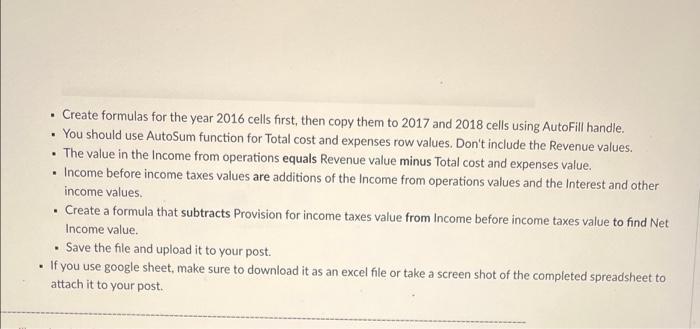
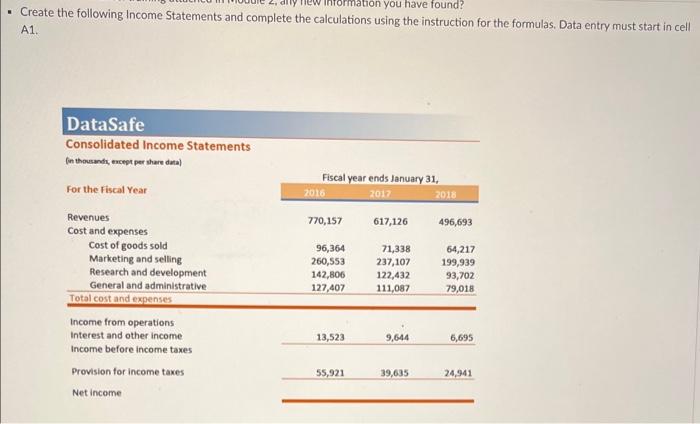
. Create formulas for the year 2016 cells first, then copy them to 2017 and 2018 cells using AutoFill handle. You should use AutoSum function for Total cost and expenses row values. Don't include the Revenue values. The value in the Income from operations equals Revenue value minus Total cost and expenses value. Income before income taxes values are additions of the Income from operations values and the Interest and other income values Create a formula that subtracts Provision for income taxes value from Income before income taxes value to find Net Income value. Save the file and upload it to your post. . If you use google sheet, make sure to download it as an excel file or take a screen shot of the completed spreadsheet to attach it to your post. . imation you have found? Create the following Income Statements and complete the calculations using the instruction for the formulas. Data entry must start in cell A1 DataSafe Consolidated Income Statements in thousands, except per share data) For the Fiscal Year Fiscal year ends January 31, 2016 2017 2018 770,157 617,126 496,693 96,364 260,553 142,806 127,407 71,338 237,107 122,432 111,087 64,217 199,939 93,702 79,018 Revenues Cost and expenses Cost of goods sold Marketing and selling Research and development General and administrative Total cost and expenses Income from operations Interest and other income Income before income taxes Provision for income taxes 13,523 9,644 6,695 55,921 39,635 24,941 Net income
Step by Step Solution
There are 3 Steps involved in it

Get step-by-step solutions from verified subject matter experts
 Study Help