







Question: I need help please to solve it with explanation. i need to solve these two question in VB VB Coding and Do Loops Create VB
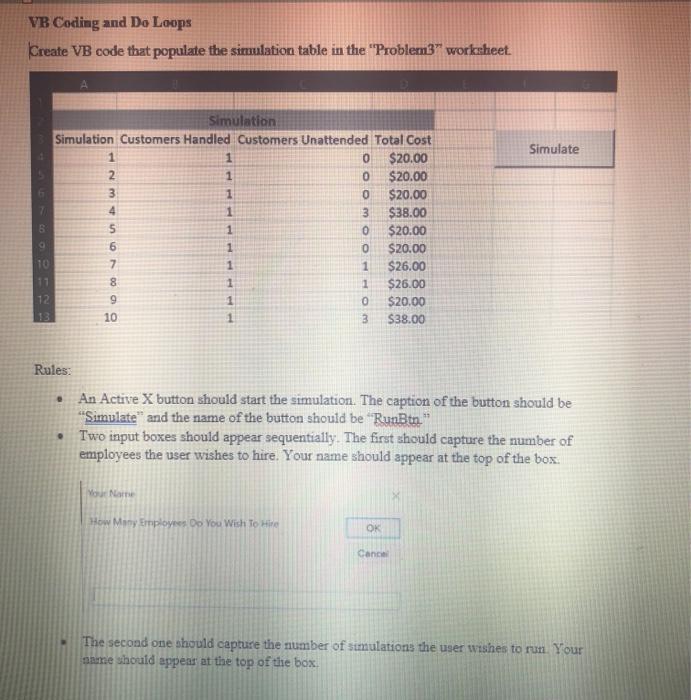
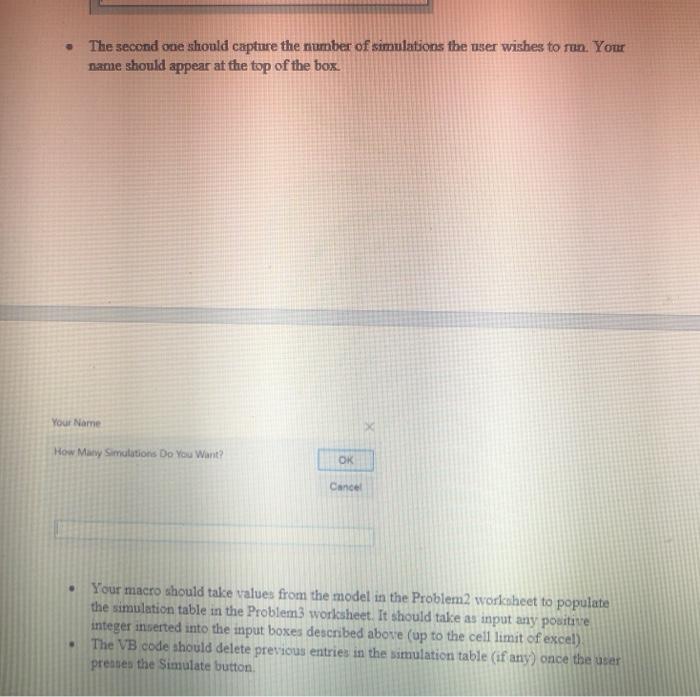
VB Coding and Do Loops Create VB code that populate the simulation table in the "Problem3" worksheet. Simulate Simulation Simulation Customers Handled Customers Unattended Total Cost 1 1 0 $20.00 2 1 0 $20.00 3 1 0 $20.00 4 1 3 $38.00 5 1 0 $20.00 6 1 0 $20.00 10 7 1 1 $26.00 17 8 1 1 $26.00 12 9 1 0 $20.00 13 10 1 3 $38.00 Rules: An Active X button should start the simulation. The caption of the button should be "Simulate and the name of the button should be RunBtn." Two input boxes should appear sequentially. The first should capture the number of employees the user wishes to hire. Your name should appear at the top of the box. Your Name How Many Employees Oo You Wish To Hire OK Cance The second one should capture the number of simulations the user wishes to run Your same should appear at the top of the box The second one should capture the number of simulations the user wishes to run. Your name should appear at the top of the box Your Name How Many Simulations Do You Want? OK Cancel Your macro should take values from the model in the Problem2 worksheet to populate the simulation table in the Problem3 worksheet. It should take as input any positive integer inserted into the input boxes described above (up to the cell limit of excel) The VB code should delete previous entries in the simulation table (if any) once the user preates the Simulate button VB Coding and Do Loops Create VB code that populate the simulation table in the "Problem3" worksheet. Simulate Simulation Simulation Customers Handled Customers Unattended Total Cost 1 1 0 $20.00 2 1 0 $20.00 3 1 0 $20.00 4 1 3 $38.00 5 1 0 $20.00 6 1 0 $20.00 10 7 1 1 $26.00 17 8 1 1 $26.00 12 9 1 0 $20.00 13 10 1 3 $38.00 Rules: An Active X button should start the simulation. The caption of the button should be "Simulate and the name of the button should be RunBtn." Two input boxes should appear sequentially. The first should capture the number of employees the user wishes to hire. Your name should appear at the top of the box. Your Name How Many Employees Oo You Wish To Hire OK Cance The second one should capture the number of simulations the user wishes to run Your same should appear at the top of the box The second one should capture the number of simulations the user wishes to run. Your name should appear at the top of the box Your Name How Many Simulations Do You Want? OK Cancel Your macro should take values from the model in the Problem2 worksheet to populate the simulation table in the Problem3 worksheet. It should take as input any positive integer inserted into the input boxes described above (up to the cell limit of excel) The VB code should delete previous entries in the simulation table (if any) once the user preates the Simulate button
Step by Step Solution
There are 3 Steps involved in it

Get step-by-step solutions from verified subject matter experts
 Study Help