







Question: I need help with answering this Linux Lab class Lab Writeup NOTE: If you type the command in step 8 incorrectly, e.g tar -cvzf *.
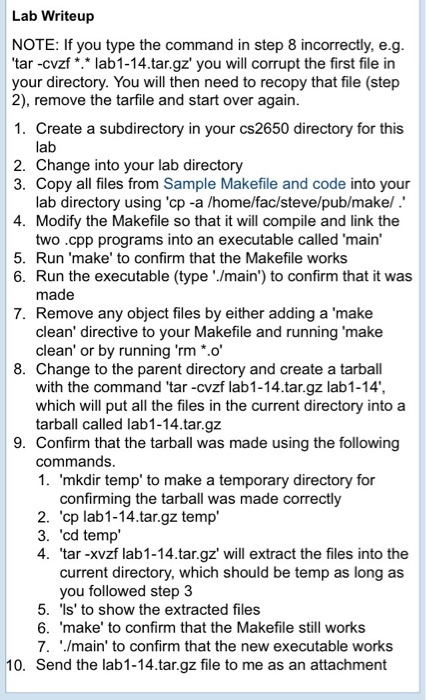
Lab Writeup NOTE: If you type the command in step 8 incorrectly, e.g tar -cvzf *. lab1-14.tar.gz' you will corrupt the first file in your directory. You will then need to recopy that file (step 2), remove the tarfile and start over again 1. Create a subdirectory in your cs2650 directory for this lab 2. Change into your lab directory 3. Copy all files from Sample Makefile and code into your lab directory using 'cp -a /home/fac/steve/pub/makel. 4. Modify the Makefile so that it will compile and link the two .cpp programs into an executable called 'main' 5. Run 'make' to confirm that the Makefile works 6. Run the executable (type main) to confirm that it was made 7. Remove any object files by either adding a 'make clean' directive to your Makefile and running 'make clean' or by running 'rm *.o 8. Change to the parent directory and create a tarball with the command 'tar -cvzf lab1-14.tar.gz lab1-14', which will put all the files in the current directory into a tarball called lab1-14.tar.gz 9. Confirm that the tarball was made using the following commands 1. 'mkdir temp' to make a temporary directory for confirming the tarball was made correctly 2. 'cp lab1-14.tar.gz temp 3. cd temp 4. 'tar -xvzf lab1-14.tar.gz' will extract the files into the current directory, which should be temp as long as you followed step 3 5 'ls' to show the extracted files 6. 'make' to confirm that the Makefile still works 7. main' to confirm that the new executable works 10. Send the lab1-14.tar.gz file to me as an attachment
Step by Step Solution
There are 3 Steps involved in it

Get step-by-step solutions from verified subject matter experts
 Study Help