







Question: I need help with this code. I provided an image of what the output should look like. 1 . You are required to read Chapters
I need help with this code. I provided an image of what the output should look like.
You are required to read Chapters and and practice the code examples in each chapter in order to complete this
homework. However, you dont need to submit the sample code since the publisher has made it available for download.
The data files eg images if any, are available on canvas.
You are not allowed to use the Swing package to create the apps in the assignment.
a If you do so you will be deducted for on that exercise created using the Swing package. Swing package is
outdated and that is why we use the javaFX package.
You are free to use Scene Builder together with NetBeans to create this app if you want to
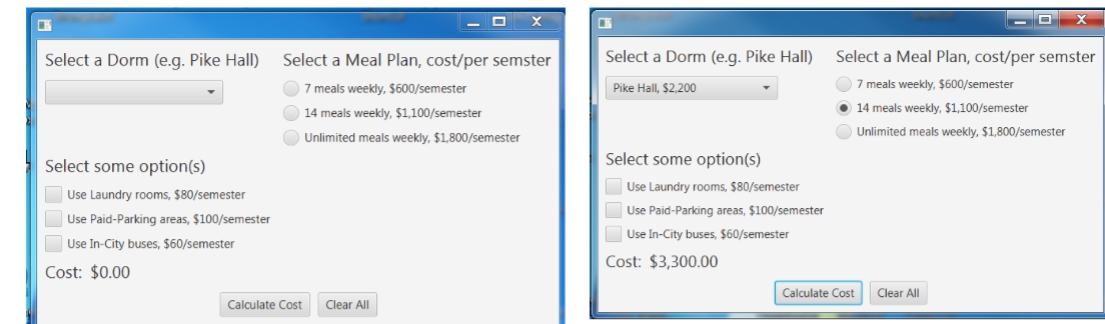
Ex Dorm, Meal Plan, and miscellaneous options Calculator:
A university has the following dormitories:
Allen Hall: $ per semester
Pike Hall: $ per semester
Farthing Hall: $ per semester
University Suites: $ per semester
The university also offers the following meal plans:
meals per week: $ per semester
meals per week: $ per semester
Unlimited meals: $ per semester
The university also offers the following miscellaneous
options:
Use laundry room: $ per semester
Use paidparking areas: $ per semester
Use incity school buses: $ per semester
Below is the todo list:
Create an application with the following controls
the names of the dormitories ie ComboBox controls
the meal plans ie RadioButton controls
the option list ie Checkboxes
other required controls eg labels, button
plus a stylesheet which will set the label controls font size to when the app is loaded.
The app will allow the user to select a dormitory, a meal plan, and some options see the screenshots below if any,
and the app should show the following functions:
the total charges for the semester when the Calculate Cost button is clicked
clear any selections on ComboBox, RadioButton, and CheckBox controls and the text on the cost Label control
when the Clear All button is clicked.
setting the title of the app to Dorm and Meals Calculator even though I didnt set that on my app when I took
the screenshots.
Validating the correctness of your app.
Making sure that the appearance of your app resembles to the app in the screenshots.
I will use the HD screen resolution x to test your app so please make sure that the shapes of any
control or text wont get cut off.
Step by Step Solution
There are 3 Steps involved in it
1 Expert Approved Answer
Step: 1 Unlock

Question Has Been Solved by an Expert!
Get step-by-step solutions from verified subject matter experts
Step: 2 Unlock
Step: 3 Unlock
 Study Help