







Question: Bash Scripting Homework - Hi, I've been working on this homework for countless hours and I was wondering if I could get some help. I'm
Bash Scripting Homework -
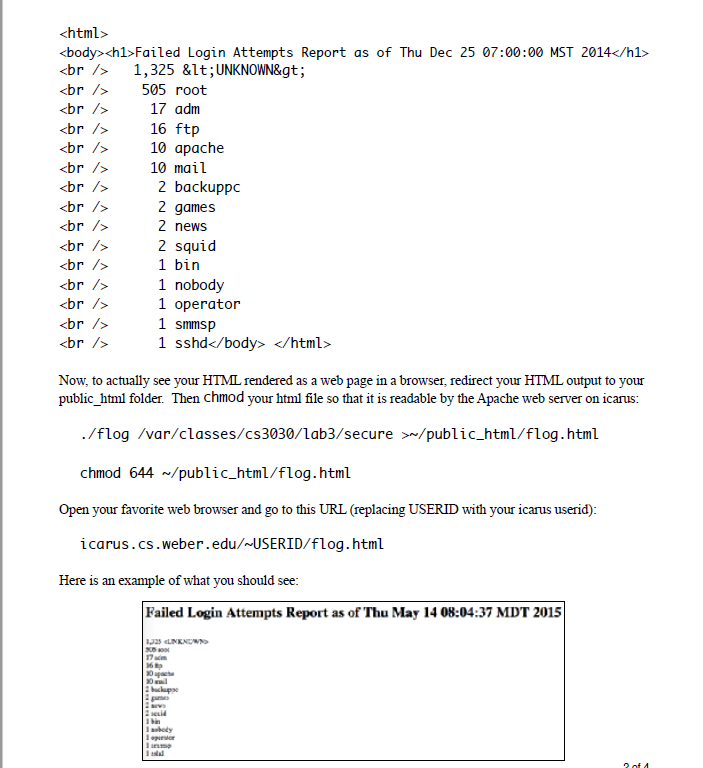
Hi, I've been working on this homework for countless hours and I was wondering if I could get some help. I'm so lost and I have no idea what to do. From what the rubric says, I'm supposed to make a script that writes out code for a simple HTML page. The HTML page is a failed login report. The coding should be done in a Linux terminal using bash scripting. I have looked at other answers, but they are not giving me what I need. The output given needs to be as close to the output shown in the pdf as possible. I've been getting weird readings showing "1896 localhost" instead of anything that should be shown below the header part. If any kind soul would be willing to show me what code would print out this HTML page, it would be greatly appreciated.
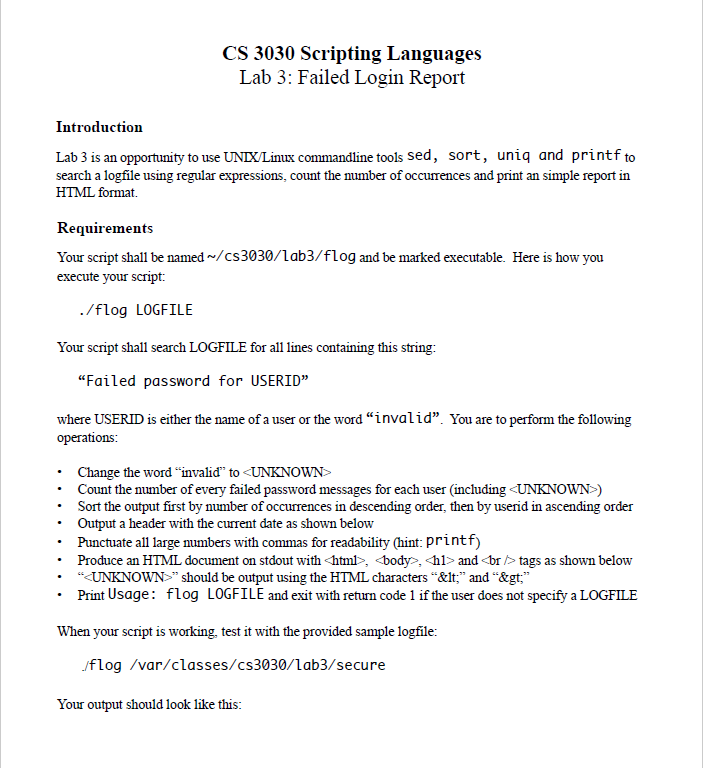
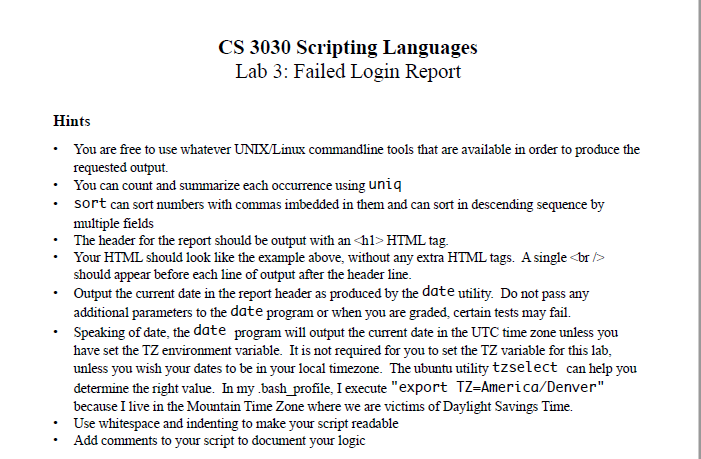
CS 3030 Scripting Languages Lab 3: Failed Login Report Introduction Lab 3 is an opportunity to use UNDX/Linux commandline tools sed, sort, uniq and printf to search a logfile using regular expressions, count the number of occurences and print an simple report in HTML format. Requirements Your script shall be named~/cs3030/Lab3/flog and be marked executable. Here is how you execute your script: /flog LOGFILE Your script shall search LOGFILE for all lines containing this string: "Failed password for USERID" where USERID is either the name of a user or the word "invalid". You are to perform the following . Change the word "invalid" to and
tags as shown below . UNKNOWN>" should be output using the HTML characters "&it," and ">," Print Usage: flog LOGFILE and exit with return code 1 if the user does not specify a LOGFILE When your script is working. test it with the provided sample logfile: flog /var/classes/cs3030/lab3/secure Your output should look like this: CS 3030 Scripting Languages Lab 3: Failed Login Report Introduction Lab 3 is an opportunity to use UNDX/Linux commandline tools sed, sort, uniq and printf to search a logfile using regular expressions, count the number of occurences and print an simple report in HTML format. Requirements Your script shall be named~/cs3030/Lab3/flog and be marked executable. Here is how you execute your script: /flog LOGFILE Your script shall search LOGFILE for all lines containing this string: "Failed password for USERID" where USERID is either the name of a user or the word "invalid". You are to perform the following . Change the word "invalid" to and
tags as shown below . UNKNOWN>" should be output using the HTML characters "&it," and ">," Print Usage: flog LOGFILE and exit with return code 1 if the user does not specify a LOGFILE When your script is working. test it with the provided sample logfile: flog /var/classes/cs3030/lab3/secure Your output should look like this
Step by Step Solution
There are 3 Steps involved in it

Get step-by-step solutions from verified subject matter experts
 Study Help