







Question: I need help writing a formula to pull out and delete duplicates. Please see direction below the example of the screen shot. AutoSave( InvoiceData Excel
| I need help writing a formula to pull out and delete duplicates. Please see direction below the example of the screen shot. |
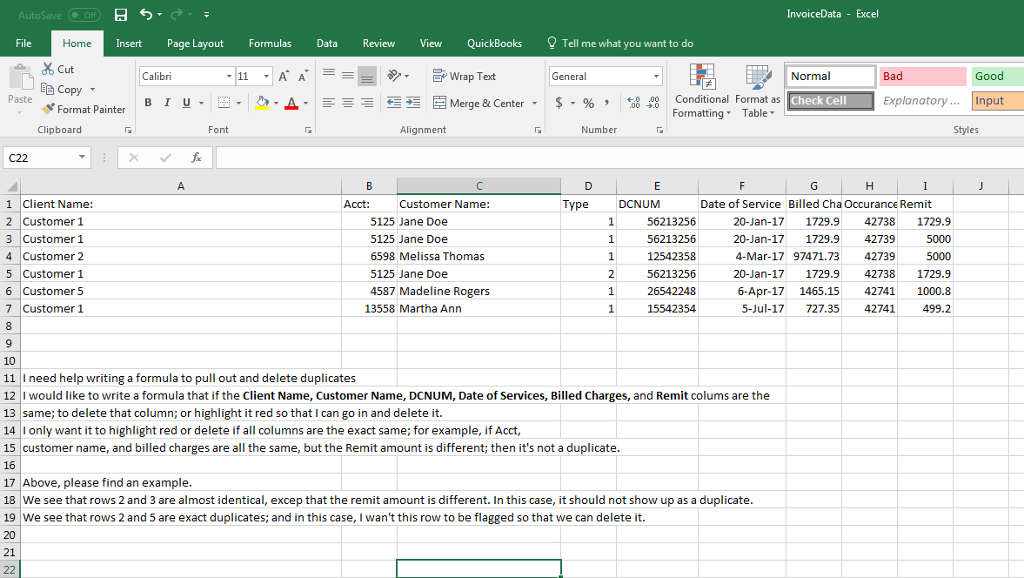
AutoSave( InvoiceData Excel Insert Page Layout FormulasData Review View QuickBooks Tell me what you want to do Cut Calibri Wrap Text Normal Paste Conditional Format as Formatting Table Merge & Center Check Cell ExplanatoryInput Format Painter Clipboarcd Font Alignment Number Styles 1 Client Name: 2 Customer 1 3 Customer 1 4 Customer 2 5 Customer 1 6 Customer 5 7 Customer 1 Customer Name: Type DCNUM Date of Service Billed Cha Occurance Remit 5125 Jane Doe 5125 Jane Doe 6598 Melissa Thomas 5125 Jane Doe 4587 Madeline Rogers 56213256 56213256 12542358 56213256 26542248 15542354 20-Jan-17 1729.9427381729.9 20-Jan-17 1729.9 42739 4-Mar-17 97471.7342739 20-Jan-17 1729.9 42738 1729.9 6-Apr-171465.15 427411000.8 5000 13558 Martha Ann 5-Jul-17 727.35 42741499.2 10 11 I need help writing a formula to pull out and delete duplicates 12 Iwould like to write a formula that if the Client Name, Customer Name, DCNUM, Date of Services, Billed Charges, and Remit colums are the 13 same; to delete that column; or highlight it red so that I can go in and delete it. 14 Ionly want it to highlight red or delete if all columns are the exact same; for example, if Acct, 15 customer name, and billed charges are all the same, but the Remit amount is different; then it's not a duplicate 16 17 Above, please find an example 18 We see that rows 2 and 3 are almost identical, excep that the remit amount is different. In this case, it should not show up as a duplicate 19 We see that rows 2 and 5 are exact duplicates; and in this case, I wan't this row to be flagged so that we can delete it 20 21
Step by Step Solution
There are 3 Steps involved in it

Get step-by-step solutions from verified subject matter experts
 Study Help