







Question: I need some help with this application in Android Studio. Your application will be very similar to your Module 3 application. You will still use
I need some help with this application in Android Studio.
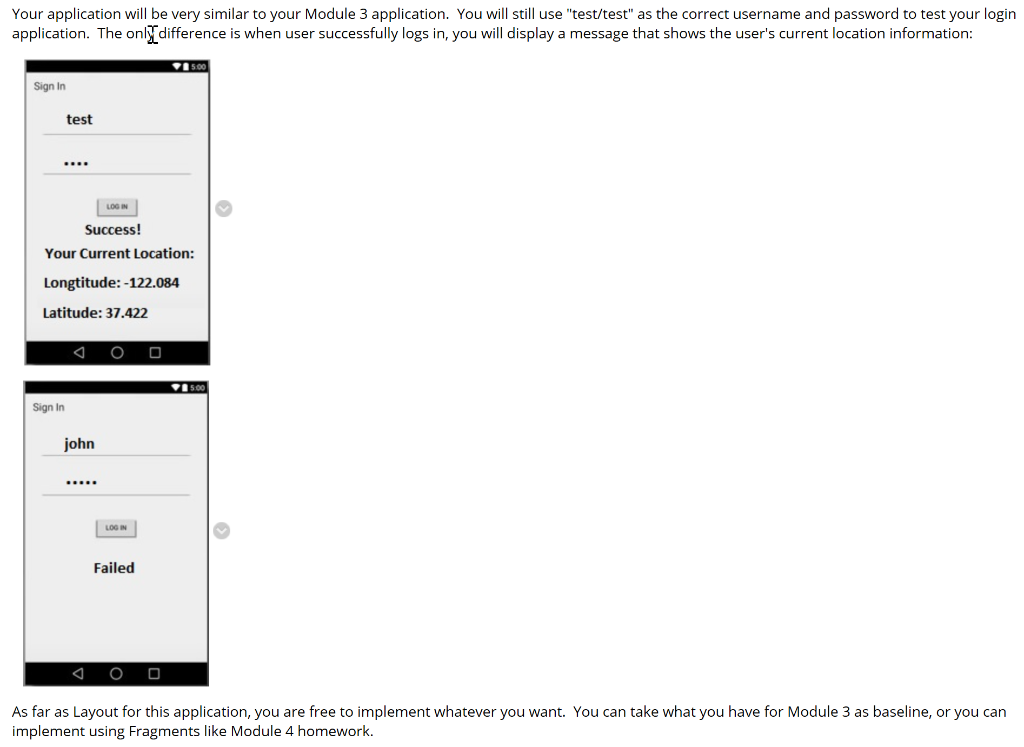
Your application will be very similar to your Module 3 application. You will still use "test/test" as the correct username and password to test your login application. The only difference is when user successfully logs in, you will display a message that shows the user's current location information: Sign In test LOGIN Success! Your Current Location: Longtitude: -122.084 Latitude: 37.422 500 Sign In john LOEN Failed As far as Layout for this application, you are free to implement whatever you want. You can take what you have for Module 3 as baseline, or you can implement using Fragments like Module 4 homework. Your application will be very similar to your Module 3 application. You will still use "test/test" as the correct username and password to test your login application. The only difference is when user successfully logs in, you will display a message that shows the user's current location information: Sign In test LOGIN Success! Your Current Location: Longtitude: -122.084 Latitude: 37.422 500 Sign In john LOEN Failed As far as Layout for this application, you are free to implement whatever you want. You can take what you have for Module 3 as baseline, or you can implement using Fragments like Module 4
Step by Step Solution
There are 3 Steps involved in it

Get step-by-step solutions from verified subject matter experts
 Study Help