







Question: I need to create an SQL query using the AdventureWorks Database. Posted below are the instructions, and table structure for the database. Any assistance is
I need to create an SQL query using the AdventureWorks Database. Posted below are the instructions, and table structure for the database. Any assistance is appreciated. Thank You
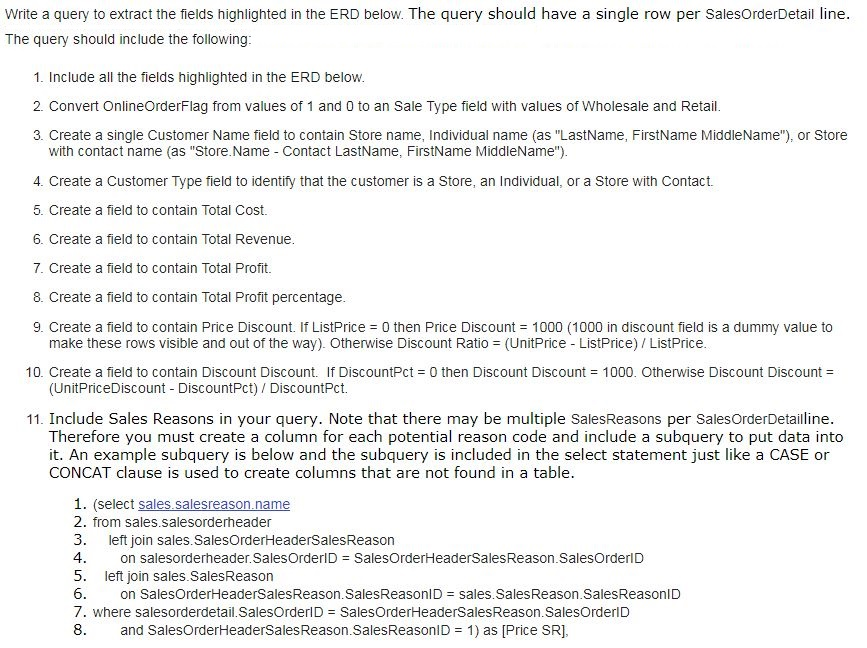
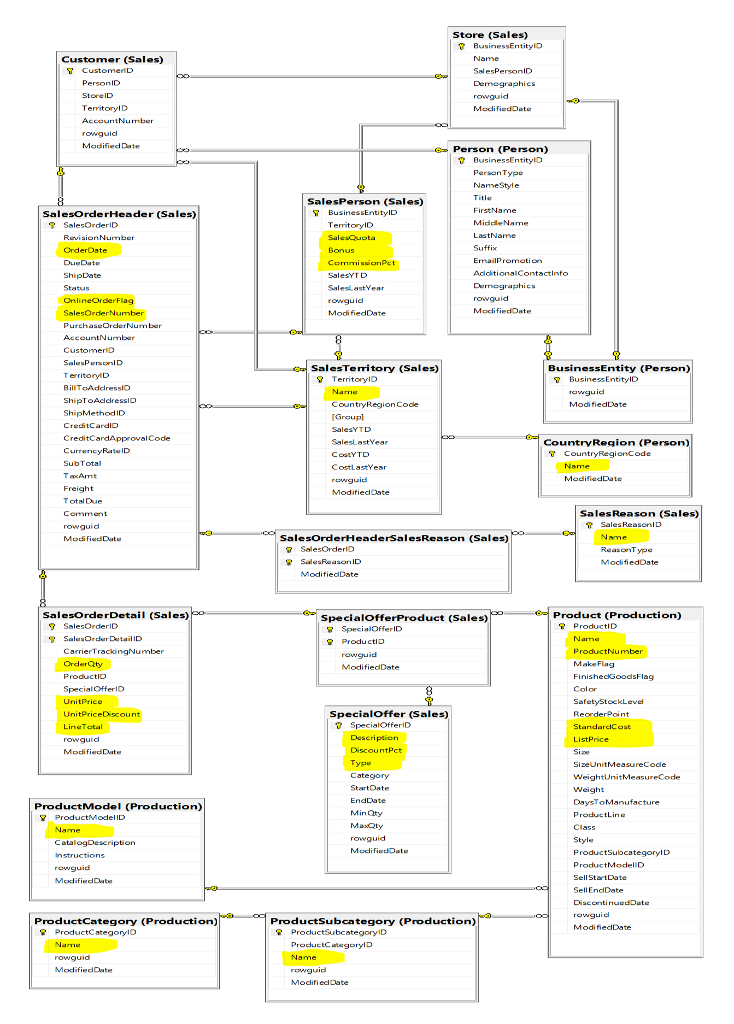
Write a query to extract the fields highlighted in the ERD below. The query should have a single row per SalesOrderDetail line The query should include the following 1. Include all the fields highlighted in the ERD below 2. Convert OnlineOrderFlag from values of 1 and 0 to an Sale Type field with values of Wholesale and Retail 3. Create a single Customer Name field to contain Store name, Individual name (as "LastName, FirstName MiddleName"), or Store with contact name (as "Store.Name Contact LastName, FirstName MiddleName") 4. Create a Customer Type field to identify that the customer is a Store, an Individual, or a Store with Contact. 5. Create a field to contain Total Cost. 6. Create a field to contain Total Revenue 7. Create a field to contain Total Profit. 8. Create a field to contain Total Profit percentage 9. Create a field to contain Price Discount. If ListPrice = 0 then Price Discount = 1000 (1000 in discount field is a dummy value to make these rows visible and out of the way). Otherwise Discount Ratio = (UnitPrice-ListPrice)/ ListPrice 10. Create a field to contain Discount Discount. If DiscountPct 0 then Discount Discount = 1000, Otherwise Discount Discount = (UnitPriceDiscount - DiscountPct) DiscountPct. 11. Include Sales Reasons in your query. Note that there may be multiple SalesReasons per SalesOrderDetailline Therefore you must create a column for each potential reason code and include a subquery to put data into it. An example subquery is below and the subquery is included in the select statement just like a CASE or CONCAT clause is used to create columns that are not found in a table. 1. (select sales.sa 2. from sales.salesorderheader 3. left join sales. SalesOrderHeaderSalesReason 4 5. left join sales. SalesReason 6 7. where salesorderdetail.SalesorderlD = SalesOrderHeaderSalesReason. SalesOrder!D 8. and SalesOrderHeaderSalesReason.SalesReasonID = 1) as [Price SRI on salesorderheader.SalesOrderlD = SalesOrderHeaderSalesReason-SalesOrder!D on SalesOrderHeaderSalesReason. SalesReason1D = sales.SalesReason.SalesReasonID Write a query to extract the fields highlighted in the ERD below. The query should have a single row per SalesOrderDetail line The query should include the following 1. Include all the fields highlighted in the ERD below 2. Convert OnlineOrderFlag from values of 1 and 0 to an Sale Type field with values of Wholesale and Retail 3. Create a single Customer Name field to contain Store name, Individual name (as "LastName, FirstName MiddleName"), or Store with contact name (as "Store.Name Contact LastName, FirstName MiddleName") 4. Create a Customer Type field to identify that the customer is a Store, an Individual, or a Store with Contact. 5. Create a field to contain Total Cost. 6. Create a field to contain Total Revenue 7. Create a field to contain Total Profit. 8. Create a field to contain Total Profit percentage 9. Create a field to contain Price Discount. If ListPrice = 0 then Price Discount = 1000 (1000 in discount field is a dummy value to make these rows visible and out of the way). Otherwise Discount Ratio = (UnitPrice-ListPrice)/ ListPrice 10. Create a field to contain Discount Discount. If DiscountPct 0 then Discount Discount = 1000, Otherwise Discount Discount = (UnitPriceDiscount - DiscountPct) DiscountPct. 11. Include Sales Reasons in your query. Note that there may be multiple SalesReasons per SalesOrderDetailline Therefore you must create a column for each potential reason code and include a subquery to put data into it. An example subquery is below and the subquery is included in the select statement just like a CASE or CONCAT clause is used to create columns that are not found in a table. 1. (select sales.sa 2. from sales.salesorderheader 3. left join sales. SalesOrderHeaderSalesReason 4 5. left join sales. SalesReason 6 7. where salesorderdetail.SalesorderlD = SalesOrderHeaderSalesReason. SalesOrder!D 8. and SalesOrderHeaderSalesReason.SalesReasonID = 1) as [Price SRI on salesorderheader.SalesOrderlD = SalesOrderHeaderSalesReason-SalesOrder!D on SalesOrderHeaderSalesReason. SalesReason1D = sales.SalesReason.SalesReasonID
Step by Step Solution
There are 3 Steps involved in it

Get step-by-step solutions from verified subject matter experts
 Study Help