







Question: I need to know why the Add Simple PDU failed when I changed the IP address? 4. The pointer changes to an envelope symbol. Click
I need to know why the Add Simple PDU failed when I changed the IP address?
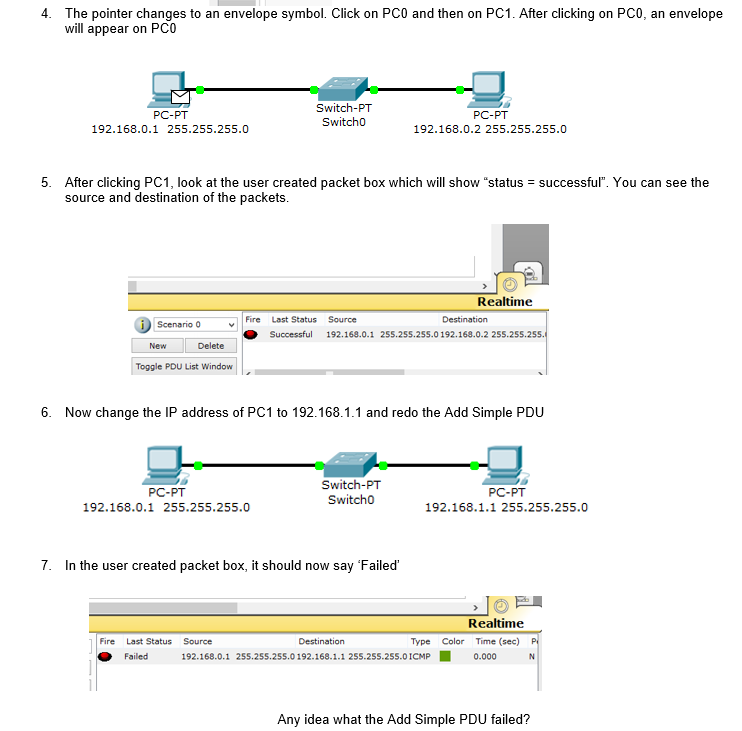
4. The pointer changes to an envelope symbol. Click on PCO and then on PC1. After clicking on PC0, an envelope will appear on PCO PC-PT 192.168.0.1 255.255.255.0 Switch-PT Switcho PC-PT 192.168.0.2 255.255.255.0 5. After clicking PCI, look at the user created packet box which will show "status source and destination of the packets successful". You can see the Realtime Fire Last Status Source Scenario 0 Successful 192.168.0.1 255.255.255.0192.168.0.2 255.255 New Delete Toggle PDU List Window 6. Now change the IP address of PC1 to 192.168.1.1 and redo the Add Simple PDU PC-PT 192.168.0.1 255.255.255.0 Switch-PT Switcho PC-PT 192.168.1.1 255.255.255.0 7. In the user created packet box, it should now say 'Failed Realtime Fire Last Status Source Destination Type Color Time (sec) Failed 192.168.0.1 255.255.25s.0192.168.1.1 255.255.255.0ICMP0.000 N Any idea what the Add Simple PDU failed
Step by Step Solution
There are 3 Steps involved in it

Get step-by-step solutions from verified subject matter experts
 Study Help