



Question: I want VBA in Excel F A C D E 1 1 Scores on aptitude tests for a company's employees 2. 3 Employee Score 1
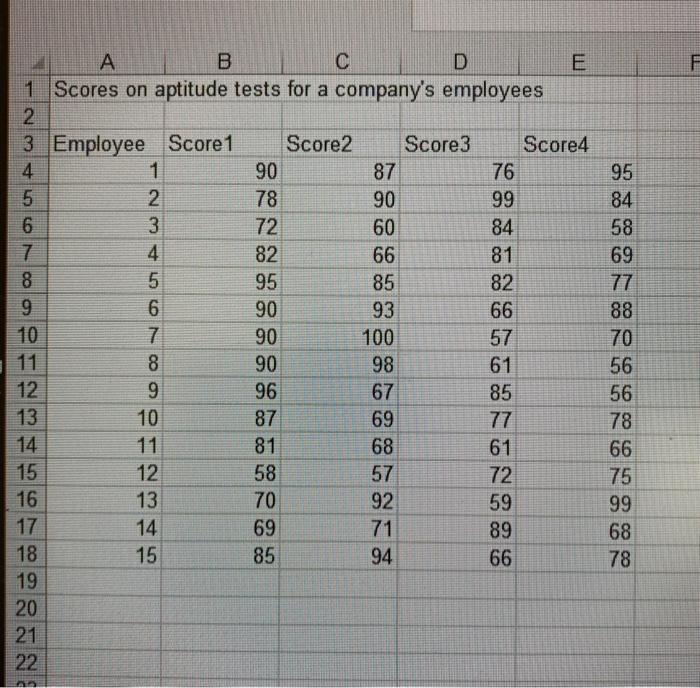
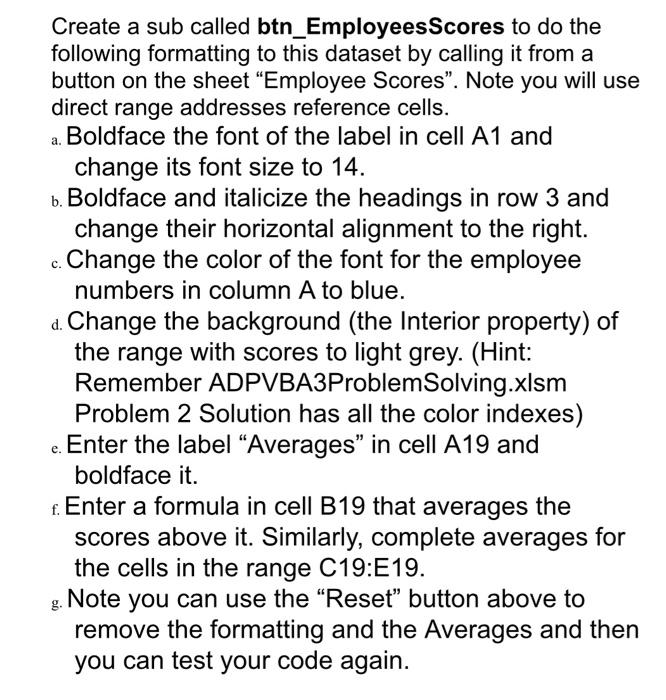
F A C D E 1 1 Scores on aptitude tests for a company's employees 2. 3 Employee Score 1 Score2 Score3 Score4 4 1 90 87 76 5 2 78 90 99 6 3 72 60 84 7 4 82 66 81 8 5 95 85 82 9 6 90 93 66 10 7 90 100 57 8 90 98 61 12 9 96 67 85 13 10 87 69 77 14 81 68 61 15 12 58 57 72 16 13 70 92 59 17 14 69 71 89 18 15 85 94 66 19 20 21 22 95 84 58 69 77 88 70 56 56 78 66 75 99 68 78 Create a sub called btn_Employees Scores to do the following formatting to this dataset by calling it from a button on the sheet Employee Scores. Note you will use direct range addresses reference cells. a. Boldface the font of the label in cell A1 and change its font size to 14. b. Boldface and italicize the headings in row 3 and change their horizontal alignment to the right. Change the color of the font for the employee numbers in column A to blue. d. Change the background (the Interior property) of the range with scores to light grey. (Hint: Remember ADPVBA3Problem Solving.xlsm Problem 2 Solution has all the color indexes) Enter the label Averages" in cell A19 and boldface it. . Enter a formula in cell B19 that averages the scores above it. Similarly, complete averages for the cells in the range C19:E19. Note you can use the "Reset" button above to remove the formatting and the Averages and then you can test your code again
Step by Step Solution
There are 3 Steps involved in it

Get step-by-step solutions from verified subject matter experts