





Question: I working in a project that sends data from a Raspberry PI 3B to firebase, but for now I want to try a simple code

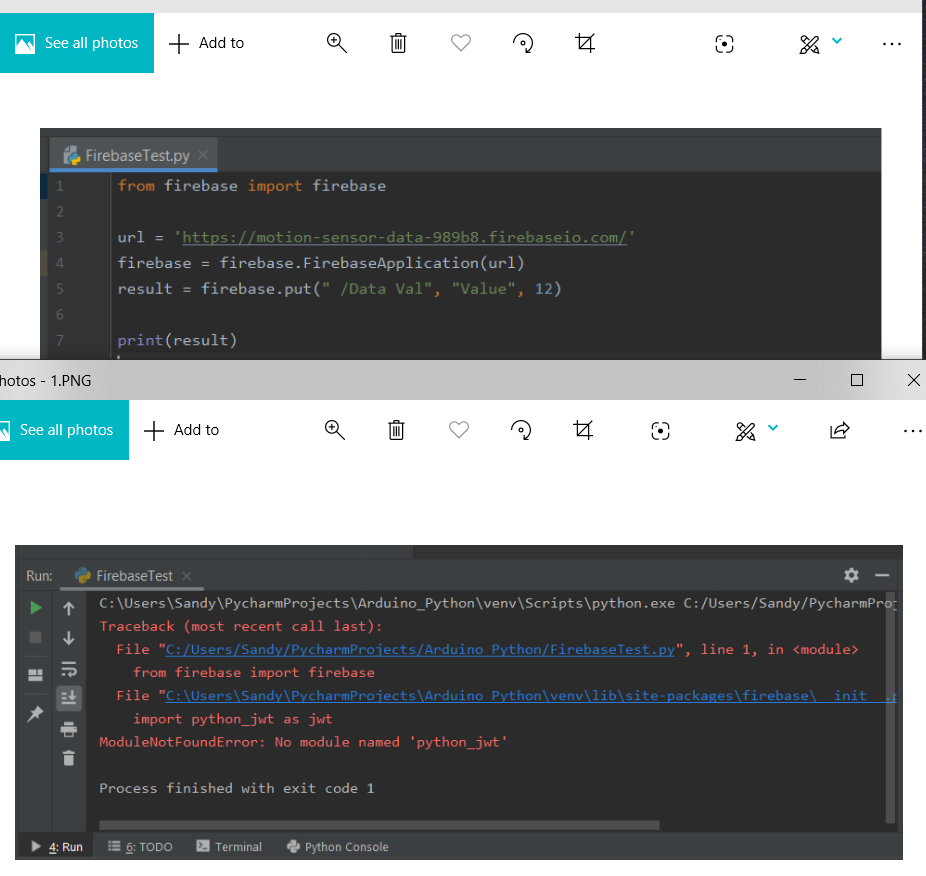
I working in a project that sends data from a Raspberry PI 3B to firebase, but for now I want to try a simple code that sends data from a user using python and pycharm but some reason I getting this error can someone explain step by step how to fix it? The first part is just a simple code and the bottom one is the output which shows the module error
I working in a project that sends data from a Raspberry PI

See all photos + Add to Q @ .. e Firebase Test.py X from firebase import firebase url = "https://motion-sensor-data-989b8.firebaseio.com/ firebase = firebase.FirebaseApplication(url), result = firebase.put("_/Data Val", "Value", 12), print(result) hotos - 1.PNG - 0 x .. See all photos + Add to Q @ # $ % Run: + Firebase Test x C:\Users\Sandy PycharmProjects\Arduino_Python\venv\Scripts\python.exe C:/Users/Sandy/PycharmPro Traceback (most recent call last): File "C:/Users/Sandy/PycharmProjects/Arduino Python/FirebaseTest.py", line 1, in from firebase import firebase File "C:\Users\Sandy\PycharmProjects\Arduino Python\venv\lib site-packages\firebase init import python_jwt as jwt ModuleNotFoundError: No module named 'python_jwt' IR 2 0 - Process finished with exit code 1 4: Run 6: TODO Terminal Python Console See all photos + Add to Q @ .. e Firebase Test.py X from firebase import firebase url = "https://motion-sensor-data-989b8.firebaseio.com/ firebase = firebase.FirebaseApplication(url), result = firebase.put("_/Data Val", "Value", 12), print(result) hotos - 1.PNG - 0 x .. See all photos + Add to Q @ # $ % Run: + Firebase Test x C:\Users\Sandy PycharmProjects\Arduino_Python\venv\Scripts\python.exe C:/Users/Sandy/PycharmPro Traceback (most recent call last): File "C:/Users/Sandy/PycharmProjects/Arduino Python/FirebaseTest.py", line 1, in from firebase import firebase File "C:\Users\Sandy\PycharmProjects\Arduino Python\venv\lib site-packages\firebase init import python_jwt as jwt ModuleNotFoundError: No module named 'python_jwt' IR 2 0 - Process finished with exit code 1 4: Run 6: TODO Terminal Python Console

Step by Step Solution

There are 3 Steps involved in it

1 Expert Approved Answer
Step: 1 Unlock blur-text-image
Question Has Been Solved by an Expert!

Get step-by-step solutions from verified subject matter experts

Step: 2 Unlock
Step: 3 Unlock

Students Have Also Explored These Related Databases Questions!