







Question: I wrote this code in java and now i have to add a GUI to draw Cube,Square and Circle object on the Drawing Panel. I
I wrote this code in java and now i have to add a GUI to draw Cube,Square and Circle object on the Drawing Panel. I should add the paint functions of the classes Circle, Cube and Square.I should add position information on the panel, abstract paint function and also update the mSide and mRadius types to int from float according to needs of this new program
Run Scenario is:
Select an object on the toolbar
Click a point on the blue drawing panel
Selected object is drawn on the drawing panel:
Circle center at the clicked point
Square top-left corner at the clicked point
Cube front-top-left corner at the clicked poin
and the final resault should look like this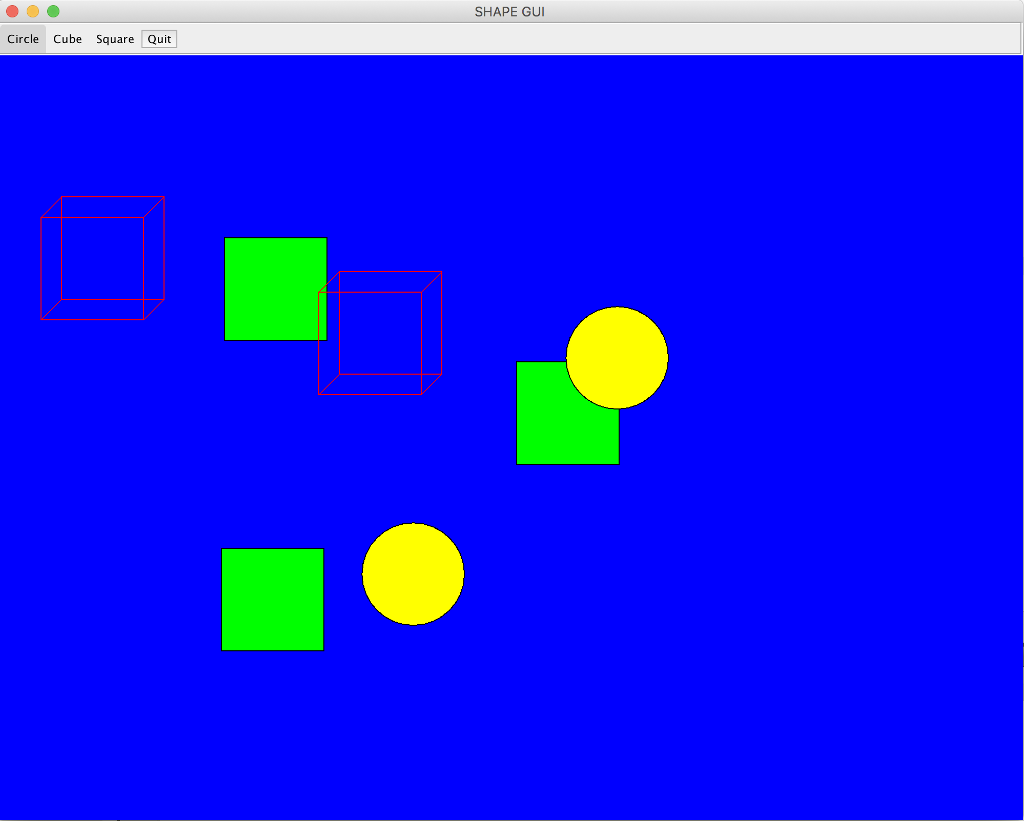
Here is my code, Could you please help me add those GUI and paint functions to my program?
Assignment3.java class
import java.awt.Color; public class Assignment3 { public static void main(String[] args) { Circle circle = new Circle(Color.RED, "myCircle", 2.f); circle.print(); System.out.println("Area : "+circle.computeArea()); System.out.println("Perimeter : "+circle.computePerimeter()); Square square = new Square(Color.BLUE, "mySquare", 3.5f); square.print(); System.out.println("Area : "+square.computeArea()); System.out.println("Perimeter : "+square.computePerimeter()); Cube cube = new Cube(Color.CYAN, "myCube", 2.3f); cube.print(); System.out.println("Volume : "+cube.computeVolume()); } }
Shape.java class
import java.awt.Color; abstract class Shape { public Color mColor; public String mName;
Shape(Color mColor, String mName) { this.mColor = mColor; this.mName = mName; }
public String getName() { return mName; }
public Color getColor() { return mColor; }
public void setName(String name) { mName = name; }
public void setColor(Color color) { mColor = color; }
public abstract void print(); }
Cube.java class
import java.awt.Color; public class Cube extends Square { Cube(Color c, String n, float s) { super(c,n,s); }
public float computeVolume() { return mSide*mSide*mSide; } public void print() { System.out.println("Type of the Shape is Cube"); //System.out.println("Name of the Shape is: "+getName()); System.out.println("Name of the Shape: "+ mName); System.out.println("The parameter of the Shape is side "); } }
Square.java class
import java.awt.Color; public class Square extends Shape { public float mSide; public Square(Color c, String n, float s) { super(c,n); mSide = s; }
public float computeArea() { return mSide*mSide; }
public float computePerimeter() { return 4 * mSide; }
public void print() { System.out.println("Type of the Shape is Square"); //System.out.println("Name of the Shape is: "+getName()); System.out.println("Name of the Shape: "+ mName); System.out.println("The parameter of the Shape is side "); } }
Circle.java class
import java.awt.Color; import java.lang.Math; public class Circle extends Shape { public float mRadius;
public Circle(Color c, String n, float r) { super(c,n); mRadius = r; } public double computeArea() { return Math.PI*mRadius*mRadius; }
public double computePerimeter() { return 2*Math.PI*mRadius; } public void print() { System.out.println("Type of the Shape is Circle"); //System.out.println("Name of the Shape is: "+getName()); System.out.println("Name of the Shape: "+ mName); System.out.println("The parameter of the Shape is radius "); } }
SHAPE GUI Circle Cube Square Quit
Step by Step Solution
There are 3 Steps involved in it

Get step-by-step solutions from verified subject matter experts
 Study Help