







Question: ics 213 - Objective - Edit, compile, and run a program on UH UNIX/Linux shell. - Work with the input stream, retrieving a single character
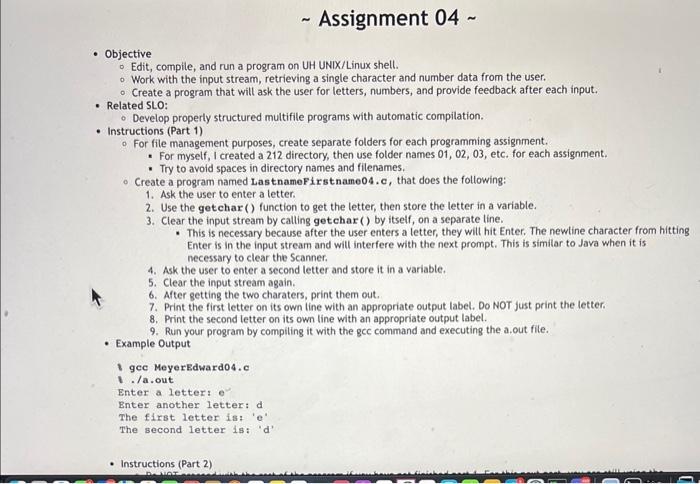
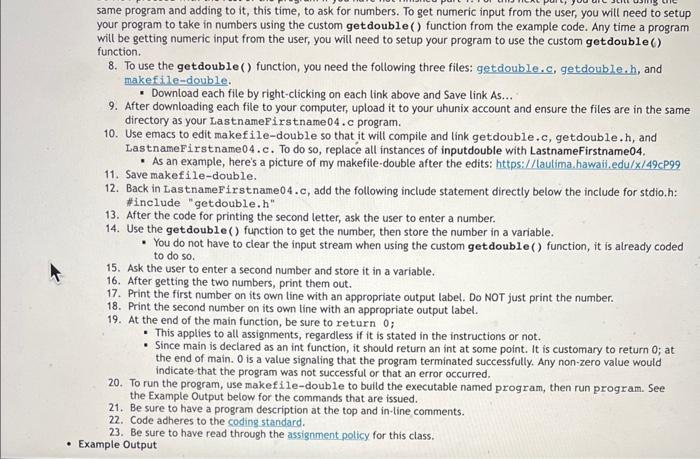
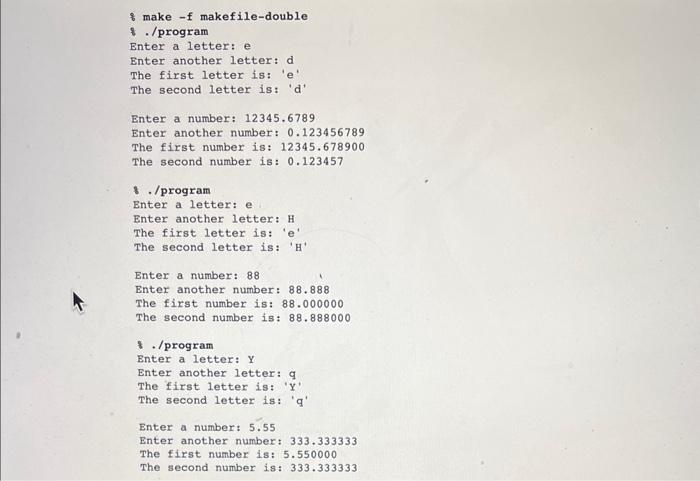
- Objective - Edit, compile, and run a program on UH UNIX/Linux shell. - Work with the input stream, retrieving a single character and number data from the user. - Create a program that will ask the user for letters, numbers, and provide feedback after each input. - Related SLO: - Develop properly structured multifile programs with automatic compilation. - Instructions (Part 1) - For file management purposes, create separate folders for each programming assignment. - For myself, I created a 212 directory, then use folder names 01, 02, 03, etc. for each assignment. - Try to avoid spaces in directory names and filenames. - Create a program named LastnameFirstname04, c, that does the following: 1. Ask the user to enter a letter. 2. Use the getchar () function to get the letter, then store the letter in a variable. 3. Clear the input stream by calting getchar () by itself, on a separate line. - This is necessary because after the user enters a letter, they will hit Enter. The newtine character from hitting Enter is in the input stream and will interfere with the next prompt. This is similar to Java when it is necessary to clear the Scanner. 4. Ask the user to enter a second letter and store it in a variable. 5. Clear the input stream again. 6. After getting the two charaters, print them out. 7. Print the first letter on its own line with an appropriate output label. Do NOT just print the letter. 8. Print the second letter on its own line with an appropriate output label. 9. Run your program by compiling it with the gcc command and executing the a.out file. Example Output gcc MeyerEdward04.c ./a.out Enter a letter: e Enter another letter: d The first letter is: ' e ' The second letter is: ' d ' - Instructions (Part 2) same program and adding to it, this time, to ask for numbers. To get numeric input from the user, you will need to setup your program to take in numbers using the custom getdouble () function from the example code. Any time a program will be getting numeric input from the user, you will need to setup your program to use the custom getdouble ( ) function. 8. To use the getdouble () function, you need the following three files: getdouble.c, getdouble.h, and makefile-double. - Download each file by right-clicking on each link above and Save link As... 9. After downloading each file to your computer, upload it to your uhunix account and ensure the files are in the same directory as your LastnameFirstname 04 . c program. 10. Use emacs to edit makefile-double so that it will compile and link getdouble.c, getdouble.h, and LastnameFirstname04. c. To do so, replace all instances of inputdouble with LastnameFirstname04. - As an example, here's a picture of my makefile-double after the edits: https://laulima.hawaii.edu/ x/49c999 11. Save makefile-double. 12. Back in LastnameFirstname04.c, add the following include statement directly below the include for stdio.h: \#include "getdouble. h " 13. After the code for printing the second letter, ask the user to enter a number. 14. Use the getdouble () function to get the number, then store the number in a variable. - You do not have to clear the input stream when using the custom getdouble () function, it is already coded to do so. 15. Ask the user to enter a second number and store it in a variable. 16. After getting the two numbers, print them out. 17. Print the first number on its own tine with an appropriate output label. Do NOT just print the number. 18. Print the second number on its own tine with an appropriate output label. 19. At the end of the main function, be sure to return 0 ; - This applies to all assignments, regardless if it is stated in the instructions or not. - Since main is declared as an int function, it should return an int at some point. It is customary to return 0 ; at the end of main. 0 is a value signating that the program terminated successfully. Any non-zero value would indicate that the program was not successful or that an error occurred. 20. To run the program, use makefile-double to build the executable named program, then run program. See the Example Output below for the commands that are issued. 21. Be sure to have a program description at the top and in-line comments. 22. Code adheres to the coding standard. 23. Be sure to have read through the assigament policy for this class. Example Output of make -f makefile-double 8. /program Bnter a letter: e Enter another letter: d The first letter is: ' e ' The second letter is: ' d ' Enter a number: 12345.6789 Enter another number: 0.123456789 The first number is: 12345.678900 The second number is: 0.123457 8 . /program Enter a letter: e Enter another letter: H The first letter is: ' e ' The second letter is: ' H ' Enter a number: 88 Enter another number: 88.888 The first number is: 88.000000 The second number is: 88.888000 \&. /program Enter a letter: Y Enter another letter: q The first letter is: ' Y ' The second letter is: ' q ' Enter a number: 5.55 Enter another number: 333.333333 The first number is: 5.550000 The second number is: 333.333333
Step by Step Solution
There are 3 Steps involved in it

Get step-by-step solutions from verified subject matter experts
 Study Help